Unknown's avatar

So, I Did Have To Get A New Phone, And It’s Great!

Well, in my earlier post, “Smartphone Not Acting Right? Don’t Ditch It Yet!”, I explained how a problem with your phone doesn’t always mean it has to be ditched and replaced, and how it seemed that was the case with mine.

Well, it turns that my phone’s problem did persist even after a factory reset, so I ultimately needed a new phone. But, it isn’t all bad. The new phone I got? One of those new I-Phones or Samsung Galaxies for $500-$700 ? No!

I got a Motorola Moto-e 2nd generation 2015. And I’m really satisfied with it.

Photos of my Motorola Moto-e 2nd generation 2015 phone. 4/30/2016

Photos of my Motorola Moto-e 2nd generation 2015 phone. 4/30/2016

And I did well for the pricing, again, too! I paid $89 at the Verizon store instead of the $119-$149 shown on the web.

And I kept my current “Paygo” plan as well with no price increase ($45 monthly for unlimited talk, text, and now, 3GB of data!)

The phone itself? It is bigger than my LG Optimus Zone 2 was, and so I did need to get a new case for it, and also a new way of carrying it on me, and no local stores carried anything for this phone. One thing I’ve learned with both my smart phones is, stores mainly carry cases for the high-end level (Read: More Expensive) I-Phones and Samsung Galaxy phones as well as a few other high end phones of a few other brands. Your best bet for a phone case is to go online and get one from Amazon, Ebay, or any other online store, as they will have a much wider selection. There are also other good sources of accessories such as Mobile Mob. I found a case for my old phone on Amazon and Amazon is where I found my current case, which came with a clip on holder which works really well, so I don’t have to try to fit the phone in my pocket or try to find a camera or other type of carrying case or pouch that the phone will fit in.

Fortunately, this phone is still a good deal smaller than the large Samsung and I-Phones so is still easier for me to carry, and yet is large enough for me to see things on the screen more clearly than on my previous phone.

This phone also has the latest edition of Android, which is called “Lollipop”. It has 1 GB of RAM, twice what my old phone had, and 2,390 units of battery storage, about 40% more than my previous phone, so this phone has a much better standby battery life and loads pages and installs apps much faster than my old phone did.

It also comes with the full suite of Google apps, some of which I’m finding to be very useful.
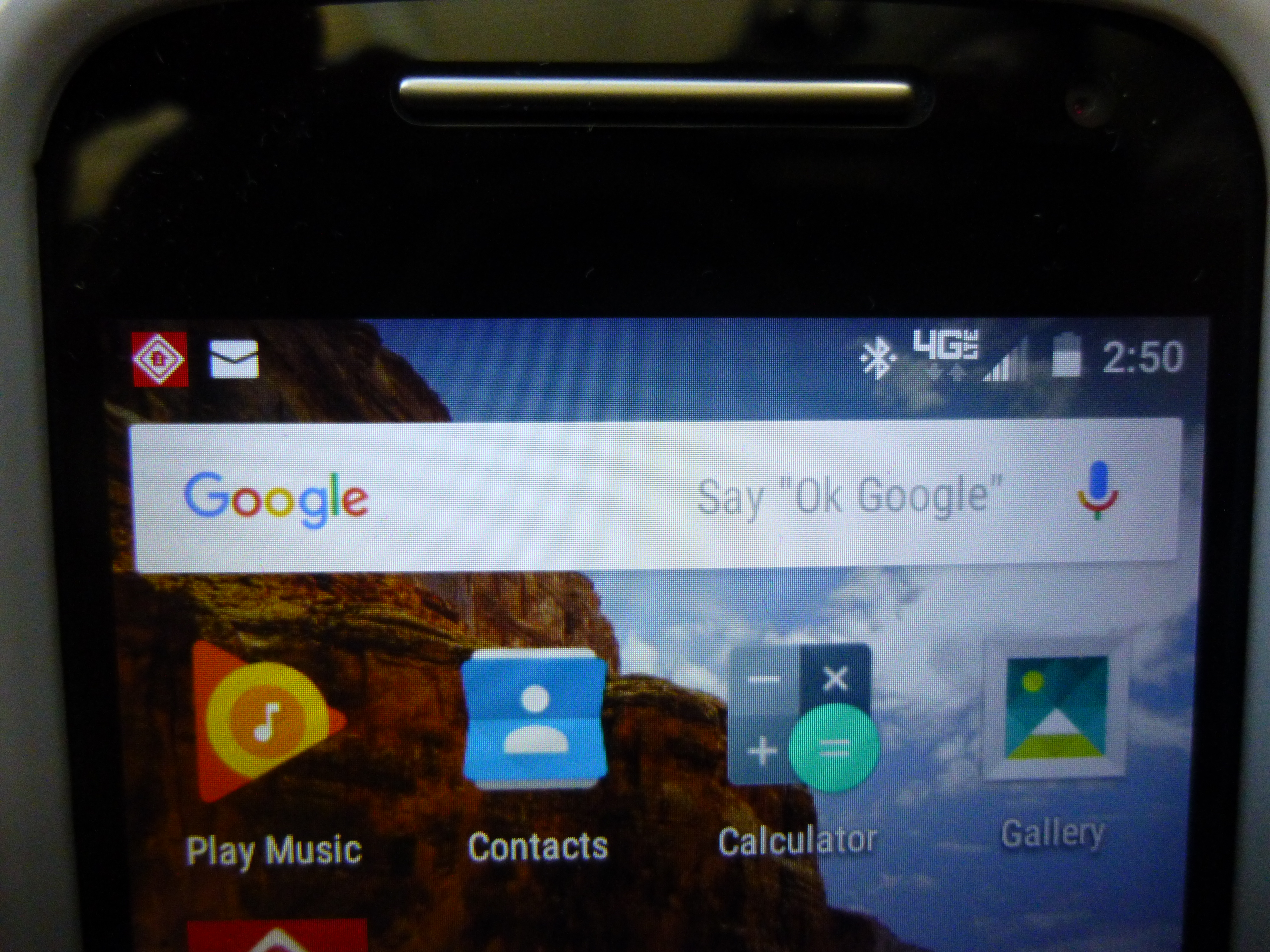
Google Search Bar with Voice Activation. Photos of my Motorola Moto-e 2nd generation 2015 phone. 4/30/2016

Google Search Bar with Voice Activation. Photos of my Motorola Moto-e 2nd generation 2015 phone. 4/30/2016

The Google Search bar pictured here, is voice activated and will do searches and also activate the Google Maps gps function just by voice alone. All I have to do to get it to listen is to say, “Ok Google”, just as it says. It will say that it is listening. Then, as an example, I can say, “Take me to 123 Somestreet”, and it will turn on the GPS feature and take me there, and it will recognize places that Garmin won’t. My old phone had this, too, but I hadn’t yet tried to use it.

Next, it also has a better camera and both front and back facing lenses so I can take selfies if I wish or make video calls.

So far, this phone has worked really well and I’m getting used to how it works, as it does do some things differently, and makes different sounds, than my previous phone, which was an LG.

But all in all, I am really enjoying this phone and still learning more about what it can do.

So, even if you do have to ditch your current cell phone, it can lead to a better phone and without a great cost besides!

Happy phoning!

If you like what you’ve read here, please let others know of this post, blog, and site.

And thanks for reading!  🙂

Unknown's avatar

More Than Meets The Eye

You walk into a McDonald’s, order a burger and fries and get it quickly, or you go into a hardware store, find the part you need, and buy it and leave. It all seems so simple, right?

Many people think the business has these items or services and rakes in the money and that it’s easy and simple. But, in reality, there’s a lot that goes on behind the scenes of just about any business you patronize, no matter how small.

I’ve certainly come to see this with my job at a radiator shop. It’s not just repairing and selling radiators. Parts have to be kept on hand, which means having them warehoused on site, stock has to be kept up, which means ordering new items from time to time. Add to this, moving items from stores that are overstocked to stores that need more of any item. In addition, there is a need for parts of radiators that need to be ordered and kept track of. Then, the shop also needs to have other services related to the repair of radiators and related items, so the shop does business with other service vendors as well.

Then, there are peripheral items which are just as important, such as items needed for the repair and upkeep of the tools and machines and vehicles that the shop uses. These can range from gloves and goggles for the welders, new blades for various saws and cutting equipment, lubricants and paints, and delivery of chemicals, fuels, and supplies needed daily. This also includes that item virtually all businesses use, paper.

Now, if you go to an eating place, you’ll likely see the cooking staff working, especially if it is a fast food place. But even here, you don’t see everything, especially the management of supplies and services provided by outside vendors, many of which are as important as the food they serve you.

When we are the customer, it’s easy to forget that all those other businesses and the clerks and employees you deal with, have as much complication as you do, and that there’s a lot more to a business than just the facade or sign.

So, next time you are feeling frustrated as a customer, even though the employee you’re dealing with is honestly trying to help you, the company honestly cannot make delivery any sooner, or the mechanic can’t see you today, try not to take it out on them. They’ll thank you for it. Happy shopping!

If you like what you’ve read here, please let others know of this post, blog, and site.

And thanks for reading!  🙂

Unknown's avatar

About That WiFi…

For a long time, I was confused about how WiFi worked and also afraid to use it because of security issues brought up by articles on the internet. I’d heard all these stories about how WiFi exposes your computer to others and so on.

Well, I had the unit that powers my internet router go out on me about two weeks ago and had to have a technician come over to fix it. So, I decided that would be the time to ask about WiFi. And I’m glad I did.

So, What is the truth? Well, my main concern was security. And I found out that, if you are using a router provided by an internet provider such as Verizon, Frontier, or AT&T, you are safe using the WiFi connection to that router and don’t need any extra security in addition to your anti-virus program or software. (You do have some kind of anti-virus program or software on your computer, right? I hope so.)

Your provider provides the password or key. (You do need to check as each provider may be different as to where or how the info is provided.)

Since this is encrypted and the router and provider have their own protection, you are safe using your router’s WiFi network.

With WiFi, if you have a laptop, you can ditch the Ethernet or CAT 5E cable, plug in your battery, and access the internet from anywhere in your home, including using Skype or any other communication. I did this last week using Skype and it’s great!

Of course, your battery has to have enough of a charge, but, you can still plug in anywhere instead of only at your computer desk.

Even if you are using a desktop PC (If it does have wifi, most desktop pc’s don’t.), this can eliminate one cable. Also, more and more printers are being made WiFi capable, so this has the possibility of eliminating another cable. And, if you have more than one computer, they may be able to connect using the router’s WiFi network. Your mobile phone may be able to as well if it, too, has WiFi capability.

Now, there are security concerns, of course. If you turn on WiFi on your computer, you will notice that several networks show up as “available” One of these will be your router, if it is WiFi capable. The others are neighboring networks, usually from nearby homes, apartments, and possibly businesses, too.

Can they access your network? No, because they don’t have the codes. And you probably cannot access their networks, either for the same reason. And besides, you wouldn’t want to access networks you don’t know.

So, if you do connect to your router, you are the only one. And no one else can connect to your router’s network unless you give them the codes.

What about these places with free WiFi, like cafe’s and hotels? Here is where you have to be careful, as this network, even if secured against “outside” access, is still shared by those customers who are given the code by the management or employees. So, if you connect with the network at the coffee place, you are sharing that network with strangers you don’t know and your files and info are more vulnerable to being hacked. For this, you may need additional protection on your computer.

One solution? You can purchase your own “hot spot”, usually a small portable router that many internet providers sell, along with the service, which allows you to access WiFi from just about anywhere. It, too, is secure and again, only you would have the code for accessing the network.

Another couple of things to know about WiFi, is that, if you are downloading new software, especially if it is large, it will download faster using an Ethernet cable than it will using WiFi, so it’s best not to discard your Ethernet cable completely just yet.

For phones with data plans, using WiFi when it’s available means that your phone is not using up its allotted Data, since it is being provided by the network and not the phone’s own data plan. It’s like getting extra data for your phone for free. But you do have to be in range of the router or hot spot your phone is connected to.

One great thing I’ve found is that you only have to put in the codes for the network once on your machine. Then, when you use WiFi, your machine will automatically connect to the network and you have access to the internet!

So, how to activate WiFi on your computer? Fortunately, most WiFi capable computers already have their WiFi activated, which does not mean they’re connected to a network, only that the capability is turned on.”

If it’s not turned on, or has been turned off or deactivated, you need to turn it on. If you have a Windows 10 computer, just click on the Start button, then select settings, then Internet and go from there. Or you can simply click on the internet icon on the right hand area of the task bar and this will bring up your Internet/WiFi controls on the right hand side of your screen. (At least on an HP Computer. Some computers may be different.) If you unplug your Ethernet cable, the internet icon will change to a WiFi icon and you may see the message, “Networks are available”. Clicking on the icon will bring up the available networks.

To connect to your router’s network, and it will be there if your router has WiFi, just click on it. You’ll be presented with fields for your password or key. Enter that, and you’re set.

On a Windows 7 computer:

  1. Click the Start Button, then select “Control Panel”, then “Network and Sharing Center”.

  2. On the left hand column, select “Change Adapter Settings”.

  3. Click on “Wireless Network Connection”.

This “turns on” your WiFi. A small icon will appear on your task bar on the right side. Clicking on this will bring up the available networks. As above, just click on your router’s network and enter the password or key, and you’re set!

Hope this clears up things for those of you who are wondering about WiFi.

Happy Computing!

If you like what you’ve read here, please let others know of this post, blog, and site.

And thanks for reading!  🙂

Unknown's avatar

You’ve Been Hacked!: What Not To Do!

Recently, someone I know saw a message pop-up on their computer saying that they’d been hacked. The message had a phone number and said to call the number right away. So, the person did and gave them all kinds of information.

The trouble was, the pop-up was a scam and not from any legitimate company or source!

This, and other types of scams are appearing now. Another type is where you get a phone call, usually saying the same thing or similar, that your computer has been hacked or is causing some sort of problem.

So, how to protect yourself? First, the pop-ups. Just as with phishing e-mails, these pop-ups will claim to be from a legitimate source, like Microsoft or your bank. They can really scare you at first, but don’t panic and don’t call any numbers listed or go to any websites listed in the pop-up! Chances are that any phone number or website posted on the pop-up will be to a “scam artist” or “center” where they’ll take your information and use it for nefarious purposes, or, in the case of a website listed, you computer will really be hacked if you go there! And, neither Microsoft nor your bank or other institutions will contact you via pop-ups on your computer if there is a problem.

If you’re really not sure and the pop-up scares you into thinking there is a problem, do not call the number listed on the pop-up! And don’t visit any websites or send any emails to email addresses listed on the pop-up either! If the pop-up claims to be from Microsoft or your computer manufacturer, call or contact Microsoft or your computer manufacturer, directly, through their legitimate numbers that came with your computer package!

If it claims to be from your bank or an institution or company you know and have dealings with, do the same thing, that is, call them directly through the numbers on material you have from them or through the phone book or their website. Don’t use any numbers or go to any websites listed on the pop-up!

If it’s from a source you don’t recognize, do note it, but otherwise ignore it, as it may just be a front name. However, if you have an anti-virus program, I would do a scan of your computer, just to be sure. And see if the pop-up comes up again in the future. If it does, especially if it does so often, it may be that you do have a virus or other malware. Here, I would contact my local computer store or a computer security expert and not any numbers or websites or email addresses shown in the pop-up.

As for phone calls, you can often recognize these if you have caller id. They will often be numbers that don’t look like a normal phone number, such as “86483”. If you do answer, they will often claim to be from a Microsoft call center and will claim that they need info from you about your computer, usually passwords you use, because of some problem. And, if pressed, they often cannot give you specifics of the problem. Again, they are a complete scam. And, they could claim to be from your bank or other important institution you deal with, like the IRS.

I know people who’ve gotten these calls, too, and I did get one supposedly from Microsoft. I knew it was a scam, but was curious what they would say when pressed for specifics, but they were vague and insisted that, “it was my computer” and wouldn’t say more than that. Needless to say, I never gave, nor intended to give, any information whatsoever, even before I answered the call. And if the caller is threatening, you know it’s a scam. Companies, and government institutions will not contact you in this manner, nor are they likely to be threatening over the phone.

Again, here, if you’re not sure, don’t give any information over the phone to the caller, nor should you call any numbers left from a voice message.. Hang up and call the institution or company itself, using the numbers you already have for them and they’ll tell you if there’s a problem. Most likely there isn’t and they’ll let you know that it was a scammer who called you.

You may want to report it to the police as well, though they won’t really be able to do anything except take it as a heads up if it’s a new scam hitting the area. However, if you do fall for the scam, report it to the police, especially if the scammer starts harassing you or shows up in person!

So, if you get an “urgent message” in the form of a pop-up, phone call, or of course, an e-mail, don’t panic, don’t call or contact using numbers or websites or e-mail addresses listed in the message, (and don’t reply to said e-mail either!) and contact the source company directly using their legitimate numbers, websites, or email addresses, not those listed on the message you received!

Be safe and happy computing! Happy 100th posting! Merry Christmas and a

Happy New Year, too!

If you like what you’ve read here, please let others know of this post, blog, and site!

And thanks for reading! 🙂

Unknown's avatar

When’s The Best Time for Christmas Shopping? October!

What’s the rush? Christmas is still two months away! Right? Sure. But, the best time to go Christmas shopping is actually, now! That is, October!

Why October? Well, July may be too early, as you may not really know what to get for whom, yet and you may be too busy with summer activities.

But, why wait till December, or even Black Friday, when the crowds will be intense and things will get crazy and crowded very quickly. I know of at least one mall area in California that is a constant traffic jam from Thanksgiving through Christmas Eve! And I’m sure it’s not the only one!

Also, I’ve heard that those “sweet deals” that you see advertised during the holidays may be artificial, that is, their low prices may be only relatively low. What happens is that some retailers may slowly raise prices on items they believe will be popular for gift giving during the holidays, so that the holiday  shopping season lowering of prices on those items is really just bringing the price down to their normal level, and you’re not really getting a true bargain! I could be wrong on this, but it is something I once heard.

In October, the focus is on Halloween, which covers a smaller niche of items. Everything else will probably be normally priced and the crowds won’t be insane. You’ll be able to get a parking space less than 3 miles from the store! And it won’t take you 3 hours to get out of the mall parking lot when you’re done shopping!

And many stores will also be featuring Christmas decor by this time, so you can even get those items for decorating in October as well.

And perhaps best of all, you can smugly smile in December, knowing your Christmas shopping is done, as your friends tell their tales of struggle as they shop in the thick of the holiday shopping season!

So, think about shopping for Christmas now, in October. It just may make for a less stressful shopping season.

Happy shopping!

If you like what you’ve read here, please let others know of this post, blog, and site.

And thanks for reading!  🙂

Unknown's avatar

So, How Do I Like My Smart Phone After 6 Months?

Well, I’ve had my Smart Phone for 6 months now. It’s my first. So, how do I like it, and smart phones in general?

I have to say, so far, so good! And, as a matter of fact, I’ve gotten used to what my phone can do for me now.

First, and probably most important, are the apps that I can get, for free. Yes, there are some you have to pay for, but so far, I haven’t needed those. Most companies that provide apps will provide them for free, since many of them want you to come to them or buy from them. And the free app acts as free advertising for them as well.

Apps are really great, as they can often allow easy access to finding things on the go, and comparing prices. They can also alert you.  If your favorite store is having a sudden sale, and you have their app, you may get an alert from them.

Apps can also help in monitoring information and controlling things from afar. I have an app that allows me to check to see if my burglar alarm is set, and, if it’s not, I can set it from my phone!

I also have an app for locating theaters and checking what movies are available, where they’re playing, and I can even purchase tickets, which would be waiting for me when I get there! It’s also the same with many apps for eating places, including many of your favorites!

And if I don’t know where there is?

I have Google Maps, which can mark the location and tell me how to get there, too! This came standard with my phone, and most smart phones will come with a set of pre-installed apps, such as the Google set on Android phones.

Next, I have internet access. So, I can check up on e-mails and unclutter my inbox without having to wait until I get home! I can also surf the web. And, I can also watch YouTube videos, though these will use up lots of data and memory.

So, am I one of those who is constantly texting or checking my phone? No, I’m not. While you do have to try to avoid the urge to multitask with a smart phone, (Studies show multi-tasking makes one less effective!) I’ve never been a good multitasker and I refuse to bend to the idea that one must be doing everything at once all the time or be connected all the time!

But, if I’m waiting in a doctor’s office or am in some other “waiting situation”, then yes, I may check my e-mail inbox with my phone.

And finally, there are apps for free games, which are pretty good, too. I have Chess and also Checkers apps.

So, while I didn’t feel the need for a smart phone until a possible job situation came up which required one, I’ve seen that they can do a whole lot more than a “regular” cell phone can.

And best of all, you don’t need the latest, top of the line $700 I-phone or Android phone to get these great features! I got my phone, an LG Optimus Zone 2, for only $49! To see how, check out my post, “Again, Before Jumping In, Do Your Research! (Or how I got a $149 phone for just $49!)”.

So, if you’re thinking about a smart phone, you can get them with lots of features, and cheaply, too!

Good luck with your smart phone!

If you like what you’ve read here, please let others know of this post, blog, and site!

And thanks for reading!  🙂

Unknown's avatar

Air blowers: A Symbol of Stupidity

Lots of things can be a symbol of stupidity, but I do have one candidate that stands out for me. It’s the air blower.

Why? Well, I distribute fliers door to door and often run across gardening crews working on someone’s yard. And the crews are often using the usual equipment, including mowers, weed wackers, various pruning shears, brooms, and of course, air blowers.

The weed wackers and mowers are the most constructive, as the grass has to be mowed, weeds need to be cut back or out, and bushes and trees often need pruning. And the brooms are good for cleanup.

Air blowers are also used for cleanup. But what do they really do? They blow dust and debris all over the place, for one.  And some goes into the neighbors’ yards and driveways, and onto their cars, too.

Some people may say, “So what, at least they cleaned my place!”
But guess what happens? The crew that does your neighbor’s yard (And it could be the same crew you hired!) will use air blowers to do their cleanup, and some of that dust and debris that was blown from your yard to theirs, will be returned to you!

Stupid, stupid, stupid!

Add to this the noise. Always, I have observed that the air blowers were the loudest of all the equipment that the crew used.  They drown out the gas-powered pruners, the weed wackers, and even the lawn mowers!

So, why are air blowers used? I think it’s just “grown” on gardeners over the years.

It’s simpler and easier than using just brooms, for one.  And gardeners often claim that they cannot work without them!

Well, there have been gardeners as long as humans have had homes, for thousands of years. What did all those gardeners do before air blowers came along?

And, as for ease of cleanup, using a hose would be just as easy, far less dusty, and much cleaner. And the neighbors won’t be complaining about the coating of dust on their just washed cars.

Now, of course in areas where there is drought, such as California, using water is no longer an option for now.

But how about this: A vacuum cleaner. Not a real large truck mounted model, or the ones you use in your house, but one you can push with a large bag and its own motor.

This is not new. When I was in elementary school, before air blowers were used very much, a custodian would push a vacuum cleaner with a very large bag around the play yard every so often. It worked just fine. The vacuum had its own motor and was fully portable, and no louder than an air blower. It used no water and created no dust, nor did it just shuffle debris around that would be shuffled back when another section of the play yard was vacuumed. And it was small enough to be easily carried in a gardener’s truck.

I doubt this solution would be implemented, but, if you know a gardener, or have one working for you, you might give him or her this suggestion.

Maybe you can stop the dust and debris transfer this summer season.

If you like what you’ve read here, please let others know of this post, blog, and site.

And thanks for reading!  🙂

Unknown's avatar

Hate to Cook After a Long Day? Try This!

You’ve had a long day at work and now you have to cook dinner and you’re tired. And you don’t want to go out, either. So, what to do?

Maybe try a meal delivery service! I worked for one for a short time last year, delivering meals directly to people’s homes along a route.

Yes, these services do exist, offering different plans for different needs. The company I worked for featured fully cooked dinners. No drinks are included and people sign up and can choose which days they want meals delivered, and can also have special consideration for food allergies and dislikes. The company also provided insulated bags on request. It provided a good service. Other companies will provide drinks or other variations of service.

Of course, there is a charge, and most companies have customers create accounts. And it may not be for everyone, either. But I can see how it can benefit those who have long workdays or just plain hate to cook.

Some may think this is only for senior citizens, but my clients included all types of people, young, old, families, single, and other multiple living arrangements.

So, if you don’t like to cook, or just don’t have the time, you may want to check out a meal delivery service. Bon Appetit!

If you like what you’ve read here, please let others know of this post, blog, and site!

And thanks for reading!  🙂

Unknown's avatar

Stay Prepared! Keep the Charge and Gas Up!

A blog post, It Took an Earthquake to Teach Me Preparedness and Priorities from The Idea Bucket, regarding the recent earthquake in Nepal, brought something to mind. Namely, the things we often overlook when planning for an emergency.

Two of these are: Keeping your cell phones adequately charged up, and keeping an adequate amount of gas in your car.

I usually charge my phone if the battery level falls below 80 percent by day’s end, barring unusual circumstances, and when I travel; I always bring my chargers with me. And, I have a car charger for the phone, as well as one for my home. And this is a good idea, because you never know when you may need to use your cell phone at an unusual time. See Lesson 4 in It Took an Earthquake to Teach Me Preparedness and Priorities from The Idea Bucket.

I also keep my other electronics charged up as well, even though they are less likely to be needed in an emergency, possibly. If they are, I know I’m prepared.

And the car? Yes, I have read once or twice in the past that one should keep at least a quarter tank of gas in the car for emergency purposes. I usually fill up when my car’s gas gauge reaches the quarter tank level as it is. Occasionally, I do go past this, but most of the time, I do fill up at the quarter tank level.  Again, you never know, no matter how remote the possibility, when you may have to evacuate your town or city in the middle of the night due to some disaster and your car is the only ticket out.

So, don’t overlook these items when planning for emergencies. You have planned for emergencies, haven’t you?

Be safe!

If you like what you’ve read here, please let others know of this post, blog, and site!

And thanks for reading!  🙂

Unknown's avatar

Again, Before Jumping In, Do Your Research! (Or how I got a $149 phone for just $49!)

Well, believe it or not, I just got my first true smart phone! Yeah, really! So, what kind did I get? I Phone 6? Top of the line Moto X? Did I pay $300 to $600?

Nope. I got an LG Optimus Zone 2. And I love it! I just got the phone last weekend for a new part-time job that I’ll be adding to my other two jobs. So, as usual, instead of jumping in and getting the first phone and plan I saw, I did some research. And it really paid off for me!

First, the plan. I was on a “Paygo” plan, where I would pay just $1.99 on any day I used my phone, no matter how many calls I made that day or how long I talked. Texts only cost about 2 cents. No data included. It was a great plan, as I never got above $35 monthly, and there was no contract, unlike my previous plan, where I was sometimes hit with $100 monthly bills, and roaming charges if I went out of the area. Worst case scenario, I’d make or get a call every day and pay $62 for a monthly period equivalent.

Now, however, I needed to add data and get a smart phone. Most plans of the type I was now looking for, (No Contract, flat fee, unlimited talk) charge between $40 and $50 now. (By the way, this would still give me a great annual savings over the plan I had before I switched to Paygo!) I knew I didn’t want a contract, so that if I didn’t like the plan, I could leave it without penalty. All of the plans I researched offered unlimited talk and text and varying amounts of data usage per month. But, instead of just paying for more data that I may not need, I asked the potential employer what I would be using data for, then, I asked the respective mobile service carriers how much data would I need in doing what my future employer said I’d need to do.

This helped me make my decision. I stuck with my original carrier because I knew them, they’d always treated me right, and it’s easier to talk to a human being when I need to contact them. Their plan was $45 monthly flat fee. Plus, they offered a doubling of my data at no extra charge if I used their autopay system, which frees me from having to remember to add money to my account in order to keep my service running.

Now, the phone. The LG phone that I got was really the best for me. It’s an LG Optimus Zone 2, and is about the same size as my previous phone, an LG Extravert, yet has a larger screen. Its small size also means that it will fit into the same carrying case that my previous phone did, so I don’t need to get a new case for it! And, because it’s not the size of a small skateboard, I’m not afraid that I’ll break it when I get into my car and it bends or breaks because it’s attached to my belt! (I know, this is an exaggeration, but smart phones have been getting bigger even as they get thinner, and so are getting more awkward to carry and are more prone to getting bent and broken.)

However, the carrier’s store quoted me $149 for the phone! I didn’t want to pay this much and knew I’d seen the phone for less at a nearby super center. So, I went there and checked out the phone there, and got written confirmation of the phone’s $49 price tag. So, I went back  to my carrier’s store, confirmation in hand, and showed it to the guy at the carrier’s store. Upon seeing my confirmation of the $49 price for the same phone he was offering at $149, he said he’d sell me the same phone at the same price offered by the super center, $49, if I bought it from his store instead.

So I did, saving $100 in the bargain. So remember, even if you have to get something on short notice like I did, try to do your research first! It will really pay off!

Good luck shopping!

And thanks for reading! 🙂

If you like what you’ve read here, please let others know of this post, site, and blog! 🙂