Unknown's avatar

Looking to Advance Your Personal Website? Here’s How

Are you looking for new ways to advance your own personal website? It can be difficult to come up with ideas, so if you’re stuck, this guide will help you out. Everyone who has a personal website, has one for their own reasons. However, they’re usually linked to your personal brand or your career or creative work. So, if you want to advance your website, here’s how to go about making it happen.


Allow People to Contact You Easily


Most people want to be contacted for commissions and work opportunities. If that’s what the purpose of your website is, you need to make it as easy as it possibly can be for people to get in contact with you. So, your contact page needs to be up to scratch. You can find some useful guidance at www.creativebloq.com/design-contact-page-7-pro-tips if you need help with any of this.


Put the Most impressive Things Front and Centre


If you’re using your website as a vehicle to promote your work, you need to make sure that your best work is at the front. Make it easy for visitors to see what you do and what you’re all about. You want them to be impressed as soon as they visit your website and have a quick look around. Don’t hide your best work behind multiple links. That will bury it and stop it from getting the attention it needs and deserves.


Make it Work Well With Search Engines


Search engines are vitally important to your website. This is how people will find your website. You can’t just assume that people will be able to find your website because that’s not going to happen by itself. You should with www.ignitedigital.com to help you improve your approach to SEO. Your website needs to work hand in hand with search engines if you want it to find real success.


Provide Clear Links to Your Social Media Profiles


Your social media profiles are probably just as important to your personal brand as your website is. That’s why you need to provide clear and obvious links to those profiles on your website. There are many ways in which this can be done. You can just add them to the top of the page above the header. Or you could list them on the contact page if you want to. Making them clear on the page at all times is the best option, though.


Include Relevant Testimonials


If you want people to have trust in you and your personal brand, you should provide reasons for them to do that. One of the best ways to do that is to post some customer or client testimonials on your website. This shows people that other people have taken advantage of what you have to offer and have had a positive reaction. That can really help to persuade people to get in touch and use your services, so it has to be done.

Image Source


Your personal brand could be enhanced massively if you improve your personal website. Make the most of these ideas and put them into action as soon as you can.

Contributed Post.

If you like what you’ve read here, please let others know of this post, blog, and site.

And thanks for reading!  🙂

Unknown's avatar

A Handy Tool for Rendering Computer Help Remotely

Are you computer savvy? Even just a little bit more than most people you know? Well, if you are, they probably know it. And, when they need help with their computers, chances are, they call you, right? And, unless you live close enough to simply hop over to their place within minutes, you probably have to help them remotely, over the phone. And, when you do, you come to realize why doctors often refuse to make a diagnosis over the phone.

Windows 10 Start Menu. 11/27/2015


It can be really frustrating to identify a computer problem over the phone and even tougher to correct it, as you have to guide the person who you’re helping and they may not always understand, or be as familiar as you are, with what you’re trying to tell them. And it often doesn’t matter that they may be as computer savvy or literate as yourself. When I worked for a large company in the past, I often had to try to describe technical problems to our IT department, and I often wished I had some kind of camera that would allow them to see what I was talking about, because it was still difficult at times for both sides to “see” the same problem.

Well, there is a free software program that can really help in this regard. It’s called, Team Viewerand it’s really great! If you ever allowed a tech company to remotely control your computer to diagnose a problem for you, Team Viewer is similar. How it works is, you go to the website, download it, and install it on your computer, and also have the other person do the same. You’ll also see more information about Team Viewer, including resources for both business and personal use. The website is quite informational.

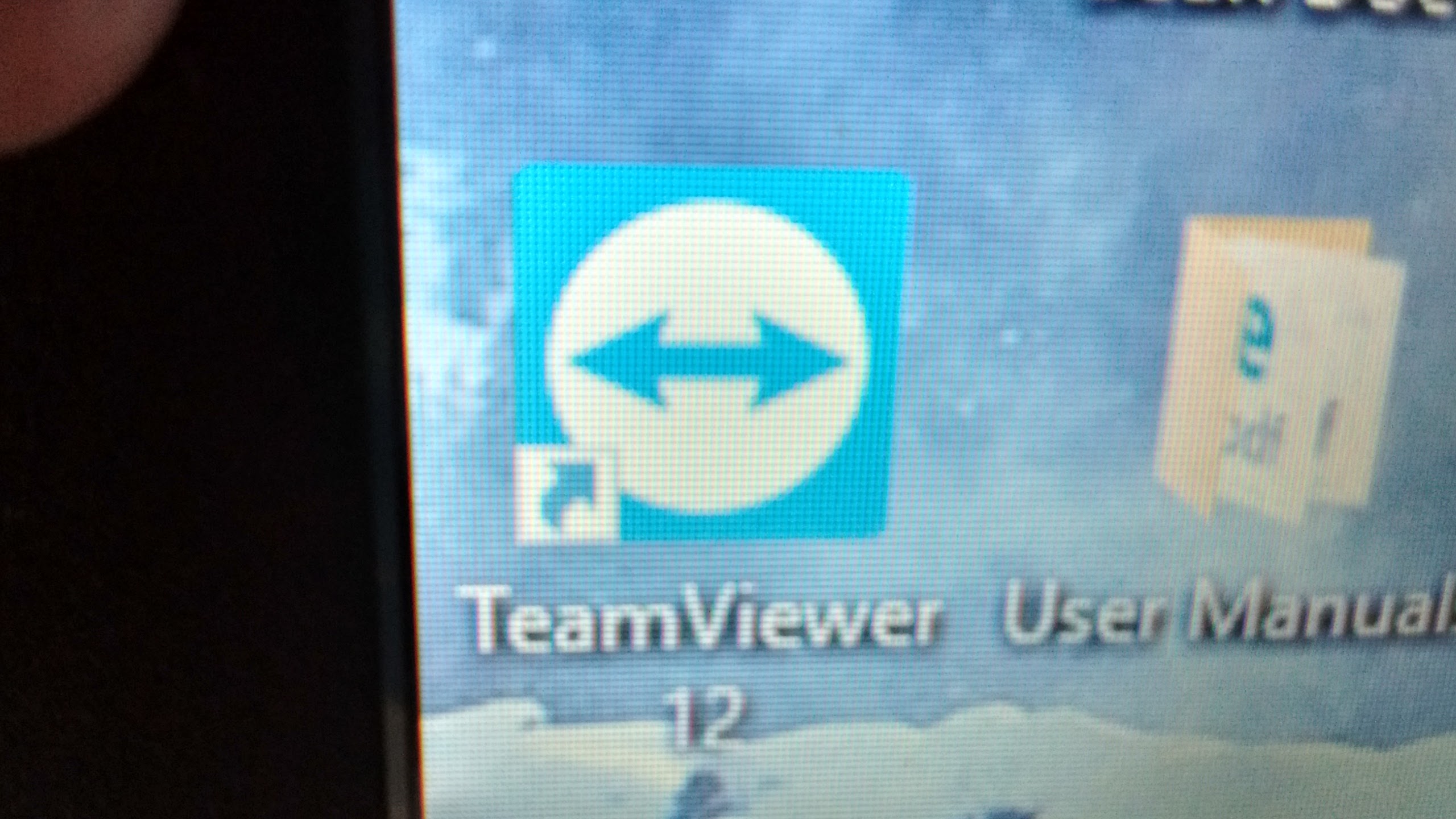
The program will install a desktop shortcut like the one pictured once it is installed. Then both you and the other person call each other and then each of you will click on the shortcut on your computers. This will bring up  the team viewer windows.


The person needing your help will then give you their password, which you enter into a field on your Team Viewer window. You’ll then see the other person’s computer and your mouse will move the cursor on their screen. They can still move the cursor and see their own screen as well. You can then see what they are seeing and can correct the problem for them or guide them while seeing what they are actually doing and what actually happens when the problem shows up if it is not readily apparent. This means you can see the problem as it really is, which makes it much easier to identify and correct!

It’s really helped me since my cousin told me about it. As I often help a few of my relatives with their computers, and with them living quite a distance from me, it has made it much easier to identify and correct problems on their computers.

If you’re worried about having someone else have control of your computer, just remember, they cannot get control until you give them your password, which changes every time you open Team Viewer. Your mischievous nephew cannot take control of your computer on a whim. He would have to have you turn your computer on and give him the current password.

And, there is a Team Viewer app for Chromebooks, which can then be used to diagnose problems on other computers, whether they are Chromebooks or regular Windows pc’s or laptops.

So, if you are the go-to person when your friends or relatives need computer help, Team Viewer is for you!

Happy computing!

If you like what you’ve read here, please let others know of this post, blog, and site.

And thanks for reading!  🙂

Unknown's avatar

When it Comes To The World Wide Web, How Safe Are You Really?

In today’s digital age, staying safe online is of the utmost importance. Every day, businesses are targets of fraud and individuals are subject to identity theft. Hackers can ravage our devices, and even celebrities aren’t immune- with a number of them having photos stolen from their phones. We live so much of our lives online, it’s how we work, socialize with friends, we do our banking online and have all kinds of personal and sensitive information stored on our devices and online accounts. So our safety online is something that we all should be taking very seriously. Here are a few points to consider


Safety on Your Smartphone

It’s well documented that Apple iPhones are more safe and secure than any other model. All of the apps you can download are verified, and overall it’s almost impossible to hack your information from them. A new update means you can set up two-step verification for icloud too meaning this is unable to be compromised. If someone has physical access to your phone for any length of time, it’s possible to jailbreak and store malicious software, however, for the average person, this really isn’t a concern. According to http://www.icloudlogin.com/, on any device, you should be exercising caution such as not clicking links in text messages from unknown senders, or using unsecured wifi networks. However, the security on iPhones are far better than the other leading models. So if you’re in the market for a new phone and safety is high on your priority list then investing in an iPhone is a good option. There are a number of apps now which let you log in using your fingerprint, it’s worth setting this up if you have the option to give you that added peace of mind.

Image: Pexels


Safety When You Make Purchases

There’s a reason the high street is in decline – rather than trawl through the shops most of us prefer the convenience of shopping from the comfort of our homes. Online shopping has taken off massively in the last few years, but this can also mean it’s something we need to be conscious of from a safety point of view. Websites selling counterfeit goods are common, and others are simply set up to take your money with nothing ever even being posted. Be wary of where you shop online, even if it’s a big brand or well-known store be sure to check the website’s URL. If it’s not the official link, then it’s likely to be a scammer. If you want to shop from a site you’re unfamiliar with, one thing to look at is their social pages. Scam sites that have been set up in a hurry won’t have tons of followers and interaction. Check on their socials for customer reviews, see if there are any complaints and if so, the way they have been responded to. And unless you’re using a very well known site like Amazon, always use PayPal to make purchases. That way, if anything does go wrong during the transaction, you know that you will be able to get your money back – there’s more information on how this works here https://www.paypal.com. You don’t want to be entering card details into anywhere that you’re unsure of, and it goes without saying that you should never send over bank details. Any company asking you to do this is definitely not legitimate.


Safety on Social Networks

The problem with social networks is that privacy settings are regularly changed, meaning you might be sharing details that you didn’t intend to. Snapchat for example recently released an update allowing you to share your location. If you share to Snapchat’s story, your location will show regardless of what settings you’ve chosen. These kinds of issues should be taken seriously, so make sure you’re not putting yourself at risk. Things like your phone number, email address and other personal details should be set to private. Do regular privacy checks to make sure everything looks as it should. It can be worth regularly deleting private messages too, we bear all to our friends in messages, and if someone does gain access they’re going to be able to see everything. Be sure to actually delete rather than archive where they can’t be recovered.

Image: Pexels


Safety on Email

Safety on all of your accounts is important, but particularly so when it comes to email. If a hacker gains access to your email, then they can reset passwords and gain access to everything that’s linked to it. Be sure to set a strong, complex password (and make sure you’re the only one who knows what this is). A mixture of upper and lowercase letters, numbers and punctuation will make it extremely difficult to crack. Avoid kids, pets, partners and nicknames, important dates and other passwords that someone could guess. Always set up two-step verification too for email. This is often done by texting a code to your phone before you can log in, or you can sometimes use an authenticator. This is an app which you can link to your accounts and generates codes every thirty seconds, there’s more info on the way they work on sites like https://security.stackexchange.com. To log in, you simply enter the code shown. These days most email inboxes will automatically filter junk, but be careful of clicking on anything that looks dodgy from unknown senders and certainly don’t click on any links. If you receive an email from somewhere like Paypal or your bank and you’re unsure if it’s legitimate, always type the address in manually into your browser and log in this way instead of going through a link. Since the link can lead you to a website that looks exactly as it should but is really just there to steal your details and login to your account.


Have you put much thought into online safety? What steps do you take to ensure your details are kept safe online?

Contributed Post.

If you like what you’ve read here, please let others know of this post, blog, and site.

And thanks for reading!  🙂

Unknown's avatar

Why Everyone Should Have Their Own Website

Have you ever wondered why people have their own website? Most people are more than content just managing their Facebook accounts. They can share funny articles and memes. They can post their favorite photos, and they can give their friends updates about big events in their lives. So why should anyone want to give up their time and energy with a website as well? There may be more reasons that you think!


Starting A Business

If you want to start up your own business, a website is essential. It helps you to let customers know where you are, what you do, and what your product or service is. It can also be used to contact you. Perhaps you would like to have an online contact form or a live chat service? Most importantly you can post articles, information and images about all the things you sell.

Picture from Pexels


Many business websites can also handle online purchases. You need a secure website and an online checkout system. These might require additional costs, but they will help your customers purchase safely. The ordering system will then alert you that you have a sale so you can process the order.


Perhaps the best thing about having an online business is that you can trade globally. You might pick a domain name for your website that is the same as your company name. That will probably end in “.com” if you’re in the States. But if you want to sell in the UK or Canada or anywhere else, you might also buy the domain name relevant to that region. UK domain name registration is as easy as any other. You can even register all your preferred domain names with one company if you like.


Say It With A Blog

If you find you’re posting to Facebook and other social media accounts a lot, you might love the idea of having your own blog. As with a business website, you can choose to register your own domain name, making it uniquely yours. And just like every other kind of website, you will need to pay a company to host it for you. There are plenty to choose from, and contracts often last for a year. Consider how much storage you need. Lots of photos and videos will take up more room.

Picture from Pexels


WordPress is a firm favorite for bloggers because it is often already installed on your domain when you buy it. You can then pick a theme, add a couple of photos or a logo and you’re good to go. The platform is really easy to use. Simply type and post. You can add plugins to help you share your articles across all your social media accounts, so you don’t have to double up the work.


Getting A Job

If you’re not keen to run your own business, but you are serious about pushing your career forward, then use your website to promote yourself. You shouldn’t publically list lots of personal information from your resume, but you can upload your portfolio and samples of your work. If you’re applying for jobs, you should include your website URL and your LinkedIn profile on your application. Potential employers can then see if you’re a fit for their company. You can visually demonstrate your skills and experience – this is perfect if you’re not a wordy type of person!


Organizing An Event

A big event like a wedding or birthday party can be tough to organize. You can use your website to detail the different companies you’re using and to post records of the event. This might include photos and videos. You can add quotes from happy guests and post a big thank you to everyone who helped. It’s a great place to collate everything from the event in one place.

Picture from Pexels


While you’re planning the event, you can use online survey forms to garner opinions. “Which color do you like?” “Do you like roses or tulips best?” “Should I order this chocolate cake or this fruit sponge?” Visitors to your website can answer the surveys so you can make a decision based on their responses. Again, these posts can all be shared to your social media accounts with a single click.


Entertaining

Of course, websites should be entertaining. Websites can be designed to show off your talents as an entertainer. If you love singing, dancing, or performing, why not set up a website to showcase your skills? YouTube has been a popular video platform, but your own website can be used to promote upcoming gigs and even to sell tickets direct. What will you use your website for?

Contributed Post.

If you like what you’ve read here, please let others know of this post, blog, and site.

And thanks for reading!  🙂

Unknown's avatar

The 2 Best And Cheapest Methods Of Entertaining Yourself Online

Flickr


Entertainment has now become so commonplace that finding a digitized form of it is easier than ever, and what’s more, it won’t cost you much to experience. Finding some of the best content online doesn’t even take a diligent eye anymore either. For the price of an internet connection and a laptop, you have access to a world of entertainment that will leave you laughing, crying, inspired and horrified.


For the frugal person, this is a beautiful boon of the modern digital age. Life online has facilitated many entertainment sources in becoming more competitive, and as a result the cost of admission to these services has plummeted. It’s not difficult to imagine these days just how easy it might be to find the next great piece of content you adore for the minimal cost of a cheap subscription service.


But where are the best places to look to entertain yourself cheaply?


Look no further than these online hubs:


YouTube


YouTube is becoming more and more of an internet sensation as the years go by. In its early, humble stages, YouTube used to be a place for viral videos and funny cat picture compilations, but now a full culture of YouTube personalities who make their living providing free video entertainment mean that you can easily waste hours watching funny videos without having to pay a single penny.


Not only do amateur ‘video loggers’ make entertaining content, but now many shows place their ‘highlight reels,’ or promotional videos designed to get you watching their shows on YouTube for free. With video game ‘let’s plays,’ music videos and even some rudimentary television shows all being hosted on YouTube these days, YouTube is your one-stop shop if you have no money to place towards entertainment past your internet connection.


Netflix


If you’re looking for something much more professional, consider getting a cheap $9.99 Netflix subscription. With it, a world of content is at your fingertips. The favorite shows you had as a child, as well as some absolutely stunning original content,  makes Netflix the absolute best de-facto streaming service on the internet.


Shows like The Crown, Stranger Things, and Orange Is The New Black have all won awards for their amazing talent and tight storylines. What’s more is that they release these shows on a staggered schedule, so there is always something intrinsically entertaining to watch and keep you satisfied. What’s more, the new season of Orange Is The New Black is about to air on Netflix; you can find more information about that here https://netflixupdate.com/spoiler-alert-season-5-orange-new-black-trailer-finally/ – OITNB is heralded as one of Netflix’s most popular shows, and offers hours of hours of already hosted content.


Another benefit of a Netflix subscription is that the service places entire seasons of television shows on at the same time, lending itself to the ‘binge-watching’ format that many people claim is superior to waiting for a show to air week-by-week.


These two methods, combined, can provide you with more entertainment than you could adequately consume in a lifetime, and what’s more, combined they will only cost you £9.99 a month.


Who said life online had downsides?

Contributed Post.

If you like what you’ve read here, please let others know of this post, blog, and site.

And thanks for reading!  🙂

Unknown's avatar

Ecommerce: When Boom Threatens Bust

Image Credit


There are some things in life it’s hard to sympathize with. If someone tells you that their job is too well paying and they don’t know what to spend money on anymore, chances are, your sympathy well is going to be pretty dry. Or if someone else ventures the fact they sometimes worry they are too happy and content in their relationship – there’s not much you can do with that except roll your eyes.


If you ever find yourself in the position of struggling to keep up with demand for your online retail company, then that too will be cause for a lack of sympathy. In a world where companies are going bust all the time, the idea of having too much business to handle is something that most entrepreneurs would only dream of. If you were to go and post on a business forum, panicking about how well your products are selling, then you’re not going to receive much but a few mutterings about how it’s “alright for some people”.


It’s a shame that few focus on the idea of demand being too high, because it’s something that can happen without any warning. At the beginning of your business, you just hoped for one sale – and you celebrated every one that trickled in. Now, you find yourself rushed off your feet, struggling to keep up with orders, and wondering how your little from-home job has suddenly taken on a life of its own.


Small Business: Now Big Business


The vast majority of online stores that are set up by sole traders are motivated by passion. They are unlikely to turn a profit in the early days of trading, but they are sustained by determination and a desire for a part-time income. Very few people embark on ecommerce with the idea that it’s going to be their full-time job and something they devote their time to entirely.

Image Credit


It’s a good job that’s the case, because being able to pack in your normal job and work from home selling online isn’t something that many businesses can sustain. If you have been one of the lucky ones, it can feel wonderful… but there’s no doubt it’s a surprise too. You didn’t expect to be this successful, which means you don’t have any plans for handling being this successful.


Make The Choice: Stay Or Go?


You now have to make a decision: are you going to go full-time and dedicate yourself to your flourishing business? Or did you only want it as a side job, a little extra income, rather than a replacement for your main job?


If the latter is the case, then you have no choice but to scale down and start refusing orders. You could genuinely harm your reputation if you can no longer meet demand, so be more select and close sales down when you’re becoming overwhelmed.


However, most people will choose the first option: go for it and try to make this your career. It’s a big leap, but you’ve already got some positives going for you as you switch to working for yourself, from home. You clearly know what you’re doing and have hit on an idea that is successful; you now have a legitimate chance ahead of you to make your ecommerce business into a reality.


Of course, you’re now faced with the task of doing just that – and it’s something that’s a lot easier said than done.


The Next Steps: What Do You Need?


So you find yourself in a situation where your business is expanding at a rate you can’t handle. The best thing to do might be to finish all of your existing orders, then suspend online ordering for a couple of days while you put the next steps into action.


As this is ecommerce, let’s assume that you are selling a product. So ask yourself a few key questions, and you will find the answer to what your next step should be will reveal itself. Of course, when you start asking questions, a few more spring up alongside them – but such is the nature of business!


Question One: How do I source my product?


Do you make it yourself, buy it intact and then sell it on? Who are your suppliers for the materials you are using?


Question Two: Can I source more of my product?


Do you have the time to make more of your product? Might you need to bring in other people to help, and how might you go about doing that?


Question Three: Is it time for a price rise?

Image Credit


If you are currently selling stock as fast as you can make/procure it, then you have to examine your pricing strategy. It’s a simple matter of supply and demand. If you can only produce a limited number of items, then you need to charge more for them. Even if you can source more products, it’s still worth experimenting with higher prices – you have clearly hit a space in the market, so why not make the most of it?


Question Four: How will you cope with the extra tasks ahead of you?


This one can be trickier to answer than you might initially think. If you’re going to be selling more products, then you’re going to be doing more of everything. For example, you’re going to be sending more parcels, spending more time processing orders, entering the fresh income into your business books.


This is why you likely need to leave your full-time job; just managing the business at a slight increase in sales is going to take a lot more extra work. Identify the areas that you will need to increase your time and financial investment into.


Question Five: What help might I need?


When you have reached the stage where a business is a success and you are dedicating more time to it, you can’t afford to be an island. Making, selling, and sending your products solo might have been possible in the beginning – but it’s fast becoming a liability. That’s why you need to investigate your options.


  • Could you do with a service that lists items for sale for you?
  • Do you need to hire a writer to help you craft perfect product descriptions?
  • Are you going to need to rent space for the higher stock volume you will now be handling?
  • Are you going to need ecommerce store inventory management to help you cope with all that extra stock?


The answer to all of the above is probably a resounding yes, so you have to launch yourself into sourcing all of these complex forms of assistance.


Question Six: Do I need a partner?


You began by yourself, but you only need to reread the last few paragraphs to see how much more work you are now going to be bringing upon yourself. Can you realistically continue to do this alone? Do you need a partner or part-time employees to help you cope?

Image Credit


All of the above might seem like big, scary questions for a small business you founded with few dreams beyond making some extra spending money. Nevertheless, they are the reality of the situation you face. If your business is expanding at a rate you are struggling to manage, then it’s crystal clear that something needs to change – and soon.


The more you struggle to meet demand, the more your business is going to be groaning under the strain. Without wanting to scare you, it’s important to remember this simple truism: if you don’t handle the boom, you’re soon going to be handling the bust. This is a big change in your life, but it’s one that is going to give you a career you might only have dreamed of. Make the most of it; you’re one of the lucky ones, so enjoy it.

Contributed Post.

If you like what you’ve read here, please let others know of this post, blog, and site.

And thanks for reading!  🙂

Unknown's avatar

Protect Your Business on All Fronts Now, You’ll Thank Yourself Later

Unfortunately, businesses always have been and always will be prime targets for criminals. Whether these be criminals that break into premises in the hope of finding and stealing goods. Or whether it be online criminals, such as hackers, that seek to steal valuable information via technology. There are criminals just waiting to prey on all businesses — both the young startups and the mature market leaders — everywhere. So, no matter what stage of its life your business is at, it’s now time to protect it and make it as secure as can be. If you don’t, then you will more than likely end up regretting the decision not to. Below are a few areas that you should target, and a few ways to make them secure.

Image source


Change your locks


Changing your locks as soon you move your business into a new working premises is a must. It is must because, quite frankly, you can’t know for sure who has a set of keys for the current locks. The old occupants may seem like nice people, but can you really trust them not to use their keys to sneak into your new premises as soon as you’ve moved your valuable goods into it? And even if the old occupants have no such desires, who knows who they may have given access to the keys before. And who’s to say that these people won’t have had a spare pair of keys cut? You can never know who has access to the keys that unlock your building, and you can never know what they plan to do with them. So, whatever safety procedures you do put in place, remember that rekeying your business is must.


Strengthen your doors


Changing your locks strengthens your doors in a sense that it stops alien bodies unlocking them at will — but changing your locks doesn’t do the whole job. No, in the venture of securing your business’s property, you must be willing to have your doors strengthened as much as they can be. By doing so you will be doing all you can to thwart potential burglars and stop them from gaining access to the inside of your building. Make sure to check out these simple yet effective techniques when it comes to strengthening your doors.


Backup your files


Burglary doesn’t just occur in the physical realm of your workplace, however. No, it has the potential to take place on your technology too. In this day and age, hackers and the hacking they do is rife — this was evidenced earlier this year by the WannaCry hacking that made an international impact. There is no way to stop these hackers from trying to hack you as they are very skilled at concealing themselves and hiding their identity. You can, however, stop them from actually infiltrating your business’s technology by installing the very best antivirus and anti-hacker software. Better still, you should invest in backup disaster recovery. What this kind of software will do is offer you a solution when it comes to recovering any data that has been hacked. Also, it will offer you great ransomware protection; this will mean you won’t ever have to be forced to yield to the financial demands set upon you by hackers.


Not protecting your business on all fronts is a mistake that can land it and you in huge trouble. So, don’t be that business that loses everything just because they were too lazy to put safety procedures in place!

Contributed Post.

If you like what you’ve read here, please let others know of this post, blog, and site.

And thanks for reading!  🙂

Unknown's avatar

The Most Essential Online Business Skills

Image source

If you are considering setting up your own online business, something which is becoming a more and more popular way to earn a living, then it makes sense to ensure that you have all of the relevant skills you need to make your new venture a success before you go ahead and take the plunge.


Being a small online business owner is a real challenge, so the more you are able to do for yourself, the easier it will be for you to succeed no matter what your budget or how many other companies you’re competing with.


Here are some of the most essential online business skills that will help you to build a successful online company:


Strategic Planning Skills


Starting a new business requires a lot of planning. You can’t just buy a website domain and start trading – you have to draw up a business plan, set goals for the future, plan the actions that will help your business grow and measure your company’s performance so that you can keep improving. With so much on your plate, it’s vital that you’re able to strategically plan for every aspect of your business, lest you end up in a real mess, not knowing what you should be doing from one way to the next.


Writing Skills

SONY DSC

Image source


When your business is online, you really do need to know how to use the written word to your advantage. During the working week, you will have to compose emails, write blog posts, create product descriptions and write web content and this will have to be as legible, error free and interesting as possible if it’s to have any effect at all. So, if you’re writing skills aren’t exactly as good as they could be unless you can afford to hire a writer, it could be worth taking a few writing classes before you launch your business.


Marketing and Communication Skills


There’s been a real boost in the number of people taking courses in imc online, and this isn’t all that surprising because Integrated Marketing Communication skills are becoming even more vital as we switch increasingly to online advertising.


As an online entrepreneur, you’ll need to market your website, good, and services, if you are to have a hope of still being in business a year from your company’s launch, and it really isn’t as easy as you might think. When you’re using the written word to advertise, you really do need to think about each and every word you use and the connotations it brings up. If you can communicate using engaging words that draw the reader in and then create a call to action that really works, you’ll be well ahead of at least half the competition, and if you can talk to your customers in a friendly, informal and persuasive way, you’ll really be able to convince  them that yours is the best company for them.


Financial Skills

Image source


When you’re starting out, there’s a good chance you won’t be able to afford your own accountant, which is why you might want to start brushing up on your accounting skills, taking a basic accounting course if necessary. Without a sound understanding of the financial side of things, you won’t be able to gauge how well your business is doing, plan for the future or file accurate taxes and you all three of these things are so important that you simply can’t neglect your financial skills.

Contributed Post.

If you like what you’ve read here, please let others know of this post, blog, and site.

And thanks for reading!  🙂

Unknown's avatar

Clever Ways Businesses Secure Their Assets

Security has become a more prominent concern as of late for business owners, mainly due to the advancement in tech that has left holes that companies can easily fall into when trying to ensure that things are set up well for their customers. For instance, there is definitely the threat of a hack. Don’t forget, if your business is hacked, it is likely that they won’t be going after you or even your company. Rather, they will be looking for ways to take advantage of your customers, steal the information and use that to commit fraud.


This is why there are now a number of tactics that businesses use to keep their company safe and secure. Particularly, in this age of technology. Here are a few examples.

Support And Assistance

Public Domain Image

It’s fair to say that if you have expert hackers trying to take advantage of your company, you need an expert team to protect it. You must make sure that you have people who know the holes that hackers use to access your company so that they can be filled in. That’s why these days, many businesses are using a full IT support team. With this team in place, security protocol begins from the very beginning. The IT support company actually sets up the business computer network from scratch, ensuring that there are no existing issues with security from day one.

After this, the networks are then monitored. If there is any issue or sign of a breach, it can be corrected immediately. Due to this, there is virtually no chance that a hack is successful because the networks are constantly being watched and corrected.

Protocol

Credit Link Location

Of course, sometimes it’s just a matter of making sure you’re following the rules. Most industries now have business standards of security. If you match these standards, you can make sure that your business is not exposed to security threats. Medical teams should be using HIPAA compliant video conferencing technology because this will mean that the transmissions on encrypted as thus can not be accessed from an outside source. That’s just one example of how the protocol can keep security levels high.

Tech Tricks

Pic Source

Technology is also being used to ensure that businesses are secure, such as cloud servers. Most security experts agree that if you want to keep information safe and private, you must use a cloud server. With a cloud server, you can guarantee that any information stored related to your business is kept off site and that’s crucial. This way, even if people break into your company, they won’t be able to access your accounts and your data. Instead, they will need to gain access to the cloud server, and this is far more complicated.

Other tech can be used to keep things secure as well such as manual security. For instance, you can set up CCTV on your business property to guarantee that you catch anyone who even tries to break in.

We hope you see now that there are various ways to use technology and other methods to ensure your business is secure.

Contributed Post.

If you like what you’ve read here, please let others know of this post, blog, and site.

And thanks for reading!  🙂

Unknown's avatar

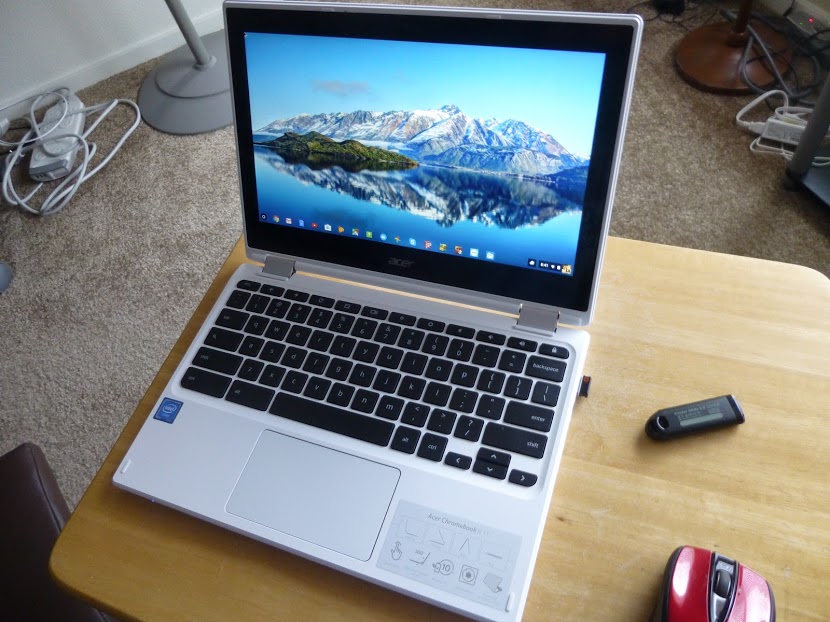
Yes, I Bought a Chromebook!

Well, I finally bought a Chromebook, believe it or not!

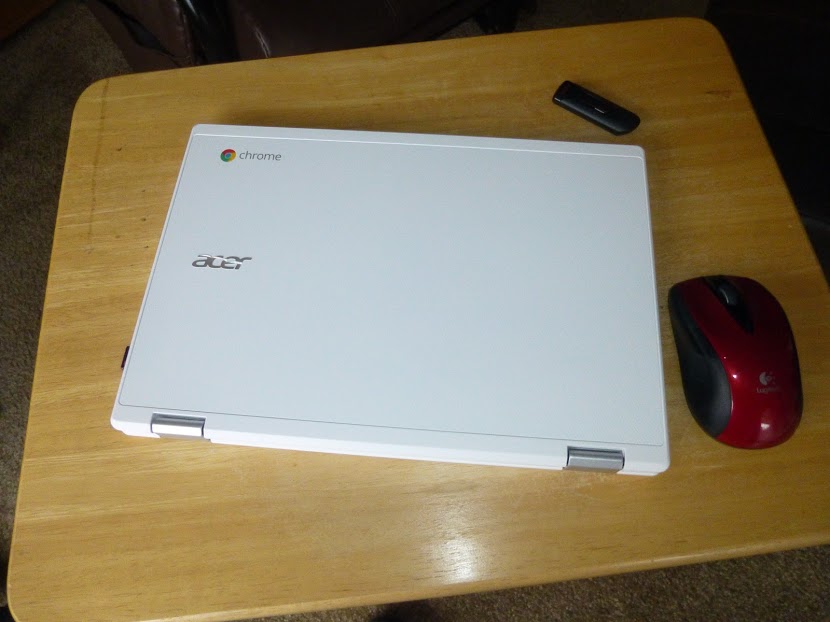
It’s an Acer R-11.

What made me do it? Well, I’d been interested in a Chromebook for a while now, but I hadn’t needed one and also, I was following my own rule of not jumping on a new technology immediately, to avoid the initial bugs, high prices, and lack of additional features inherent in new technologies when they first come out.

But, my netbook, which I use as my backup and travel computer, was getting much slower and I needed a replacement.

So, I did some research as to what was out there, and decided the Chromebook fit the bill. And, finding that there are different ones available, the Acer R-11 looked best to me.

The Pros:

I’ve had the Chromebook for a few months now and it does perform most of the functions that my Windows 10 Laptop does, with some notable exceptions. First, the pros:

  1. It uses a solid state drive. Solid state drives (SSD’s) have no moving parts and don’t require the cooling fans that regular  hard drives do. So, the computer tends not to have any heat issues, and the operating system (OS) works faster. It will also outlast conventional drives.
  2. Chrome OS works faster than windows and updates itself automatically, without slowing things down as Windows does with it’s “bit by bit” constant updates.
  3. The Chrome OS has built-in anti-virus capability, so I don’t need to install any antivirus programs.
  4. Boots very fast and performs smoothly and quickly. I simply open the lid and it comes on. I then enter my password and it’s ready to go. No loading of this and that as on a Windows PC or laptop. If I’m working on my Windows laptop, and shut down, only to find I’ve forgotten something, I simply go to my Chromebook and can quickly get back to what I wanted to and complete it, sometimes in less time than my Windows laptop can simply boot up. (And it boots up fast as it, too, is fairly new!)
  5. The Chromebook is lighter than my netbook and just as easy to carry.
  6. Chrome OS has been integrated with the Android OS, so I can install apps that I also can install on my Smart Phone!
  7. Any website that can be accessed with a Windows computer can be accessed with a Chromebook. As a matter of fact, you can perform most of the same functions on the internet, such as cutting and pasting, as you can with a Windows computer.
  8. Long battery life. I’ve used skype with the Chromebook for two hour sessions and used less than half the battery. On my Windows laptop, most of the battery would be used in that time frame.

The Cons: 

When I first researched Chromebooks just after they came out, I heard and saw cons such as small storage and complicated printing, and limited abilities, I actually thought of them as being “expensive and bulky flash drives”.

But, in taking a second look earlier this year, I’ve seen that they’ve come a long way, and can be far more useful than I thought at one time.

While the OS is different from Windows, and the keyboard and built-in touchpad have a few qualities one must get used to, the Chromebook is not a totally alien machine. For instance, apps can be placed on a task bar, referred to as the “shelf” in Chromebook lingo, and you can attach a mouse or other peripherals via usb as you would on a Windows computer.

Even what I consider the two major cons, printing set-up and lack of storage, I find that they are no longer the show stoppers I thought they once were.

Main cons:

  1. Complicated print set-up.
  2. Inadequate internal storage space.
  3. Inability to work with many Windows programs and software.
  4. Chromebooks are more internet intensive and will run fewer offline programs.
  5. You do need a Google account, but this is free and easy to open. Once open, you can sync the account across devices so you will have the same Chrome homepage, complete with your bookmarks, settings, etc, no matter which device you use to access Chrome or your account.

There are workarounds to the cons, which make the Chromebook quite usable, however.

You still cannot simply plug in a usb cable from your printer and print from a Chromebook. However, if your printer has WiFi or wireless printing or Google print ability, then you can set up your Chromebook for printing. It is a little complicated, and probably requires that you adjust some settings on your printer as well as on your Chromebook, basically making your printer a “network” printer, even though it may be the only one. You may also need your router’s password. And, when printing, you may need to select your printer with the word, “network” in parentheses after it.

Internal storage space on my Chromebook is 32 gigabytes, which is currently at the high end. However, this can be remedied by using an sd card or flash drive for extra storage.  Also, using such google apps as Google Docs, which store your documents in the cloud, you can also save space.


As for Windows software and apps, Windows software won’t install on a Chromebook, but, the Chromebook does have a word processing program which will open Windows word documents, even if they are on a flash drive or sd card. Also, apps such as Google Docs, can help in this regard, especially since documents created and run on this app can be converted to windows compatible docs and docs can also be made available offline, which also addresses the problem of the Chromebook needing the internet for productivity when internet access is just not available in any form.

The Chromebook also has an app that will open your pictures and videos from a windows computer stored on a flash drive or sd card.

As for music, I have found that music files from Windows Media Player won’t be opened by the Chromebook, but it’s possible that using an app, such as Google Play Music, personal music playlists might be accessible. I haven’t tried this yet so I don’t really know. Of course, music acquired through Google Play will play on the Chromebook.

In fact, with the integration of Android apps, you can add android games and other functions to the Chromebook. Some apps you will find are specifically made for phones and may not perform as they would on a smart phone. But many apps will do just fine on the Chromebook.


So, how do I like my Chromebook so far?


I think it’s great! Sure, there are a few things I still can’t do that I can on my Windows computer, but I can still browse and use apps like YouTube, access accounts like my Craigslist account, and perform other productivity tasks. And by adding apps, I can even play games!

There’s still more to explore on my Chromebook, but so far it has really exceeded my expectations. So, if you’re thinking a Chromebook is just an expensive flash drive, or is too complicated, I once thought so, too, and learned that it’s not. It’s much, much more and nothing to fear, especially if you have used the Chrome browser on your Windows computer. Happy computing!

If you like what you’ve read here, please let others know of this post, blog, and site.

And thanks for reading!  🙂