Unknown's avatar

Again, Before Jumping In, Do Your Research! (Or how I got a $149 phone for just $49!)

Well, believe it or not, I just got my first true smart phone! Yeah, really! So, what kind did I get? I Phone 6? Top of the line Moto X? Did I pay $300 to $600?

Nope. I got an LG Optimus Zone 2. And I love it! I just got the phone last weekend for a new part-time job that I’ll be adding to my other two jobs. So, as usual, instead of jumping in and getting the first phone and plan I saw, I did some research. And it really paid off for me!

First, the plan. I was on a “Paygo” plan, where I would pay just $1.99 on any day I used my phone, no matter how many calls I made that day or how long I talked. Texts only cost about 2 cents. No data included. It was a great plan, as I never got above $35 monthly, and there was no contract, unlike my previous plan, where I was sometimes hit with $100 monthly bills, and roaming charges if I went out of the area. Worst case scenario, I’d make or get a call every day and pay $62 for a monthly period equivalent.

Now, however, I needed to add data and get a smart phone. Most plans of the type I was now looking for, (No Contract, flat fee, unlimited talk) charge between $40 and $50 now. (By the way, this would still give me a great annual savings over the plan I had before I switched to Paygo!) I knew I didn’t want a contract, so that if I didn’t like the plan, I could leave it without penalty. All of the plans I researched offered unlimited talk and text and varying amounts of data usage per month. But, instead of just paying for more data that I may not need, I asked the potential employer what I would be using data for, then, I asked the respective mobile service carriers how much data would I need in doing what my future employer said I’d need to do.

This helped me make my decision. I stuck with my original carrier because I knew them, they’d always treated me right, and it’s easier to talk to a human being when I need to contact them. Their plan was $45 monthly flat fee. Plus, they offered a doubling of my data at no extra charge if I used their autopay system, which frees me from having to remember to add money to my account in order to keep my service running.

Now, the phone. The LG phone that I got was really the best for me. It’s an LG Optimus Zone 2, and is about the same size as my previous phone, an LG Extravert,Β yet has a larger screen. Its small size also means that it will fit into the same carrying case that my previous phone did, so I don’t need to get a new case for it! And, because it’s not the size of a small skateboard, I’m not afraid that I’ll break it when I get into my car and it bends or breaks because it’s attached to my belt! (I know, this is an exaggeration, but smart phones have been getting bigger even as they get thinner, and so are getting more awkward to carry and are more prone to getting bent and broken.)

However, the carrier’s store quoted me $149 for the phone! I didn’t want to pay this much and knew I’d seen the phone for less at a nearby super center. So, I went there and checked out the phone there, and got written confirmation of the phone’s $49 price tag. So, I went back Β to my carrier’s store, confirmation in hand, and showed it to the guy at the carrier’s store. Upon seeing my confirmation of the $49 price for the same phone he was offering at $149, he said he’d sell me the same phone at the same price offered by the super center, $49, if I bought it from his store instead.

So I did, saving $100 in the bargain. So remember, even if you have to get something on short notice like I did, try to do your research first! It will really pay off!

Good luck shopping!

And thanks for reading! πŸ™‚

If you like what you’ve read here, please let others know of this post, site, and blog! πŸ™‚

Unknown's avatar

Back Up Your Computers!

With this being January, it’s new year’s resolution time. People make all kinds of resolutions, most commonly to lose weight, get fit, make more money, spend less, or spend more time with the family. And all of these are good. But one that I suspect many leave out is, to back up your computers. Now, many businesses, especially the larger ones, do this all the time, but how often do you back up your home computer?

Why is this important? If your computer should have a catastrophic failure, and many do unexpectedly after a time, you could lose your data, which can include your pictures, scans, documents, favorite or bookmarked sites, music, and written or artistic documents, and anything else that you have saved on your computer.

Don’t think it can’t happen because your computer is working fine? My first computer worked fine for 7 years, then developed a wiring problem that experienced techs told me was “fatal“. So, I bought a new computer and it worked fine. For a year. Then it suddenly died and was proven to be unfix-able. So now I have my current computer.

Luckily for me, I’d worked for a company that made a point of backing up its computers and I was assigned this task, so I was in the habit of backing up my own computers from the get go. So when my own computers failed, I didn’t lose any of my data.Β 

How to do this, and what do you need?

You will need a portable hard Β drive (HDD) or a flash driveΒ (Often called a thumb drive)Β if the amount of data you have is small (128 gigabytes Β is the largest I’ve heard of currently, but they are being made with higher capacities as time goes on.)

You can also use CD-R or DVD-R’s but this is much less convenient, especially with higher capacity computers.

You can also back your data up to the “cloud“, that is, online. There are services that allow you to do this. The advantages are that you can access your data from any computer anywhere in the world, so if you lose your laptop in Bangkok, you can still access your data. Also, you don’t have the worry that something like a fire will wipe out your data because both your computer and portable HDD were burned up.

However, there are disadvantages here, too. Currently, you may have to pay a fee for the service or downloading of the necessary software. And, as we all know, the internet isn’t always secure. So a breach on the part of the backup service can render your data being accessible to anyone who may want to look. And, if your service provider is doing maintenance or is otherwise shut down for some reason, you won’t be able to access your data. You can grab your portable HDD or flash drive out of your desk drawer right now and have use of the data whether you have internet service up and running or not.
16 gb flash drive.

16 gb flash drive.

Flash drives do have the advantage of having no moving parts and being solid state, and their construction is much less delicate. Add to that their small size and this makes them very easy to carry and store. But, they have limited storage capacity compared to a portable HDD.

Portable HDD drives are probably best now, as they have shrunk greatly in size and grown greatly in storage capacity and ease of use.

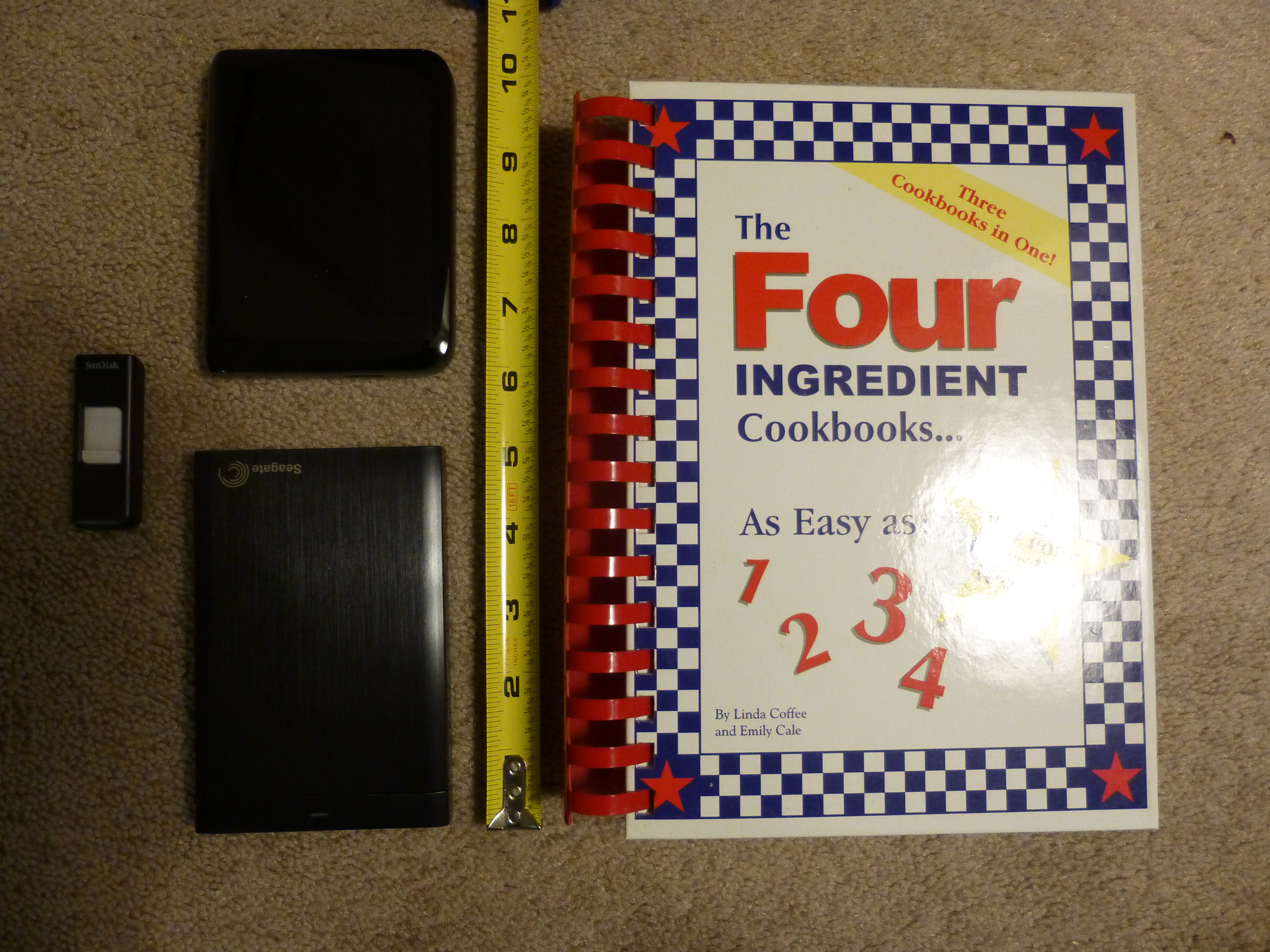
The first HDD I had only had a capacity of 80 gb, half of my first computer’s capacity. Also, in addition to having to be plugged into my computer, it also had to be plugged into a wall socket. And it was somewhat large, about the size of a small to mid-sized phone book or hard cover/text-book, such as the cookbook in the picture below.

16gb Flash Drive at far left, 750 gb Portable HDD upper left, 1 tb HDD lower left, and cook book which was the size of the 80 gb capacity HDD I once had.

16gb Flash Drive at far left, 750 gb Portable HDD upper left, 1 tb HDD lower left, and cook book which was the size of the 80 gb capacity HDD I once had.

Now, there are small portable HDD drives that are about the size of a man’s wallet and some are almost as thin as a smart phone. Some I’ve seen can hold up to 4 terabytes (tb) of data. That’s 4,000 gigabytes (gb), more than the capacity of most computers being sold today, in 2015!

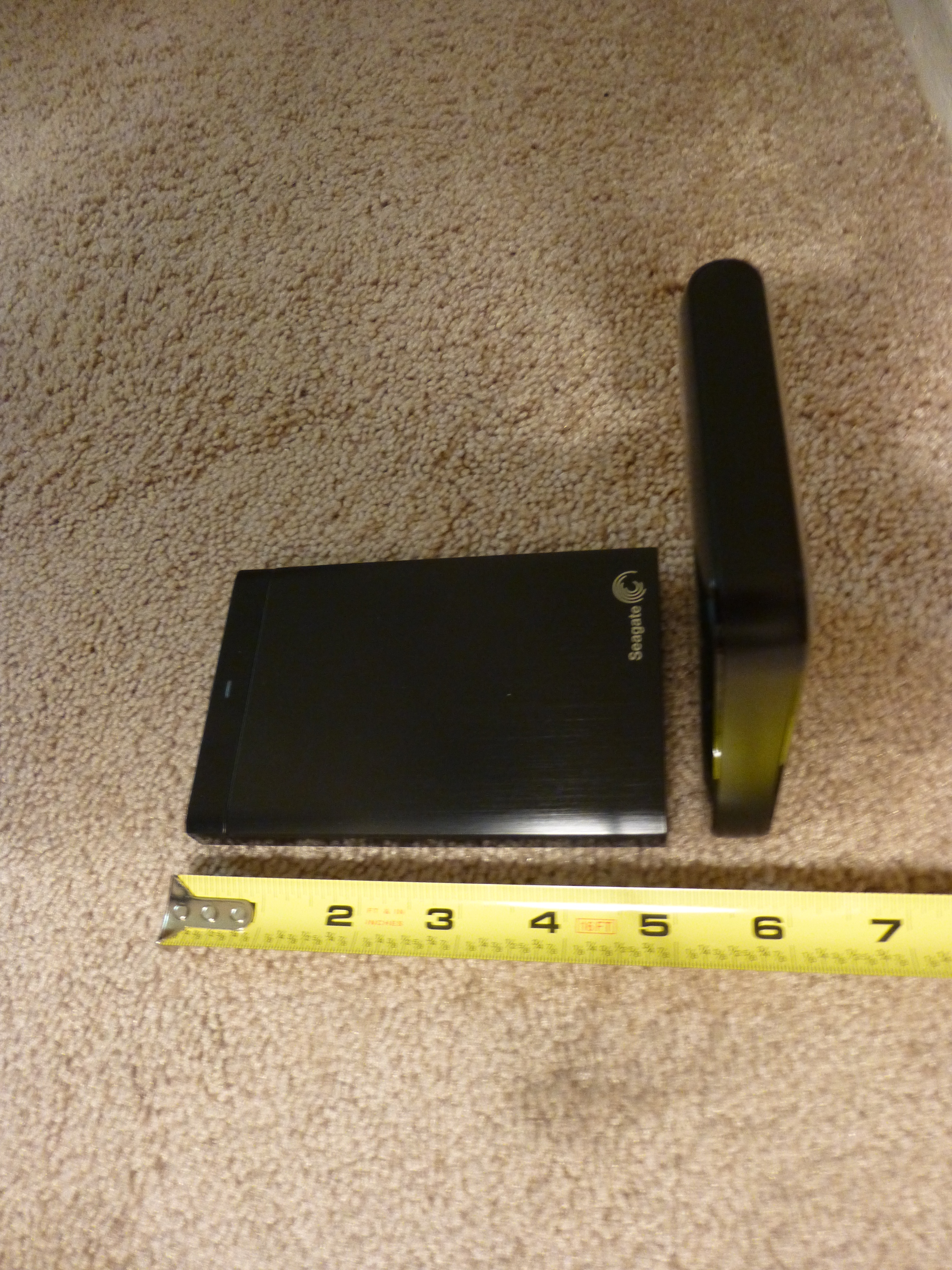
1 tb HDD lying flat on left and 750 gb HDD on it's end at right.

1 tb HDD lying flat on left and 750 gb HDD on it’s end at right.

And they can often be had for well under $200, many 1 tb and under portables are less than $100 with enough capacity to satisfy most users’ needs.

They usually come with their own USB cable and all you do is plug them in. No need for a second plug-in to Β a wall socket, either.

Now, many portable HDD’s will have their own backup software, which can often perform continuous backup so long as they are plugged into your computer. This can be very convenient as you won’t have to do periodic backups.

However, if you are like me, you may want to go into folders from time to time, whether to make changes, such as renaming folders or clicking and dragging one sub folder to another parent folder, or to retrieve a picture or document to attach to an e-mail, using the portable HDD software may not be for you.

I tried using the portable HDD software with my first computer, to save time. However, when my first computer went out and I attempted to transfer my data to my new computer, I found that the portable HDD software had created different folders with different names. or actually number and letter designations, and had completely rearranged the stored data, so I had pictures and documents on the same folder, and other things which were originally together, now separated! So, while transferring my data to my new computer was easy, I had to reorganize all my data once it was on the new computer!

So, before using the portable HDD’s backup software, be sure you read all the instructions first, and test it first by viewing the contents and folders on the portable HDD after a backup.

If you are into manual organization of your data files and folders, then you may just want to back up your computer by simply clicking and dragging your user files and folders to the portable HDD once you have it connected to your computer. I do my backups this way and find it convenient, as well as knowing that, if my computer dies, I know exactly what to look for when I transfer my data from my portable HDD to my new computer.

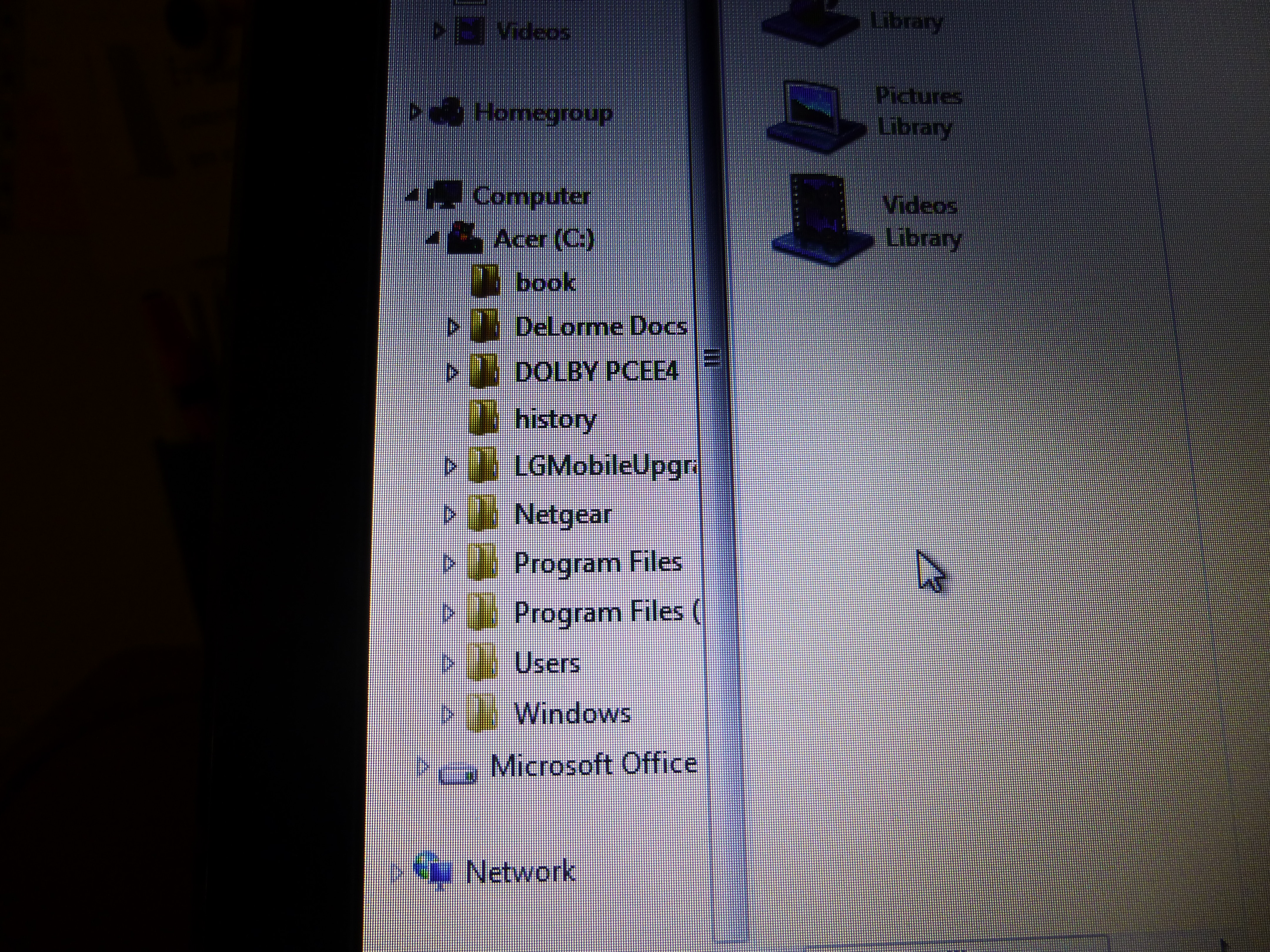
Computer main folders. Click on arrow next to "Users" folder to view sub folders.

Computer main folders. Click on arrow next to “Users” folder to view sub folders.

Also, for those of you who are brand new to backing up your computer, you only need to back up your data files, which should be under your computer name folder (whatever name you gave to your computer when you first got it and set it up.) In the picture below, the computer name folder’s title has been ‘blanked’ out. It is the folder immediately below the “Users” folder and includes sub folders from “Contacts” through “Tracing“. These folders will contain your documents, music, pictures, favorites, and video files, among others. It would be these folders that you would copy to your portable HDD for storage. I also include the “Public” folder below the “Tracing” folder as well for good measure. And, while this applies to Windows PC’s and laptops, this probably can apply to Apple/Macs to a degree as well.Β 

"Users" folder expanded to view computer's "Name" folder and it's sub folders.

“Users” folder expanded to view computer’s “Name” folder and it’s sub folders.

There’s no need to back up system or other files outside the “Users” file as any new computer you get will already have a more advanced version of these files anyway.

How often to back up your computer? It depends. If you make few changes over time, I would do it once a year at least. If you make lots of changes, then possibly weekly. It’s up to you. I usually do it every 6 months, but sometimes as soon as every 3 months if I’ve added lots of pictures or made a lot of changes in that time. If there’s a point of time in which updating would be a major chore, or a major loss if the data was to be lost, then back up sooner than that.

In any event, if you have a serious data loss you’ll be really glad that you backed up your data.

Happy computing! Β And thanks for reading!

If you like what you’ve read here, please let others know of this post, site, and blog! πŸ™‚


Unknown's avatar

Read Those Reviews and Watch Out For Them Too!

Oftentimes, if there’s something I want to buy, or a service or even a job I want to check out, but am not too sure of it, I like to read reviews on it, both from experts and customers or employees. It’s good to read reviews, especially for big-ticket items or companies you may want to do business with that you don’t know as well.

Reviews can help you decide if buying the product, doing business with that company, or working for that employer is still what you want to do and, if so, they alert you to the possible pitfalls as well as letting you know about benefits that you may not have considered or known about.

Reviews can be among the most important factors to consider for business decisions of almost every kind.

Now, I’m not saying you should look for reviews for everything you want to buy or every company you want to do business with, only for those you are less familiar with. However, know that the quality of models under the same brand can sometimes vary, so reviews can still be helpful, even though you may be familiar with the brand in general.

What are good sources of reviews? Online, good sources are Amazon, Ebay, Edmonds, MSN Autos, Cnet, Glassdoor, Consumer Reports, and many others, too, which can be found using Google.

Amazon and Ebay are good sources for almost any product. And there are ratings for sellers, too. I really like the reviews on Amazon, because you can see them according to the most helpful, as well as the most recent. And access is free. Same with MSN Autos.

MSN Autos and Edmonds are good for vehicle reviews by both experts and consumers. Glassdoor is good for reviews of companies that you may want to work for. Cnet is good for electronics, and Consumer Reports covers just about all products.

Some of these require a membership, which may include fees, for more detailed access to reviews, or more than just a free trial period.

Reading reviews, particularly from users, has helped me to make many good purchasing and business decisions.

However, there is one thing to watch out for. Even though sites containing reviews will try hard to filter out false positive reviews and false negative reviews, some reviews will be fake. And they’re not always easy to spot.

I once applied for a job doing reviews and was told to review a doctor’s office. So I asked about visiting the office and was told I didn’t have to visit, all I had to do was to write a glowing reviewΒ as if I had been a patient there! I turned down the job flat! But I know that others with less scruples are out there, writing false reviews!

My guess is that the reviews you can put the most trust in are those that list both positive and negative points.

Of course, the reviews you can trust the most as being, …Β unbiased?,Β will be from face to face meetings with actual people who own the product or have conducted business with that company or person. Before I purchased my Subaru in 2005, I’d read lots of positive reviews, but the best reviews on how good a Subaru was, were from two people who’d driven them during an ice storm in my area.

I knew both of these people owned and drove Subaru carsΒ all the time, so I knew their accounts were not faked in any way. And, no, neither worked for Subaru or had company stock, so no reason to give me a false account.

So, if you’re not sure of your pending purchase or business decision, don’t rush in! Look for reviews first, especially from those people you know or just happen to run into face to face. You’ll be glad you did.

Good Luck!

If you like what you’ve read here, please let others know of this post, site, and blog!

And thanks for reading! πŸ™‚

Unknown's avatar

Skip Those Extended Warranties!

It’s the shopping season now, and many of you are buying items like electronics, things with lots of parts, and maybe even a car. And, quite possibly, you will be offered an extended warranty. Usually, this comes at extra cost, sometimes prohibitive extra cost. Should you go for it?

The only time you shouldΒ automaticallyΒ go for an extended warranty is if it is being offered for free! Otherwise, it depends on the price, and other factors.

If the item is really cheap and the warranty offered is more than 5% of the original price, skip the warranty. Period.

Items with lots of parts, or electronics? In my opinion, it depends on the price of the extended warranty, the store where you are buying the item, and whether or not there is a free basic warranty.Β Especially if the store is noted for not really backing the customer when a dispute arises. You could be throwing money away in such a case.

Where cars are concerned,Β absolutely skip any extended warranty offers!Β Many insiders in the industry who’ve turned consumer advocate say not to get one and that they are not worth the paper they’re written on!

And I concur. I purchased a used car some years back, and it has served me well. I’ve had new cars, too, and knew not to get any extended warranties, but, since this was a used car with no basic warranty, I decided to purchase an extended warranty, believing that it would act the same as a basic warranty from a dealer, at least to some extent after I paid a $100 deductible.

Well, lo and behold, I had a part that needed repair and the warranty people said it did qualify as warranty work.Β But, they said that the job should only take 2 hours while my mechanic, who I know is honest, said it was an 8 hour job, which it was.

So the warranty helped very little, and I would have to have a real “lemon” of a car, with everything that went wrong qualifying as warranty work, to have even the slightest chance of getting back the money, through savings, that I paid for the warranty! Luckily, I was not too far into my warranty period and managed to cancel the rest of the warranty and get my money back!

You see, extended warranties for cars are more like insurance. When you get a new car, as I did in the past, the car comes with a standard basic warranty. (Usually 3 years or 36,000 miles, though some are for longer periods and greater mileage.) With this basic warranty, anything that goes wrong that is covered by this warranty gets repaired, usually at no charge with no deductible.Β 

With an extended warranty, it’s like health insurance. They can deny that the work is covered by the warranty, or, if they approve, they’ll claim that the job can be completed in far less time than it actually can. And you have to pay a deductible, too!

Let’s say you bought an extended warranty for your car for $2,000. (Usually this is a low price. Some can run as much as $5,000!)

This means that for a job that costs $1,000, you first would have to pay, say, a $100 deductible. Then, your mechanic says the job will take about 8 hours to do, and the warranty people say it only takes two hours, and so should only cost about $250, based on the hourly rate. Subtract your $100 deductible, and the warranty ends up only paying $150! You still pay $850 out of your own pocket! And since you only got $150 back from the $2,000 you paid for the warranty, you’re still out $1,850 for the warranty as well!

You would have to haveΒ 14 $1,000 repair jobs to get back the money you paid for that extended warranty! And if your car needs that many $1,000 repair jobs, you’ve got a real lemon!

It’s far better to keep that $2,000 that you would have paid for that extended warranty, and use it to pay repair bills yourself instead.

Without that extended warranty, you would pay the full $1,000 for that repair, but you would still have $1,000 left over from that $2,000 that you didn’t use to buy that extended warranty!

So, even if you get a used car,Β skip the extended warranty!Β (Unless it’s free or less than 1% of the original price of the car!)

If a car sales rep pushes an extended warranty,Β ask him or her if they are trying to sell you an unreliable car, and see their reaction!

So watch out for those warranty offers!

If you like what you’ve read here, please let others know of this post, blog, and site!

And thanks for reading! Β πŸ™‚

Unknown's avatar

In the Market for a Sports Car? Here’s some Things to Think About

If you’ve read my earlier post,Β “Why I Prefer Small Cars“,Β you may have read that, when I was younger, I liked sports cars. They looked great, (And still do, in my opinion!), they were fast, and also powerful, and I assumed they really handled well.

As time went on, however, I saw that these cars were really impractical for me. And possibly others, too. Now, you may have heard stories about some guy, (Usually a middle-aged guy, but any guy, or girl, is prone to doing something like this!), who wins the lottery or receives a really big inheritance and rushes out to get his Ferrari, Maserati, or Lamborghini. What happens?

Well, first of all, he probably thinks he looks really great and impressive. But he soon has to confront some realities.

First, cost. Unless his windfall is really, really huge, he could be blowing it all, or close to it. Many exotic sports cars come with price tags of $250,000 and up. And even used models can set you back $80,000 or more, enough to buy 3 or 4 brand new 2014 Honda Civics or Toyota Corollas fully loaded.

And that’s just the beginning. There’s insurance, which is likely to be astronomical as well. I know its pure speculation, but I would guess that one’s yearly cost for insuring a Ferrari at the lowest level of coverage could be enough to insure 5 average mid-sized cars at full coverage for each!

Also, due to their powerful engines, they are not likely to do well in the gas mileage department.

Then, these cars require lots of maintenance. And, since mechanics who specialize in these cars are in a high-end niche, they will charge much more for their services. And these cars often have more things go wrong here and there, than most less expensive cars.

Then, there’s driving them. I’ve never driven one, but I understand that it’s very easy to ruin a clutch or other part of these vehicles if shifting and acceleration aren’t done right. And, if fueled by an ignorant need to show how fast one can go, control can be easily lost. Check out You Tube videos under “Jerks Driving Super Cars”, or anything similar.

And, their interiors are often cramped, and may be more spartan in terms of amenities than one would expect. You also ride very low, and if you’re big and tall, overweight, or arthritic, or just plain unable to bend easily, getting in and out of these cars can be a real pain. And for long trips, forget it! I saw a You Tube video once about the Lamborghini Countache, One of the top exotic cars of the 1970’s, and which may be the basis of the designs of many of today’s exotic sports cars. The guy who tested the car and told about his experience with it, did say that he could not drive it for more than one hour before he had to stop and get out, or he would be in pain. And these cars also have very limited storage capacity.

So, if you do have a great windfall, and really want that Ferrari, do your homework, and think about these things, before deciding if you really want an exotic car for your next ride.

Happy motoring!

If you like what you’ve read here, please let others know of this post, blog, and site.

And thanks for reading! Β πŸ™‚

Unknown's avatar

Is it Just Me? – What I See Bad Drivers Driving

The other night, as I was coming home from work, I stopped for a yellow light. In the next lane, a minivan, that had been well behind me and driving too slow, had plenty of time to stop for that same light, which turned red as I stopped. The minivan was still further back than I was, but instead of stopping, sped up and went right through the now red light!

It may just be me, (And believe me, this post is pure speculation on my part!), but it seems that most of the bad drivers I’ve seen in over two decades of driving, were driving either small pickup trucks or minivans!

Why is this? First, let me be clear. Not all drivers of minivans and small pickups are bad drivers!

I’ve seen bad driving from people in all types of vehicles, but it’s just that most of Β the bad drivers I’ve seen were driving minivans and small pickups. Perhaps it may just be that both minivans and small pickups have enjoyed quite a bit of popularity over the last two decades or longer, so there are more of them on the road. Really small pickups, like the first Datsun, now Nissan, and Toyota pickups, have become less common, as their successor trucks have gotten larger, more substantial,Β and more powerful. But minivans still sell and there are lots of them on the road still.

As to what kinds of bad driving I’ve seen? Well, I’ve seen minivans going the wrong way in parking lots that are very clearly marked for direction of travel. And I’ve seen one minivan driver park right in the middle of a narrow residential street and go into a house, when there was room to park at a curb. She was blocking the street and complained when drivers honked their horns for her to move! And lot’s of times, I’ve seen them being driven too slowly, when there was no reason for driving that slow. And I see them often cutting off other drivers, too.

And believe it or not, the U.S.A. is not the only country where I’ve observed this! I was watching a YouTube video showing a motorcycle rider, using a GoPro camera, riding on a street in Kinshasa, Congo, and would you believe, a minivan cut him off, forcing him to slow down greatly!

So, what is it with minivans and small pickups? Could it be the shape of the vehicles? Maybe some “cosmic” force caused by the shape or size, or even type, of the vehicle that subliminally makes the driver less capable? Who knows. This is just what I’ve seen. Maybe it is just me.

If you like what you’ve read here, please let others know of this post, blog, and site.

And thanks for reading! Β πŸ™‚


Unknown's avatar

Driver-less Cars, the Way of the Future?

Recently, there was an article about driver-less cars on Yahoo. it was quite interesting, dealing with both facts and possibilities as to what it could mean. The article talked about how laws might have to be rewritten, insurance rates and accident rates would go down, and how there would be a “transition” from the cars we now have to the driver-less variety. So, what are some of the issues and what are some of the facts?

How close are we to havingΒ driver-lessΒ cars become commonplace?Β They are being developed now, and Google actually has a working model, but they are still in their infancy. Most likely, the first ones that are made available to the public will be very expensive, as is usually the case with any new technology. And like the newest technology, they will have the least features and most bugs. As to how far away the first generation of widely produced and seen models are, some articles on the subject say that it could be in as little as ten years’ time. But a lot of hurdles will need to be overcome, and they are not just about the technology.

Even if the first models available for public purchase make an excellent debut, many, many people will be reluctant to trust a vehicle to drive itself.Β I once read an article that said that the biggest reason that people fear flying is that they know that they have so little control if anything goes wrong. At least in a car, despite it being far less safe than flying, people feel that they are in control. People will perceive having less control being in a car that drives itself, and will be reluctant to trust driver-less cars. Of course, it depends how the technology is introduced. If gradually, with only a few functions being taken over by each progressive car model, then more people will get used to the idea of the fully driver-less car. However, even then, actually giving up the wheel itself will make many people reluctant.

Then there are other issues and questions.

Will a driver-less car really, really, be able to avoid an accident or be able to tell if a route has construction or some other obstacle ahead of time?

Can it predict, during the transition time from driver required to driver-less cars, what the driver of a driver required car will do?

And of course, “Can we now text, since we won’t be ‘driving'”

Then, there are those who just like the idea of driving themselves. In a world where there are only driver-less cars, you won’t be able to take those winding roads the wayΒ youΒ  want to, for instance. And, that rite of passage of getting your first license may become history.

On the plus side, there’d be fewer illegal drag races, and drunk driving would be far less of a problem, hopefully leading to greatly reduced insurance rates.

And possibly, people who, today, cannot, or will not, drive, may have more transportation options on the table, since, you may no longer need a driver’s license.

To get some picture of the myths and facts of driver-less cars at this time, November, 2014, go toΒ http://www.techrepublic.com/article/8-truths-and-myths-of-driverless-cars/

If driver-less cars become a reality, it could mean some really big changes down the road, so to speak.

If you like what you’ve read here, please let others know of this post, blog, and site.

And thanks for reading! Β πŸ™‚

Unknown's avatar

Is a Smartphone the Best For You?

My first cell phone, which I got in 1996, was one of those big Motorola flip phones. While it did clip onto my belt, it was big and heavy enough for me to feel its weight as I moved. Also, its battery had a short life and because it was analog, the number could be cloned, and it was, twice.

Thankfully, cell phones quickly improved and the next phone I had wasΒ not much larger than what I have now. And, with each progressive phone I’ve had, I’ve gotten more features.

The latest one is an LG Extravert with a slide out miniature keyboard, for easier texting. Now, it can also accommodate a data plan as well, though I don’t have one as I don’t feel the need for one. I don’t know if it is considered to be a true “smart phone”, but if not, it is as close as one could get. It is still as small as my previous phone, however, it was slippery and easy to drop as a result, so I had to get a protective rubber covering for it, as well as a screen protector.

As a result, I couldn’t use a standard flip phone clip-on case. I had to purchase a small Lowepro camera case that clips on to my belt (Lowepro makes the best and most user friendly cases!), and it works with the phone just fine and is still small enough not to feel like an added heavy appendage to my belt.

Recently, I was on a trip, visiting family, and my cousins had smartphones. The were able to see each other as well as talk, and the visual quality was great! The phones looked easy to use, too, and I could see how they could do so much. One of my cousins also used the navigation feature on her phone with no problem. While the car had its own navigation system, the phone’s worked just fine, and we could have been in a Model T, and it wouldn’t have made a difference because my cousin’s phone had its own portable navigation system!

But is a phone that can do everything really for you? Only you can answer that, but, having seen what they can do, and having checked them out in stores, I’ve made my own observations.

Being able to see one another while talking, at least for now, as I understand it, requires a data plan, which costs more money than just a talk and text plan. Readers, If I’m wrong about this as I write, please let me know.

I do know, however, that data plans, at least in the “Paygo” world, of which I am a part and highly recommend, are coming down in price.

And some smart phone class phones are being offered at cheaper prices with some plans.

But, here’s a problem. The phones are getting larger, and some are approaching tablet size. The good thing about this is, you can now find a size that fits your needs.

But, on the plus side of this, while getting larger, the size increase is only one-dimensional. They are getting thinner and are much lighter than those old Motorola phones, so that still means less bulk.

But, they can be more obtrusive and vulnerable to breakage when worn on a belt or put in a pocket. I can see them breaking if they are on a belt or in a front or back pocket when you get into your car. If they are in one of the lower pockets on a pair of cargo pants, or in someone’s purse, handbag, or day pack, they should survive. But they are not as convenient to carry as my phone still is. And recently, there was an issue with a recently released phone that bent too easily.

So, while true smartphones phones now have more and better features, I’m satisfied with what I have. Of course, if you are in the market for a smart phone, do check them out, as there are so many kinds, from Androids to Galaxies, and others.

Of course, bear in mind that new and more advanced phones are coming out all the time now, and plans are constantly evolving, so, if you can’t quite find what you really want in a phone, just give it some time before buying. Sooner or later, the phone, and plan, that you want will be here.

If you like what you’ve read here, please let others know of this post, blog, and site.

And thanks for reading! Β πŸ™‚


***Β Update!Β In January, 2015 I did get my first smart phone! An LG Optimus Zone 2. To see what transpired and what I have to say about it, see my post,Β Again, Before Jumping In, Do Your Research! (Or how I got a $149 phone for just $49!)

Unknown's avatar

How to Stay Safe with Craigslist Transactions

You may have read my earlier posts regarding Craigslist and how to buy and sell using Craigslist. But what happens after you find that item, buyer, or job offer? How do you know if it’s safe to meet or do business here?

Well, Craigslist is a lot like working with the classified ads in a newspaper, except that you can tell how old a Craigslist ad is. Other than this, Craigslist is a pretty much a free for all marketplace. They don’t act as a middleman, like Ebay or Amazon, where buyers and sellers are regulated to an extent and can be penalized for bad behavior, and where there’s a secure system for payment and shipping. And there are lots of scammers and other nefarious types using Craigslist, sometimes to commit horrible crimes.

But you can stay safe with Craigslist if you use it right and know what to look for.

When selling or buying a physical item, and you either want to see the item or you have an item that someone wants to see, there obviously has to be a meeting. And you can’t blame someone for wanting to see your item, as they are following the rule you probably follow yourself that says, “Don’t buy something sight unseen from someone you don’t know”. So, what to do?

My advice is to not meet at your place, or theirs. Not yours, because they can see what you have and case out your place for future burglary or worse.

Not theirs, because they can rob you or worse, and you be on “their territory”, so to speak, and won’t know what to expect. TheΒ only exceptionΒ to this is, if they are having a garage sale. And then, drive by first to see if theyΒ really are having a garage sale. See nothing there? Drive on.

Solution? Meet in a public place, where lots of people are. A fast food place, mall, or even a police station can be good. And take someone with you if possible. There’s safety in numbers. But if you can’t take someone with you, always meet in a crowded public place.

Now, before you meet, be sure to get the person’s name and description, and also learn to pick up what ever else they say that can help. One guy I sold something to suggested meeting at a fast food place where he worked. I came early and asked one of the employees there about him, mentioning his name, and the employee knew him and verified that he worked there, so this made it much safer.

If you or the person you want to deal with is selling items at a flea market, you can also have them meet you there, since there will naturally be people there, too.

What about large items that are hard to move, or even homes? If you are the buyer, and the item is being sold by the owner and not a dealer or agency, go early and check out the area. This may not always help, but sometimes it can. And definitely take someone with you, even if they are just an acquaintance. And let someone else know where you are going.

If you are the seller, make sure that someone is with you. Having a garage sale with neighbors, friend, and relatives helping out would be ideal.

In my opinion, if it’s your house that you’re selling and you’re selling it yourself, it would be wise to move everything out, including you and your family, out first. This way, anyone who comes to see your home, will think you no longer are actually living there and they’ll see no items to steal. However, having said this, I would still speak to a realtor first beforeΒ selling the house myself. They may have better ideas regarding this.

What about posts in the jobs or gigs categories? Same applies. When inquiring or responding to ads in these categories, always ask for the business name if it is not in the ad. If they are vague or won’t tell you outright, move on. If it is a private party, as is often the case in the gigs category, be extra cautious, especially if it involves modeling, entertainment, or the arts. Many scammers will claim that they can get you in but instead will empty your wallet or worse. If someone appears legit, check them out further and anytime someone won’t give you information that they should give you, like their name, or details about what they require, again,Β move on!

Lastly, regarding any job or gig posts, don’t give out personal information until you can really confirm that you’re dealing with someone legitimateΒ and that it is required!Β If you answer a gig where they just want you to digΒ a ditch for cash, theyΒ do not need your social security number, and if they demand it, leave!

If you are selling a service on the side, you will have customers and they will be paying you. To stay safe, if the service, or business that you do can be done online and delivered by using shipping or e-mail, try to keep from having to meet clients if possible. I do this with my resume business.

Clients call me or e-mail me and send me what they want on their resume. I put the resume together and send it to them as an e-mail attachment. They then send payment to my P.O. Box, or via PayPal, which is safer than having it sent to my home address. If the client does need to meet with me, I make sure that it is in a public place.

While none of what I said will absolutely guarantee your safety, they will lessen the odds significantly that something bad will happen to you during a Craigslist transaction. Craigslist can be a great site to use if you just use common sense and keep your eyes and ears open. Stay safe!

If you like what you’ve read here, please let others know of this post, blog, and site. And thanks for reading! Β πŸ™‚

Unknown's avatar

What Really Will Happen if Automation Phases Out Work?

Last month, I wrote a post called, “Will Automation Phase Out Work?“, in which I talked about how a fully automated world is still along ways off and that there will still be plenty of jobs for humans to fill, even if there aren’t enough jobs.

But what may happen if that fully automated world were to come about?

First, this assumes that the machines are so well made and systems so well-developed that there would almost never be breakdowns of any kind and those few that do happen would be taken care of by other machines.

With humans not being able to get any job no matter their credentials or who they know, the concepts of income and the world of work would have to change. Only CEO’s of large companies and those fortunate enough to have machines working for them could realise any sort of “traditionalΒ income”.Β 

What about the rest of us? Well, most likely, at first, people would still try to find jobs of a sort, but these would be few and far between for probably little money or just barter. Once most people run out of money, it would have to be barter only. Some might become entrepreneurs, but even here, such people might have to resort to accepting items in payment instead of actual money.

Now, to prevent the possible widespread poverty that might result from this scenario, a new concept of work and income might have to be instituted.

Here’s one scenario that I can imagine.

Both taxes and money might have to be eliminated, at least temporarily, and people given a certain amount of “credit” to start their lives with, and have a robot given to them as well. It would be the robot that would go looking for a job and ultimately support the person or family, as no human would have the skill to do any job as well as the robot could. And, combined with barter, perhaps the family could obtain a second robot and “second income”. Money could then be reintroduced into the economy.

Now, of course, this is a very simplistic example, and in real life, there would certainly be lots of possible variations, but I believe that something like this scenario would have to be the result, or there would be a widespread revolution, as people would not want to live with the level of poverty and unemployment that would otherwise result if we tried to hang on to today’s economic culture and mores in a fully automated world. How can anyone expect one to get a job in a world where truly none can be had?

People will always need something to do and, more importantly, an attainable means of supporting themselves.

A fully automated world may be a long ways off, but it is an interesting thing to think about.

If you like what you’ve read, please let others know of this post, blog, and site.

And thanks for reading! Β πŸ™‚