Unknown's avatar

Yes, I Bought a Chromebook!

Well, I finally bought a Chromebook, believe it or not!

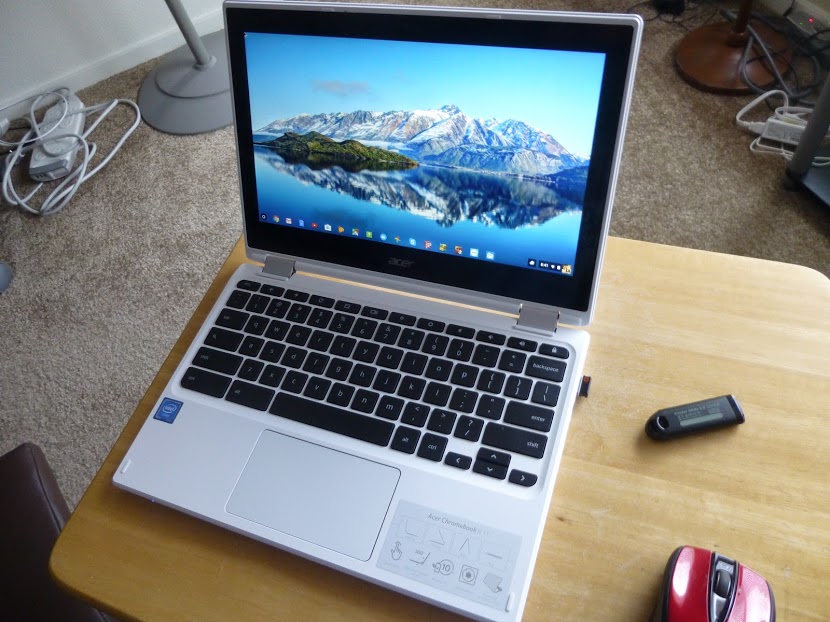
It’s an Acer R-11.
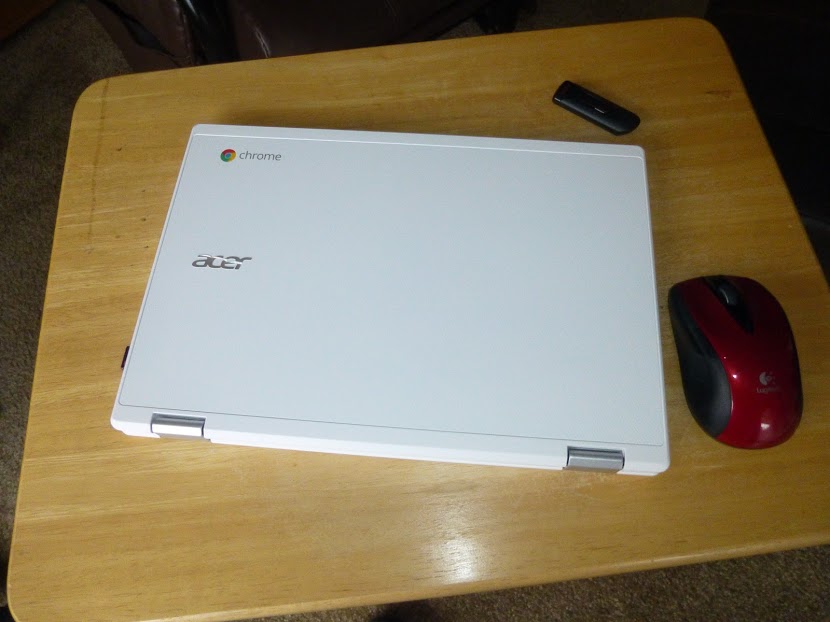
What made me do it? Well, I’d been interested in a Chromebook for a while now, but I hadn’t needed one and also, I was following my own rule of not jumping on a new technology immediately, to avoid the initial bugs, high prices, and lack of additional features inherent in new technologies when they first come out.

But, my netbook, which I use as my backup and travel computer, was getting much slower and I needed a replacement.

So, I did some research as to what was out there, and decided the Chromebook fit the bill. And, finding that there are different ones available, the Acer R-11 looked best to me.

The Pros:

I’ve had the Chromebook for a few months now and it does perform most of the functions that my Windows 10 Laptop does, with some notable exceptions. First, the pros:

  1. It uses a solid state drive. Solid state drives (SSD’s) have no moving parts and don’t require the cooling fans that regular  hard drives do. So, the computer tends not to have any heat issues, and the operating system (OS) works faster. It will also outlast conventional drives.
  2. Chrome OS works faster than windows and updates itself automatically, without slowing things down as Windows does with it’s “bit by bit” constant updates.
  3. The Chrome OS has built-in anti-virus capability, so I don’t need to install any antivirus programs.
  4. Boots very fast and performs smoothly and quickly. I simply open the lid and it comes on. I then enter my password and it’s ready to go. No loading of this and that as on a Windows PC or laptop. If I’m working on my Windows laptop, and shut down, only to find I’ve forgotten something, I simply go to my Chromebook and can quickly get back to what I wanted to and complete it, sometimes in less time than my Windows laptop can simply boot up. (And it boots up fast as it, too, is fairly new!)
  5. The Chromebook is lighter than my netbook and just as easy to carry.
  6. Chrome OS has been integrated with the Android OS, so I can install apps that I also can install on my Smart Phone!
  7. Any website that can be accessed with a Windows computer can be accessed with a Chromebook. As a matter of fact, you can perform most of the same functions on the internet, such as cutting and pasting, as you can with a Windows computer.
  8. Long battery life. I’ve used skype with the Chromebook for two hour sessions and used less than half the battery. On my Windows laptop, most of the battery would be used in that time frame.
The Cons: 

When I first researched Chromebooks just after they came out, I heard and saw cons such as small storage and complicated printing, and limited abilities, I actually thought of them as being “expensive and bulky flash drives”.

But, in taking a second look earlier this year, I’ve seen that they’ve come a long way, and can be far more useful than I thought at one time.

While the OS is different from Windows, and the keyboard and built-in touchpad have a few qualities one must get used to, the Chromebook is not a totally alien machine. For instance, apps can be placed on a task bar, referred to as the “shelf” in Chromebook lingo, and you can attach a mouse or other peripherals via usb as you would on a Windows computer.

Even what I consider the two major cons, printing set-up and lack of storage, I find that they are no longer the show stoppers I thought they once were.

Main cons:

  1. Complicated print set-up.
  2. Inadequate internal storage space.
  3. Inability to work with many Windows programs and software.
  4. Chromebooks are more internet intensive and will run fewer offline programs.
  5. You do need a Google account, but this is free and easy to open. Once open, you can sync the account across devices so you will have the same Chrome homepage, complete with your bookmarks, settings, etc, no matter which device you use to access Chrome or your account.

There are workarounds to the cons, which make the Chromebook quite usable, however.

You still cannot simply plug in a usb cable from your printer and print from a Chromebook. However, if your printer has WiFi or wireless printing or Google print ability, then you can set up your Chromebook for printing. It is a little complicated, and probably requires that you adjust some settings on your printer as well as on your Chromebook, basically making your printer a “network” printer, even though it may be the only one. You may also need your router’s password. And, when printing, you may need to select your printer with the word, “network” in parentheses after it.

Internal storage space on my Chromebook is 32 gigabytes, which is currently at the high end. However, this can be remedied by using an sd card or flash drive for extra storage.  Also, using such google apps as Google Docs, which store your documents in the cloud, you can also save space.



As for Windows software and apps, Windows software won’t install on a Chromebook, but, the Chromebook does have a word processing program which will open Windows word documents, even if they are on a flash drive or sd card. Also, apps such as Google Docs, can help in this regard, especially since documents created and run on this app can be converted to windows compatible docs and docs can also be made available offline, which also addresses the problem of the Chromebook needing the internet for productivity when internet access is just not available in any form.

The Chromebook also has an app that will open your pictures and videos from a windows computer stored on a flash drive or sd card.

As for music, I have found that music files from Windows Media Player won’t be opened by the Chromebook, but it’s possible that using an app, such as Google Play Music, personal music playlists might be accessible. I haven’t tried this yet so I don’t really know. Of course, music acquired through Google Play will play on the Chromebook.

In fact, with the integration of Android apps, you can add android games and other functions to the Chromebook. Some apps you will find are specifically made for phones and may not perform as they would on a smart phone. But many apps will do just fine on the Chromebook.


So, how do I like my Chromebook so far?


I think it’s great! Sure, there are a few things I still can’t do that I can on my Windows computer, but I can still browse and use apps like YouTube, access accounts like my Craigslist account, and perform other productivity tasks. And by adding apps, I can even play games!

There’s still more to explore on my Chromebook, but so far it has really exceeded my expectations. So, if you’re thinking a Chromebook is just an expensive flash drive, or is too complicated, I once thought so, too, and learned that it’s not. It’s much, much more and nothing to fear, especially if you have used the Chrome browser on your Windows computer. Happy computing!

If you like what you’ve read here, please let others know of this post, blog, and site.

And thanks for reading!  🙂


Unknown's avatar

Uh Oh, You’re In Tech Trouble

Image Source


Most people would agree that tech has benefited our lives in some ways. Whether it’s how easy we can communicate with people far away to how efficiently we can work tech is certainly making a difference. In the past, if someone moved halfway around the world, you would rarely ever speak to them. Now with video calling, social networks and instant messaging, it can feel like they never left. With faster processing speeds and highly advanced computer systems, large files can also be sent online in minutes.


However, for every issue that tech solves it seems to create another one. This is particularly true in the business world. Here are a few of the problems you can encounter with tech in your company and advice on how to handle them effectively.


It’s Crashed, Jim!

Pic Link Source


This is the last thing that business owners want to have to deal with, but it’s actually more common than people think. Tech can be temperamental, and computer systems can collectively crash for a number of reasons. If you’re using a lot of heavy hardware, it might be that the systems simply overheated. Don’t forget that the more servers are used, the hotter they get. Large servers need fully operational cooling systems to keep them running effectively.


You might also find that the issue is related to a glitch in the software. If that’s the case, it’s probably been there since the computer network was set up. This is one of the reasons companies should use a professional computer support service to monitor and install their IT. That way any kinks can quickly be ironed out in the first few days of the business.


Horrible Hackers

Hacker Security Binary Hack Internet Www Code

Max Pixel


Hackers decide to break through computer security systems for a variety of reasons. For some, it’s about the challenge of seeing whether they can achieve it and these hackers are mostly harmless. Others will be looking to steal sensitive data files, and there are plenty more who just like causing havoc for business owners. A hack is never good news, and if one does occur, it might be due to an incredibly simple reason. You didn’t have any IT security.


Even something as simple and small as an antivirus software could do its part to keep your company safe from a hack. That’s often how hackers get in. They send a virus that weakens your system security and then access the files themselves to find valuable information.


Loading: 1 Percent

Pic Source


There a couple of reasons why your tech might be operating at slow speeds. It could be a sign of a virus, and if that’s the case, you should get your systems checked out immediately. It might be because you haven’t cleaned and sorted your systems in a while leaving it messy and inefficient. Or, it could be simply that your tech is out of date. Business owners resist upgrading their tech due to the cost involved. But you should consider putting the effort in here.


Even just updating your tech once every two years might ensure that you don’t have too many problems with slow hardware.


Take this advice on board, and you can stay out of tech trouble that tends to do serious damage to businesses, big and small.

Credit Source


Contributed Post.

If you like what you’ve read here, please let others know of this post, blog, and site.

And thanks for reading!  🙂

Unknown's avatar

When Tech Attacks! Is Your Home at Risk?

Wikimedia


The technological revolutions many of us are seeing in our home lives, or have seen over the past decade, have brought about a lot of benefits. But there are also a number of disadvantages. Your home safety may actually be at more risk than you think when you have a home with a lot of tech in it. We’re going to take a look at the most prominent risks in home tech and what precisely you can do about it.


Overpowering


The average home has more electricity running through it than ever. With strong technology cheaper and more accessible ever, many of our homes have several computers, at least one television, some games consoles, several smartphones… if you have all of these plugged in frequently, then you risk overloading your system. Of course, most homes have very sturdy electrical infrastructures. But you need to think of individual outlets, as well as the extension methods you’re using. Most people use very cheap multi-outlet solutions, as opposed to paying about $10 or so for a surge-protected one. If you’ve got a lot of electrics in your home, invest in good outlet solutions – or you risk overloading and causing fires.


Wires everywhere


Even in our supposedly wireless age, we’re still, well, using an awful lot of wires. These present a problem because they pose a fire risk if they get worn out or if you have way too many bundled together in the same location (which is something a lot of people do in modern homes), but also because they’re a tripping hazard. Where you can, you should look into wireless solutions for things. Even something as simple as finding the best wireless keyboard and mouse can help reduce the wire count to an important degree. Other peripheral items such as speakers are also becoming wireless, and even some PC monitors.

Pixabay


Data breaches


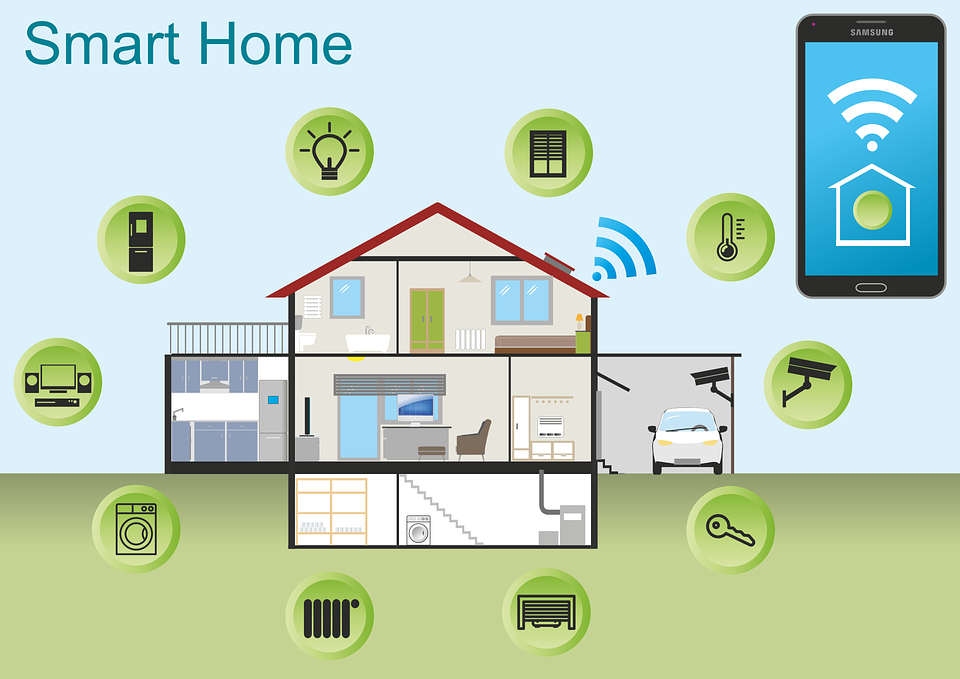
You may have heard of ‘smart homes’. Not all of us have what some would call smart homes, but many of us certainly have items that are making our properties lean in that direction. The Internet of Things gives us more use for data than ever – but it also provides a lot of entry points for cybercriminals. If they can access your WiFi – and this is much easier than you may think – then they may be able to access personal information such as payment details or even medical information, should you have those on your computers. Make sure your home is properly protected against external cyber threats.


Heavy objects


A lot of us have pretty big televisions now. It used to be that only very rich people have televisions that were sized beyond the 28-inch mark, but these days more people have televisions in the 40-inch region – precisely because they’ve become more affordable than ever. It’s worth remembering, of course, that these present safety risks because they’re so darn big. If you have small children or pets on your property, then you really need to give this some very careful though. Making sure such items are properly affixed to their surfaces, and that those surfaces are themselves properly affixed to the wall or floor, is an absolute must.

Contributed Post.

If you like what you’ve read here, please let others know of this post, blog, and site.

And thanks for reading!  🙂

Unknown's avatar

Technology For Saving Time And Money

All business owners can save a lot of time and money if they invest in the latest technology. Indeed, I’ve been saying that on this blog since the day it launched. However, lots of people in the corporate world still fail to take heed. That means there are many companies out there that could improve both productivity and efficiency. With that in mind, I’ve taken the time to list some essential tech on this page. If your operation isn’t using it already, now is the time to make the switch. I guarantee these suggestions could boost your profit margins and assist you in achieving your goals. Of course, you don’t have to take my word for it. Find out for yourself!


  • Specialist accounting packages


The last thing you want to do is get in trouble when reporting your income to the tax man. Considering that, you should use software to ensure you never make a mistake. Some of the latest releases are excellent for that task. They enable you to record all spending and income automatically. So, there is no chance you could accidentally type the wrong numbers into your computer. Balancing your books will become easier than ever before. You will have no issue accounting for every dime that comes in and out of your operation. Best of all? The packages you require won’t break the bank. Some of them are available for only a small monthly fee.


  • Social media management tools


When it comes to marketing your business, most people will use social media. The only issue is that logging into all those different accounts can take a long time. You then have to spend even longer writing and publishing posts to expand your audience. Thankfully, help is at hand. There are many different social media management tools available right now. Some of them come in the form of software, but most are accessible online. Those platforms allow you to remain logged into all your social networks at the same time. You can schedule posts and repeat them across all your pages with the click of a button. That will help you to save a lot of time.


  • Dedicated business management software


All company bosses should research the latest business management tools. That is especially important if you employ a lot of staff members. A decent HCM software selection could save you a lot of headaches. Managing a large team of employees is always going to cause stress. However, you can make the process much smoother if you use the right packages. With that in mind, now is the time to perform as much research as possible. Read reviews, and speak to any colleagues to obtain recommendations. Your competitors are using software of that nature, so you need to jump on the bandwagon.

Picture
As you can see from the info on this page, there are lots of ways in which technology could advance your operation. It’s all about keeping your ear to the ground and making use of the latest releases. Whatever you decide to do during the next twelve months, make better use of technology, and you should strive ahead in your market. Good luck!

Contributed Post.

If you like what you’ve read here, please let others know of this post, blog, and site.

And thanks for reading! 🙂

Unknown's avatar

Make Your PC Hack-Proof With These Powerful (And Easy) Tactics

Let’s face it; we all worry about people hacking into our computer systems and stealing our data! The sad truth is that malicious hacks aren’t a problem that will likely go away soon. In fact, if anything, we hear more stories in the media about people or criminal gangs hacking into the PCs of well-known companies!

The only true way to have a hack-proof PC is to keep it switched off and disconnected from the Internet! Of course, such a solution isn’t practical at all. The good news is that there are many steps we can take to secure our computers from Internet-based intrusions and malware.

So, just what can we do to turn our PCs into Fort Knox? By following the below steps, you’ll soon keep your computer more secure and private than ever before!

Image Source

Keep all wireless networks secure

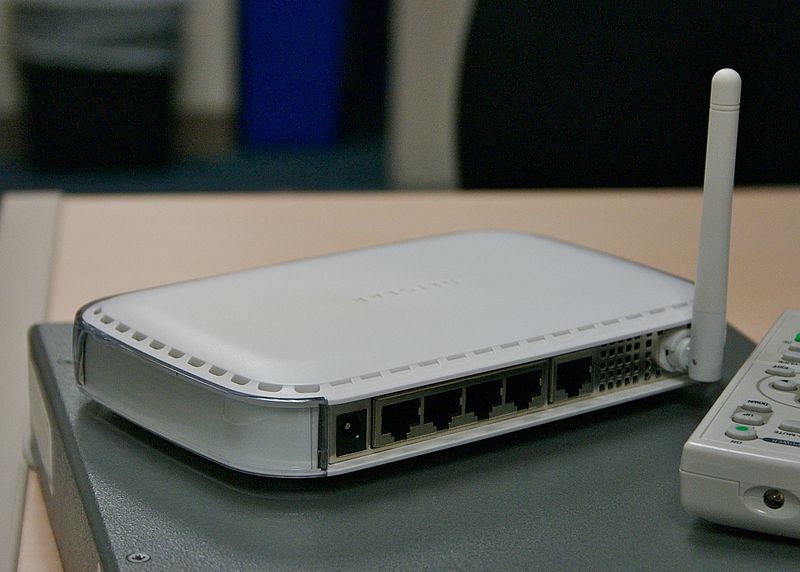
The first point of entry for any Internet hacker is to bypass your router. You may not know this, but most routers aren’t configured with top security measures by default! You can lock down your Internet router by doing the following:

  • Use WPA2 Wi-Fi security;
  • Use a long and complicated passphrase;
  • Change the default username and password for the router login;
  • Enable the option to hide your wireless network’s SSID;
  • Enable the hardware firewall in your router and only open required TCP/UDP ports.

Install Internet security software on your PC (and keep it up-to-date)

Aside from trying to bypass your Internet router, hackers can attempt to gain control of your computer via malware infections. To combat that problem, install a good Internet security software solution on your PC. Avoid the free ones; they seldom do anything other than slow your system down!

Also, be sure to enable automatic updates for your antivirus software. Doing so will lower the risk of new, unknown malware from attacking your PC.

Store your data in the cloud

The brilliant thing about solutions like Microsoft cloud file storage and Dropbox is that you can easily store your important files in a secure, off-site environment. An advantage of that approach is that your data gets kept safe and backed up even if hackers somehow manage to control your PC remotely.

Image Source

Use a VPN connection

VPN stands for Virtual Private Networking, in case you wondered. How can it help keep your computer secure, you might be wondering? Well, it provides a secure way of going online from any Internet connection.

VPN connections offer a couple of advantages. First of all, they offer extra privacy to those that wish to go online without third parties looking at their Internet connections. That’s because VPN connections are all encrypted. And, second, they can increase wireless security if your PC doesn’t use an Ethernet connection (or you happen to be using a laptop).

And, if you are sharing files through legal torrenting methods, a secure VPN is essential. Not all VPNs are created equal, however, so it’s best to find out which are the best vpns for torrenting and select one of these.

Use a secure web browser

Last, but not least, don’t just stick with the browser that comes as standard with your PC. Stick to a strong and secure one like Google Chrome or Mozilla Firefox. Those two browsers allow you to install “extensions” that can block tracking ads and help prevent malware from getting downloaded to your PC in the background.

Image Source

Contributed Post.

If you like what you’ve read here, please let others know of this post, blog, and site.

And thanks for reading!  🙂

Unknown's avatar

Streaming: The Perfect Way to Let off Some Steam

After a long day at work, there’s no better thing to do than curl up on the sofa in front of the TV. But once you’ve plonked yourself down for the night, there’s nothing worse than having to get back up to sort out your viewing consumption for the evening; however, fear not as in this day and age there is solution to this problem: streaming.

Image source

No more having to search the television magazine extensively and no more having to find and inject DVD disks — when you stream, you need do nothing at all. Streaming demands next to no physical activity as you simply choose what you will be viewing for the evening in the extensive list of titles on offer, click a few buttons, and you’re off. No more having to scroll through the various channels on offer on your TV to find the perfect show for you because with streaming everything is there at your fingertips. And to partner this: advances in smart home technology have meant that you no longer even need to get up to turn the light switch on or off — you can do so through the use of the Internet; and advances in smartphone technology have meant that the phones themselves can be used as remote controls through the implementation of infrared ports within them, this eradicating the need to change batteries or search the TV remote when it has fallen down the back of the sofa.

As well as this, streaming offers up more of an opportunity to be in control of your viewing consumption than has ever been experienced before. For instance, you no longer have for a specific time slot to be able to watch your favourite TV show — if you stream you can choose when to watch it and you can do so with just as much as ease as if you had in fact watched it when it was meant to be broadcast. But that is not the only way in which streaming induces more control of your viewing habits; you can also, in this day and age, stream your favourite flicks straight to your smartphone. MovieBox, for instance, provides a streaming app for iOS devices such as the iPhone or iPad which means that you take your viewing habits with you wherever you like (providing you have a strong Internet connection). The MovieBox app, of which you can download the latest version on their website, allows you to forego the hassles of torrents and downloading which makes it the perfect option for your viewing consumption after a long day at work, especially if you are working away from home.

When you consider all of the good ways in which streaming makes everyday life a bit easier, it’s no wonder that the death of the video store is now upon us. Streaming services really are a simple tech that can improve your life greatly, so if you haven’t introduced them to your home, it’s maybe now time that you did. It offers the most stress free way of doing absolutely nothing after work, and what can beat that?

Contributed Post.

If you like what you’ve read here, please let others know of this post, blog, and site.

And thanks for reading! 🙂

Unknown's avatar

Tech Companies Are Looking For New Ways To Secure Your Home Office

With the rise of the gig economy, more and more people are moving into home offices for work. They’re doing all sorts of things, like designing websites, writing blogs and offering transcription services over the cloud. But with the rise of the home office also comes increased risks. At any moment, somebody could break into your house, steal all your assets and then hold them for ransom, demanding payment to get them back.


For this reason, many companies are moving into the home security market. It’s big business, and there are many gadgets on sale. Here are some of the highlights.


The Nest Cam


The Nest was originally supposed to be a smart thermostat solution. But ever since Google gobbled up the original company, Nest, they’ve been on a mission to pad out the internet of things with devices which are actually useful, not just connected kettles. As a result, they’ve come up with the Nest Cam, a little camera that looks a bit like a webcam that spends all day recording goings on in the office.


The Nest cam might look simple, but it comes packed with decades-worth of high-tech surveillance technology, developed for generations by state and private interests. The lens has a sensor on it which can detect suspicious activity and immediately start sending data, via the internet, to your personal device. According to Google, the high-tech algorithms that power the Nest Cam are able to tell the difference between a tree swaying in the wind and a burglar breaking into your home. The camera allows you to save chunks of video to watch later at your own leisure.


The August Smart Lock


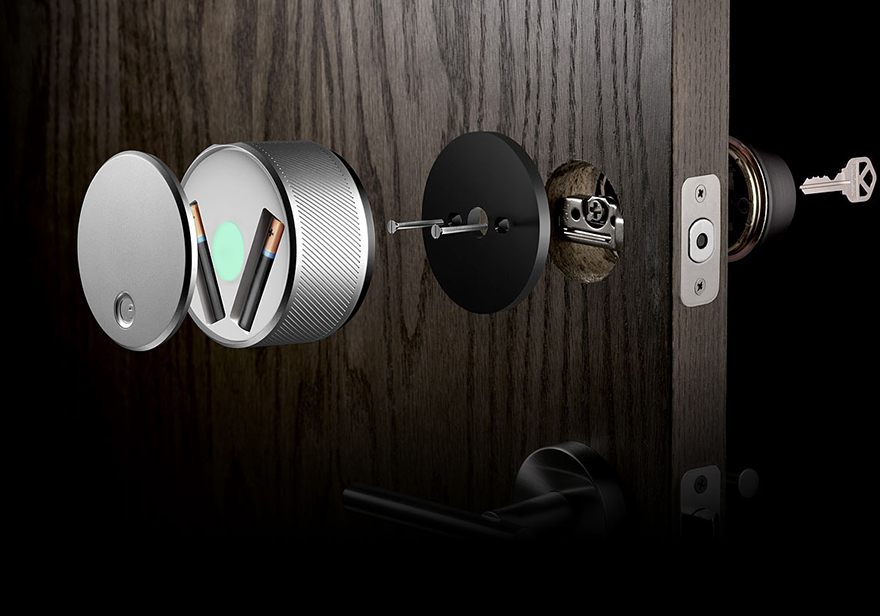
Smart locks might seem a bit over the top. But top blogs are now recommending them to people who run their own businesses. One of the tips in this article is to install a smart lock as soon as you set up at home, allowing you to determine who is allowed access to your office and who isn’t. August have a system that allows you to control access from your smartphone, enabling you to let the kids into the office if they need something while keeping everybody else out.

Flickr


With smart locks, you’re essentially throwing away the key in exchange for greater security. But you’re also adding more convenience to your life. Not only can you do away with carrying around a set of keys all day long, but you are also able to let people into your office, even when you’re not there. Suppose you’re out at a meeting on Tuesday morning, the same day as the cleaner comes to tidy up your office. With a smart lock, you can simply let her in remotely.


The Netgear Smart Home

Pixabay


The principle behind the Netgear Smart Home systems is to be able to scale your security needs, according to the size of your home. If you’ve got a small house, you may only need one or two cameras in the system, connected to the base station. If you live in a mansion, or your house comprises multiple outbuildings for offices and gyms, then you can add extra cameras you need. The Netgear Arlo smart home cameras are waterproof, meaning you can leave them outside.

Contributed Post.

If you like what you’ve read here, please let others know of this post, blog, and site.

And thanks for reading!  🙂

Unknown's avatar

Tech Teachings For The Modern Entrepreneur

Flickr:


Technology is the heartbeat of modern business, and there’s no doubt that your company already embraces it in many different aspects. However, the digital environment has evolved at a rapid rate. Subsequently, if you aren’t progressing alongside it, your entire venture could soon be left behind. Worse still, it can open the door for your competitors to capitalise.


Education is the key to sustained success. By developing new skills and incorporating new ideas, you won’t just see short-time improvements. Perhaps more importantly, you’ll be preparing yourself for an even better future.


Given the importance of tech facilities in modern business, overlooking those obvious benefits simply isn’t an option. Here are three valuable lessons that will make your venture stronger than ever in this digital age.


Get Your Head In The Cloud


Cloud computing is an area of the digital landscape that you will at least know about. After all, the major tech companies are continually marketing the benefits to consumers. However, personal gains are far from being the greatest. Quite frankly, it’s a technology that could revolutionise your entire business operation.


At its best, cloud computing can increase security, reduce overheads, and add flexibility. The increased organisation and collaboration can take efficiency to an even greater level. Then again, as with most tech features, simply installing those facilities isn’t enough. Learn to get the most out of them, and your company will have a huge edge over its competitors.


Modern business is heading increasingly towards cloud-based interactions. If you don’t jump on board now, you will regret it in the future.

Flickr:


Get Programmed For Success   


As an entrepreneur, you should always want to be in control of your business operations. Given the significance that computers play in those daily activities, tightening your grip over this aspect is key.  


Playing a more active role in the running of your computer systems brings many benefits. Raspberry Pi systems are the perfect learning platform for newbie programmers. The Pi Hut boasts a number of products to help you throughout that learning curve. Once you’ve mastered this field, you’ll have far more control over those vital aspects.   


Not only will this save you money, but it’ll allow you to restore systems when a fault surfaces too. Not bad, eh?


Get Ready To Boost The Customer Experience


Most modern businesses now sell items online. If yours doesn’t, then fixing this issue should be one of the first items on your agenda. But your bid to provide the consumer with what they need shouldn’t stop there.


Understanding consumer habits, trends, and fears is vital. Customer management software allows you to do this while building a stronger connection with the consumer. Ultimately, this should give you the best chance of increasing conversions and long-term loyalty in one fell swoop. If that doesn’t lead you to greater success in business, nothing will.


The customers will essentially decide whether your company succeeds or fails. Use the tools needed to gain a deeper appreciation of their needs, and you will not go wrong.

Contributed Post.

If you like what you’ve read here, please let others know of this post, blog, and site.

And thanks for reading!  🙂

Unknown's avatar

The Technological Uprising – Don’t Get Left Behind

(Image Source)

Technology has always been a fluid and ever-changing area. For businesses, this means that a lot of work has to be done to make sure that they don’t get left behind. Times are changing, though. And, so is the way that tech is evolving. So, nowadays, you not only have to stay ahead of the advancements; you also have to stay ahead of how tech is advancing. This is hard for people without loads of time. And, it gets harder when you don’t know what to look for.

Our technology is always advancing at an alarming rate. In fact, the rate that we are making advancements in most fields of technology are increasing. This means that humans are doing more than ever to make changes to the way that we live. But, these changes aren’t in the same ways that they used to be. When computers first hit the scene, there were loads of physical improvements that could be made to make them better. Over time, the point has been reached that we can’t get any further until we make changes to the way that computers work. This has led to innovation to be found in software; instead of hardware.

(Image Credit)

It’s hard for companies to make computers more powerful because of two major drawbacks; power and heat. At the moment, the conductors that we use for processors are very inefficient, which means that they lose a lot of the power pumped into them as heat. By making the processor larger and giving it more power; it’s possible to make a processor much more powerful than the ones found in most computers. But, this process also makes it run a lot hotter. And, it will need a lot more power to run. The best answers around for these problems can be found in superconductors and organic computers. Both of which are a very long way away from being usable on Earth. And, may not even be possible.

(Image Link)

This leaves the only room for innovation to be in the software that is run on these machines. But, as software changes, it’s hard to follow. Unlike hardware, where you will have large trade shows and news about releases; software will simply be release. And, there will be nearly no advertising for it. So, knowing that new tech is coming can be a great challenge when you’re looking for software. The best way to deal with this is by taking on a little bit of help.

Thankfully, the help that your business needs can be found everywhere. IT support is a very common business. People have realized that companies struggle with this area. And, to take some of the pressure off, have started companies dedicated to helping them. A good IT support company will be able to advise your software choices. And, they will be able to keep up-to-date, so that you don’t have to. This can make life much easier. And, even make your business a little better, too.

If you want to take your software game to the very top level, then you need to look at developing your own software.  For most companies, that’s actually going to mean working with a third-party devops professional services company to develop software to your own specifications.  Well-developed custom software meets your company’s current needs perfectly and has room to grow with your business.  It really is in a class of its own.

(Image Source)
Hopefully, this will inspire you to start working hard to make sure that your software is the latest possible option. As new software is released, new features become standards in the business sector. If you don’t keep up with this; you could struggle to communicate with business in the future.

Contributed Post.

If you like what you’ve read here, please let others know of this post, blog, and site.

And thanks for reading! 🙂

Unknown's avatar

Gaming PC’s: Value For Money?

Gaming is a darn expensive hobby.


The new Playstation 4 Pro is going to set you back about four hundred dollars, with the Playstation VR not far behind that. A 4K television set capable of displaying the full power of the PS4 Pro will cost near one thousand dollars and the controllers and games are sixty bucks a piece.

28906279633_fdf20f2018_n

(source)

That’s money that could frankly, be put to much better use – especially when you consider the five to seven year life span of games consoles.


The gaming PC is a whole different beast. For the same price as the Playstation 4 Pro, you can get a system that is arguably more powerful and you won’t need an expensive television to go with it if you choose a good monitor and there are a lot of points to consider to find the best gaming monitor.


So, is a gaming PC worth the investment? Well – it really does depend.


While the outlay on a system like the PS4 might seem initially cheaper, that could be false over its lifetime if you upgrade or buy new controllers. However, if you enjoy games that are exclusive to Playstation like Bloodborne or Infamous Second Son – then there is no question at all – the console is the choice for you as these games are unavailable on the PC. Remember that there are a number of games exclusive to PC – such as Civilization


If you aren’t fussed about console exclusives, then go right ahead with the PC. Steam and GoG have plenty of sales throughout the year meaning you can pick up good games for low prices often enough to make it worth it in the long run. Console games do go on sale, but not often enough.

31358420734_70e5a6b4b4_n

(source)

A thousand dollars of gaming PC can also run games at a higher level than the PS4. You’ll experience better draw distances, better graphics and better visuals.


Of course, PC games are customizable through user produced mods as well – so you have to take that into account as a deeper and more customizable experience might be worth more for you!


While PC’s have made huge strides in terms of size and portability over the past number of years, the consoles still hold the trump card in terms of accessibility. If you want to play on your existing TV downstairs, a console might work for you. That being said, a good PC case might be just as portable. It depends on the options available for you but you might not be able to beat a console for pure ease. A console is easier to play with friends in the first instance as well while a PC will require a bit more setup and care.


If you’re inclined to spend time and effort, the PC will work wonders for you. If you want to get up and go with an option then the PS4 and Xbox One consoles may be better. All in all though, dollar by dollar – the PC wins through and is better value in terms of performance.

Contributed Post.

If you like what you’ve read here, please let others know of this post, blog, and site.

And thanks for reading! 🙂