Unknown's avatar

Stop Paying to Pay Your Taxes!

Last year (2014) was the last straw! I went to the same tax preparation company that I’d gone to for the last ten years and ended up paying $608 to have my return prepared and filed!

$608!                    

And this for a relatively simple return!

To start at the beginning, when I used this preparer, a very well-known chain, I paid maybe $250 and was also sent a coupon that took $20 off my bill. But each year, the price kept going up! Last year (2014) it was $608, a steep rise from the year before, when I paid roughly $450! And, to top this off, the preparer stopped sending their discount coupons.

Well, I asked why my return, (which was fairly simple with some self-employment income, but certainly nothing like what a decent sized business would generate),had cost so much to prepare.

I was told that it was due to my number of w2’s and the division of my self-employment income generating more forms, each of which added another $100 to the cost! And I think I only had 3 w2’s and one 1099!

So, did they protect me and go to bat for me with any problems with the IRS? Well, yes, on two occasions. But, it was for mistakes they made! Not for anything I forgot to include or miscalculations I made!

So, this year, (2015) I decided enough was enough! I found a service, partly supported and endorsed by the AARP, which does tax returns free of charge. They also provide resources that can help you if you are audited. And they do a good job!

Luckily, in most of my past years, I had gotten refunds that were enough to cover the cost of preparation. However, I guess that had I gone to a tax preparation business, I may have paid $700 or more this time! With the $200 refund I’m getting this year, I would have ended up $500 in the hole, if not more!

Is there a down side or catch to using this free service? Sure. There are requirements, such as income levels. If too high, then you’re not eligible, although, the threshold is fairly high. Also, there are some things that they cannot do regarding tax returns, mostly things that are in much more complex returns, unless you’re willing to forgo the deductions, but, in many cases, the taxpayer will still save more by not going to a standard preparer.

In my case, the actual organization doing the free tax returns is called “Cash Oregon”, and is endorsed by the AARP. Oh, and by the way, there are no age restrictions, even though the AARP is involved.

And, depending on your area and how the organization you find works in your area, you may have to make an appointment well in advance, or, if they only do walk-in service, you may have to get up very early in the morning, arrive very early, and wait half the day or more. But, it’s well worth it! And unless you have the kind of return that is very complex and has a possibly greater chance of being audited, you should be just fine using a free service.

Just be sure to make sure that it is supported or endorsed by a reputable organization such as the AARP.

Oh, and what about the possible suggestion that I simply find another provider, one of the other well-known tax preparation companies? Well, while I was waiting, another guy came in and told the clerk he was trying Cash Oregon’s service because he was tired of paying exorbitant costs to have his taxes prepared by one of those other well-known companies!

So, if you’re seeing your tax refunds getting chewed to pieces by your tax preparer’s high costs, or even worse, having to pay that high cost on top of any taxes you owe try looking for a free service!

And support the FAIR TAX! (See my post, FAIR TAX! IT’S WAY PAST TIME!)

If you like what you’ve read here, please let others know of this post, blog, and site!

And thanks for reading! 🙂

Unknown's avatar

Don’t Drive? Need a License? No! Need an Updated ID? Yes!

So, you no longer drive or have stopped driving. And that means you have no need of a license, or a need to update it. But, do you still need an up to date ID? The answer is, yes!

Now, we’re not like an iron curtain country where we need “papers”, but there are cases where an up to date ID can really help. And no, not just to enter bars or other adults only places.

I went to do my taxes last week, and, while waiting, a customer appeared who had not updated his ID, so, the expired ID he had was considered invalid. This meant that he had to go and update his ID before he could do his taxes.

There can be other cases where an updated ID is essential. Among these are getting all kinds of services and discounts for senior citizens. Also, one is often needed for banking and other financial transactions. Then of course, you need one if you’re going to fly anywhere.

And lastly, if you lose your wallet and it ends up with the police or other law enforcement authority, you may have more trouble getting it back.

So, what to do if you don’t drive and don’t need a license? Well, you can get just an ID card, usually from the DMV. They are usually good for 10 years, to my knowledge, and are accepted as valid forms of identification. And remember to keep it updated!

You never know when a valid ID can help you.

Be up to date!

If you like what you’ve read here, please let others know of this post, blog, and site!

And thanks for reading! 🙂

Unknown's avatar

Driving for Business? Make Sure You’re Covered!

Recently, I came across an article, “15 Things You Need To Know About Buying Auto Insurance – Consumerist“, that talked about auto insurance and how people don’t realize that their auto insurance won’t cover them in certain situations, such as when they have a new teen aged driver in the family, or if they lend someone their car for the long-term, where the car is kept at that other person’s residence. There were other situations listed also, and I knew about them all and knew not to put myself in any of them…except one.

It was situation # 12 listed in the article, about business use of your car. Sure, I did know that if I had started my own delivery or taxi business using my own car, that I’d need special additional insurance for my car, but I didn’t know that taking a simple delivery job, such as delivering meals part-time, or free publications to businesses part-time, fell into this situation also.

But, this article, and another one on Yahoo that I can no longer find, led me to thinking. I decided to go to my insurance agent’s office the very next business day, to really find out if this applied to me or not. Here’s what I found:

1. Your car is not considered to be used for business if you report to a work place and the car is parked for your entire work day. And you’re still covered if you run the occasional errand for your employer.

2. If you use a company vehicle for work, your company covers you. (But always double-check first!)

3. If you don’t report to an actual building and you drive to where you work, such as going to client’s homes or businesses, even if you don’t drive from client to client, then your car is considered by the insurance company to be used for business.

And it doesn’t matter if you are an employee, independent contractor, or any other work status! So, even if you get a job as a simple pizza delivery person, or a free publication delivery person, or even to distribute fliers door to door as I do, you need to check your policy first!

As an example, I distribute fliers door to door. I go straight from my home to the neighborhood where I will distribute the fliers by walking door to door. Yet, even though I do not drive from house to house but merely drive from home to the neighborhood, the insurance company still considers my car as being used for business.

4. If you plan on transporting people or hazardous materials, you absolutely need to check with your insurer and will most likely need a special commercial policy in addition to the one you now have. And yes, if you plan on driving for Uber or Lyft, or anything similar ride service where you use your own car, you would most likely need that special commercial policy.

So, the bad news was that my policy would not cover me if I was at fault in an accident during my working hours!

The good news was, I didn’t need a special commercial policy since I wasn’t transporting people or hazardous materials. And adding the business coverage I needed only added $9 to my 6 month premium! A very good price to pay to avoid a huge shock and disaster should I have an accident while working!

Unfortunately, many people don’t know where pleasure use ends and business use begins for their cars, and many insurers don’t make this very clear, if at all.

So, if you haven’t used your car for business and are planning to, or if you’re not sure whether or not you’re currently using your car for business, check with your insurer! It could prevent a lot of shock and heartache!

Safe driving!

If you like what you’ve read here, please let others know of this post, site and blog!

And thanks for reading! 🙂

Unknown's avatar

That Great Job that seems like It’s For You, May Not Be

You see a job listing on a site like Craigslist and think “That job is for me!” Only to find out later, in the interview, or via online reviews from customers or employees, that it’s not really for you. In this case, be glad you found out before taking the job.

And here’s why you shouldn’t be afraid of turning a job down when you learn more about it. Here’s what I experienced recently.

I saw a job for a delivery driver, delivering meals from restaurants, and everything looked good, so I inquired and was called for an interview. I did my research online and things looked good, though I was required to have a smart phone in order to be interviewed. I asked why would they require this before the job was offered and was told that it was so the company could get you going sooner. So, I checked to see if I could get one for much cheaper than the $500-$600 quotes I often saw and, luckily, I found a phone and deal that was for only a little more than my plan at the time, and even if I didn’t get the job, the new phone would not be a negative for me. (And in fact, it has already served me well since and I’m glad I got it!)

(For how this went, see “Again, Before Jumping In, Do Your Research! (Or how I got a $149 phone for just $49!“))

The interview went well, too, and I was scheduled to come in the next week and ride with a driver to see how it really is on the job.

Well, when I arrived for the “ride along”, the driver told me how I would have to “rent” the carrying bags and also a few other items. In addition, there were a number of small weekly fees. Then, it was “first come first serve”, where the bags were concerned, so I might not always get the bags I need.

On top of this, it was required (not mentioned in the interview!) that I obtain a cooler for the drinks! Out of my own pocket, of course!

For drinks, I would have to guess what people would want and put fifty, yes 50, bottles in my trunk, 10 of each type and hope I didn’t run out of a particular type.

Then, I would have to fill out credit card receipts and also take cash payments, out of which I would take tips, but then have to return each night to the main office, hope I get a parking space in what was a very congested area, and give the office its share.

It just seemed like a big mess to me, with lots of potential for messing up that couldn’t always be avoided and with the consequences falling on me. So, even before we were to leave, I told them that I’d changed my mind and that it wasn’t the job for me. And I have no regrets.

Another potential employer wanted me to come for an interview and pay $30 for them to do a background check on me! I e-mailed back, “No Thanks!” Unfortunately, some employers want applicants to pay costs that should rightly be borne by the employer!

This is not the first time that I’ve turned down a job once I saw what the job actually entailed. There’s nothing wrong with turning down a job that you find you won’t be comfortable in, even in these times when jobs are scarce.

I’m not saying that you shouldn’t take a job unless it gives you everything you want, but if you really cannot live with some aspect of the job, or really know that there’s something you can’t handle that’s part of the job, then don’t take the job! The possibility of the job costing you more than you make, or the stress from those parts of the job that you know you really don’t like, can do you more harm than good.

My advice: Unfortunately, an ad alone won’t really tell you the details of what a job entails, so, unless you see red flags that says the ad is a scam, go ahead and inquire.

If you are called for an interview, go ahead with it. And even go for a “tour” or “ride along” so long as you still feel you want the job, but be sure you get all your questions answered before you actually take the job. If they won’t answer your questions, or they try to dodge them, especially those regarding your main concerns, look elsewhere. And remember, during the interview, you should also be interviewing and watching them!

And remember, many job ads, especially those for sales positions, are often trying to sell jobs that may not really be as great as the ad says.

Good luck with your job search! And thanks for reading! 🙂

If you like what you’ve read here, please let others know of this post, blog, and site! 🙂

Unknown's avatar

A Resume can do More than Just Get You a Job!

You may not necessarily be looking for a job, but maybe a promotion, or a membership, or you may want to get in on some business deal as a partner or contractor.

Well, believe it or not, a resume can help here, too! That’s right!

Your current boss, or the possible boss of a different department that a promotion may move you to, may want to see your resume. Even though they may know you and see you daily, they still may not have the full picture of what you can bring to the table.

Same with a business deal. Yes, you may be a business owner who wants to get in on a business deal with one or more other business owners. They will want to know what your business can bring to the table and what you can bring as head of your business.

I did such a resume for a business owner in just this kind of situation.

So, if you need a resume, check out my Services – Need Something? Look Here! page or my Resumes Available Here! page!

And Be sure to contact me, and if you know someone who needs one, steer them my way!

If you like what you’ve read here, please let others know of this post, blog, and site!

Thanks for reading! 🙂

Unknown's avatar

Again, Before Jumping In, Do Your Research! (Or how I got a $149 phone for just $49!)

Well, believe it or not, I just got my first true smart phone! Yeah, really! So, what kind did I get? I Phone 6? Top of the line Moto X? Did I pay $300 to $600?

Nope. I got an LG Optimus Zone 2. And I love it! I just got the phone last weekend for a new part-time job that I’ll be adding to my other two jobs. So, as usual, instead of jumping in and getting the first phone and plan I saw, I did some research. And it really paid off for me!

First, the plan. I was on a “Paygo” plan, where I would pay just $1.99 on any day I used my phone, no matter how many calls I made that day or how long I talked. Texts only cost about 2 cents. No data included. It was a great plan, as I never got above $35 monthly, and there was no contract, unlike my previous plan, where I was sometimes hit with $100 monthly bills, and roaming charges if I went out of the area. Worst case scenario, I’d make or get a call every day and pay $62 for a monthly period equivalent.

Now, however, I needed to add data and get a smart phone. Most plans of the type I was now looking for, (No Contract, flat fee, unlimited talk) charge between $40 and $50 now. (By the way, this would still give me a great annual savings over the plan I had before I switched to Paygo!) I knew I didn’t want a contract, so that if I didn’t like the plan, I could leave it without penalty. All of the plans I researched offered unlimited talk and text and varying amounts of data usage per month. But, instead of just paying for more data that I may not need, I asked the potential employer what I would be using data for, then, I asked the respective mobile service carriers how much data would I need in doing what my future employer said I’d need to do.

This helped me make my decision. I stuck with my original carrier because I knew them, they’d always treated me right, and it’s easier to talk to a human being when I need to contact them. Their plan was $45 monthly flat fee. Plus, they offered a doubling of my data at no extra charge if I used their autopay system, which frees me from having to remember to add money to my account in order to keep my service running.

Now, the phone. The LG phone that I got was really the best for me. It’s an LG Optimus Zone 2, and is about the same size as my previous phone, an LG Extravert, yet has a larger screen. Its small size also means that it will fit into the same carrying case that my previous phone did, so I don’t need to get a new case for it! And, because it’s not the size of a small skateboard, I’m not afraid that I’ll break it when I get into my car and it bends or breaks because it’s attached to my belt! (I know, this is an exaggeration, but smart phones have been getting bigger even as they get thinner, and so are getting more awkward to carry and are more prone to getting bent and broken.)

However, the carrier’s store quoted me $149 for the phone! I didn’t want to pay this much and knew I’d seen the phone for less at a nearby super center. So, I went there and checked out the phone there, and got written confirmation of the phone’s $49 price tag. So, I went back  to my carrier’s store, confirmation in hand, and showed it to the guy at the carrier’s store. Upon seeing my confirmation of the $49 price for the same phone he was offering at $149, he said he’d sell me the same phone at the same price offered by the super center, $49, if I bought it from his store instead.

So I did, saving $100 in the bargain. So remember, even if you have to get something on short notice like I did, try to do your research first! It will really pay off!

Good luck shopping!

And thanks for reading! 🙂

If you like what you’ve read here, please let others know of this post, site, and blog! 🙂

Unknown's avatar

Back Up Your Computers!

With this being January, it’s new year’s resolution time. People make all kinds of resolutions, most commonly to lose weight, get fit, make more money, spend less, or spend more time with the family. And all of these are good. But one that I suspect many leave out is, to back up your computers. Now, many businesses, especially the larger ones, do this all the time, but how often do you back up your home computer?

Why is this important? If your computer should have a catastrophic failure, and many do unexpectedly after a time, you could lose your data, which can include your pictures, scans, documents, favorite or bookmarked sites, music, and written or artistic documents, and anything else that you have saved on your computer.

Don’t think it can’t happen because your computer is working fine? My first computer worked fine for 7 years, then developed a wiring problem that experienced techs told me was “fatal“. So, I bought a new computer and it worked fine. For a year. Then it suddenly died and was proven to be unfix-able. So now I have my current computer.

Luckily for me, I’d worked for a company that made a point of backing up its computers and I was assigned this task, so I was in the habit of backing up my own computers from the get go. So when my own computers failed, I didn’t lose any of my data. 

How to do this, and what do you need?

You will need a portable hard  drive (HDD) or a flash drive (Often called a thumb drive) if the amount of data you have is small (128 gigabytes  is the largest I’ve heard of currently, but they are being made with higher capacities as time goes on.)

You can also use CD-R or DVD-R’s but this is much less convenient, especially with higher capacity computers.

You can also back your data up to the “cloud“, that is, online. There are services that allow you to do this. The advantages are that you can access your data from any computer anywhere in the world, so if you lose your laptop in Bangkok, you can still access your data. Also, you don’t have the worry that something like a fire will wipe out your data because both your computer and portable HDD were burned up.

However, there are disadvantages here, too. Currently, you may have to pay a fee for the service or downloading of the necessary software. And, as we all know, the internet isn’t always secure. So a breach on the part of the backup service can render your data being accessible to anyone who may want to look. And, if your service provider is doing maintenance or is otherwise shut down for some reason, you won’t be able to access your data. You can grab your portable HDD or flash drive out of your desk drawer right now and have use of the data whether you have internet service up and running or not.
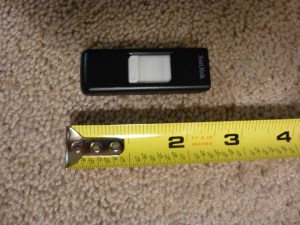
16 gb flash drive.

16 gb flash drive.

Flash drives do have the advantage of having no moving parts and being solid state, and their construction is much less delicate. Add to that their small size and this makes them very easy to carry and store. But, they have limited storage capacity compared to a portable HDD.

Portable HDD drives are probably best now, as they have shrunk greatly in size and grown greatly in storage capacity and ease of use.

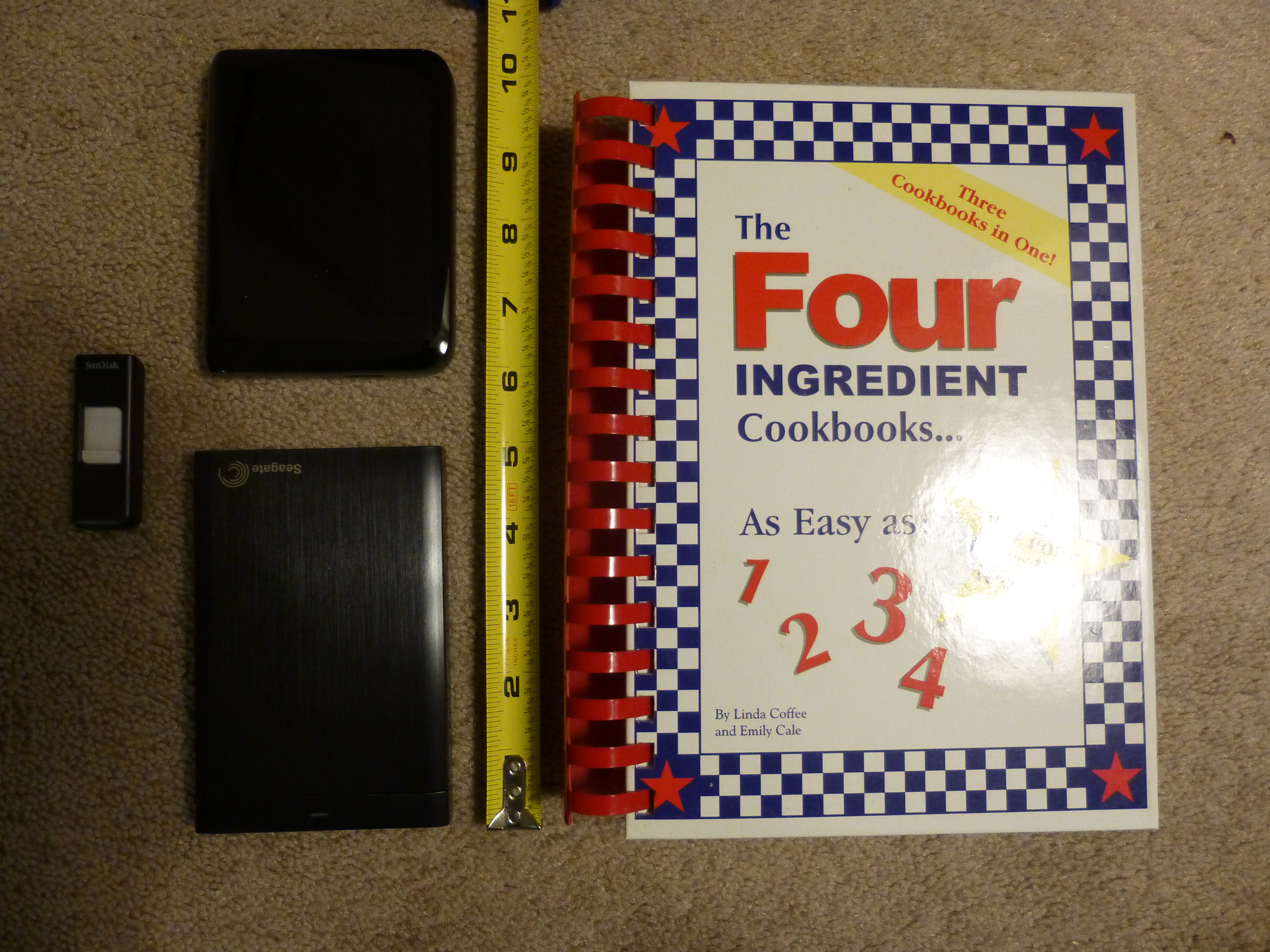
The first HDD I had only had a capacity of 80 gb, half of my first computer’s capacity. Also, in addition to having to be plugged into my computer, it also had to be plugged into a wall socket. And it was somewhat large, about the size of a small to mid-sized phone book or hard cover/text-book, such as the cookbook in the picture below.

16gb Flash Drive at far left, 750 gb Portable HDD upper left, 1 tb HDD lower left, and cook book which was the size of the 80 gb capacity HDD I once had.

16gb Flash Drive at far left, 750 gb Portable HDD upper left, 1 tb HDD lower left, and cook book which was the size of the 80 gb capacity HDD I once had.

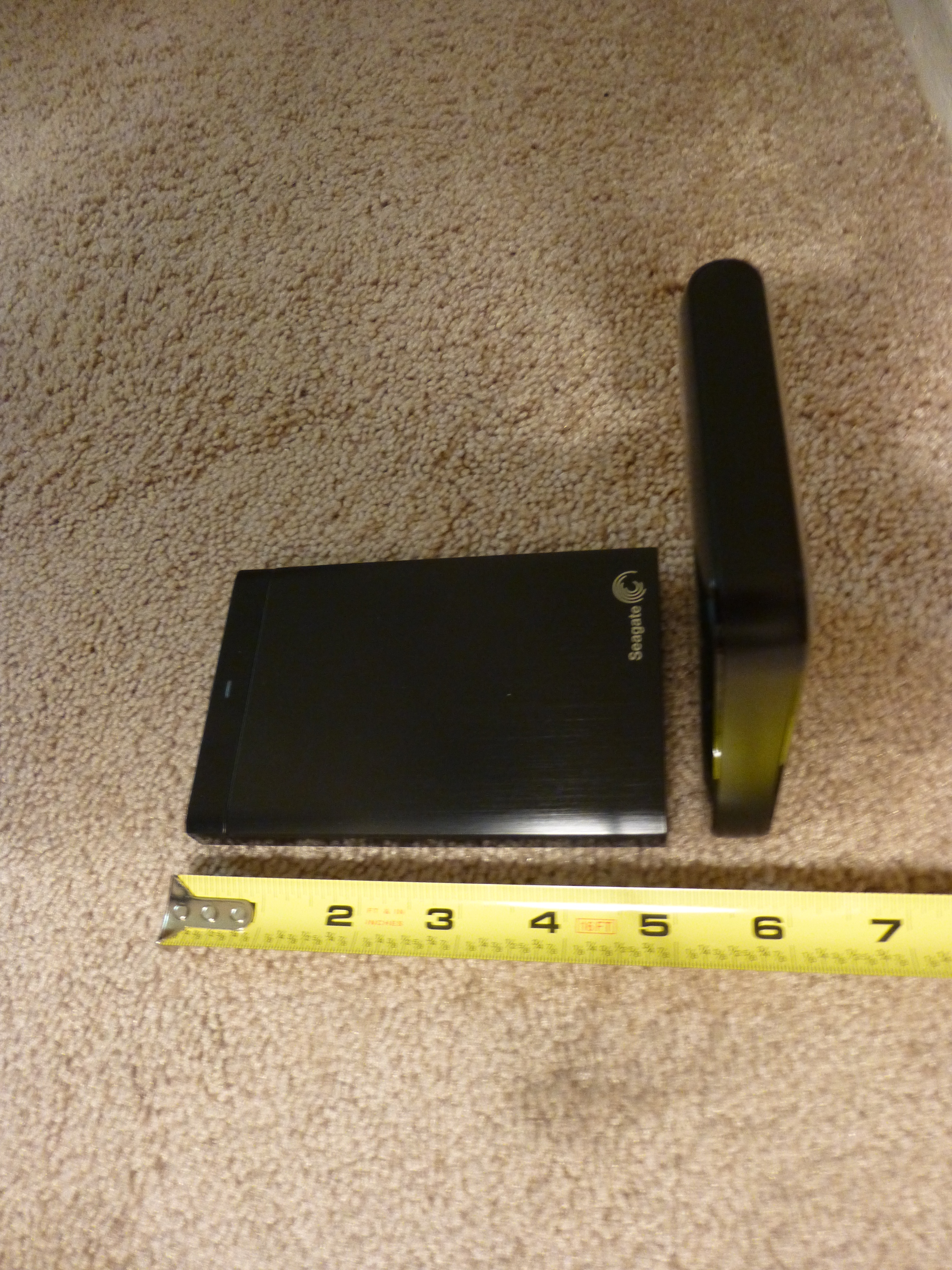
Now, there are small portable HDD drives that are about the size of a man’s wallet and some are almost as thin as a smart phone. Some I’ve seen can hold up to 4 terabytes (tb) of data. That’s 4,000 gigabytes (gb), more than the capacity of most computers being sold today, in 2015!

1 tb HDD lying flat on left and 750 gb HDD on it's end at right.

1 tb HDD lying flat on left and 750 gb HDD on it’s end at right.

And they can often be had for well under $200, many 1 tb and under portables are less than $100 with enough capacity to satisfy most users’ needs.

They usually come with their own USB cable and all you do is plug them in. No need for a second plug-in to  a wall socket, either.

Now, many portable HDD’s will have their own backup software, which can often perform continuous backup so long as they are plugged into your computer. This can be very convenient as you won’t have to do periodic backups.

However, if you are like me, you may want to go into folders from time to time, whether to make changes, such as renaming folders or clicking and dragging one sub folder to another parent folder, or to retrieve a picture or document to attach to an e-mail, using the portable HDD software may not be for you.

I tried using the portable HDD software with my first computer, to save time. However, when my first computer went out and I attempted to transfer my data to my new computer, I found that the portable HDD software had created different folders with different names. or actually number and letter designations, and had completely rearranged the stored data, so I had pictures and documents on the same folder, and other things which were originally together, now separated! So, while transferring my data to my new computer was easy, I had to reorganize all my data once it was on the new computer!

So, before using the portable HDD’s backup software, be sure you read all the instructions first, and test it first by viewing the contents and folders on the portable HDD after a backup.

If you are into manual organization of your data files and folders, then you may just want to back up your computer by simply clicking and dragging your user files and folders to the portable HDD once you have it connected to your computer. I do my backups this way and find it convenient, as well as knowing that, if my computer dies, I know exactly what to look for when I transfer my data from my portable HDD to my new computer.

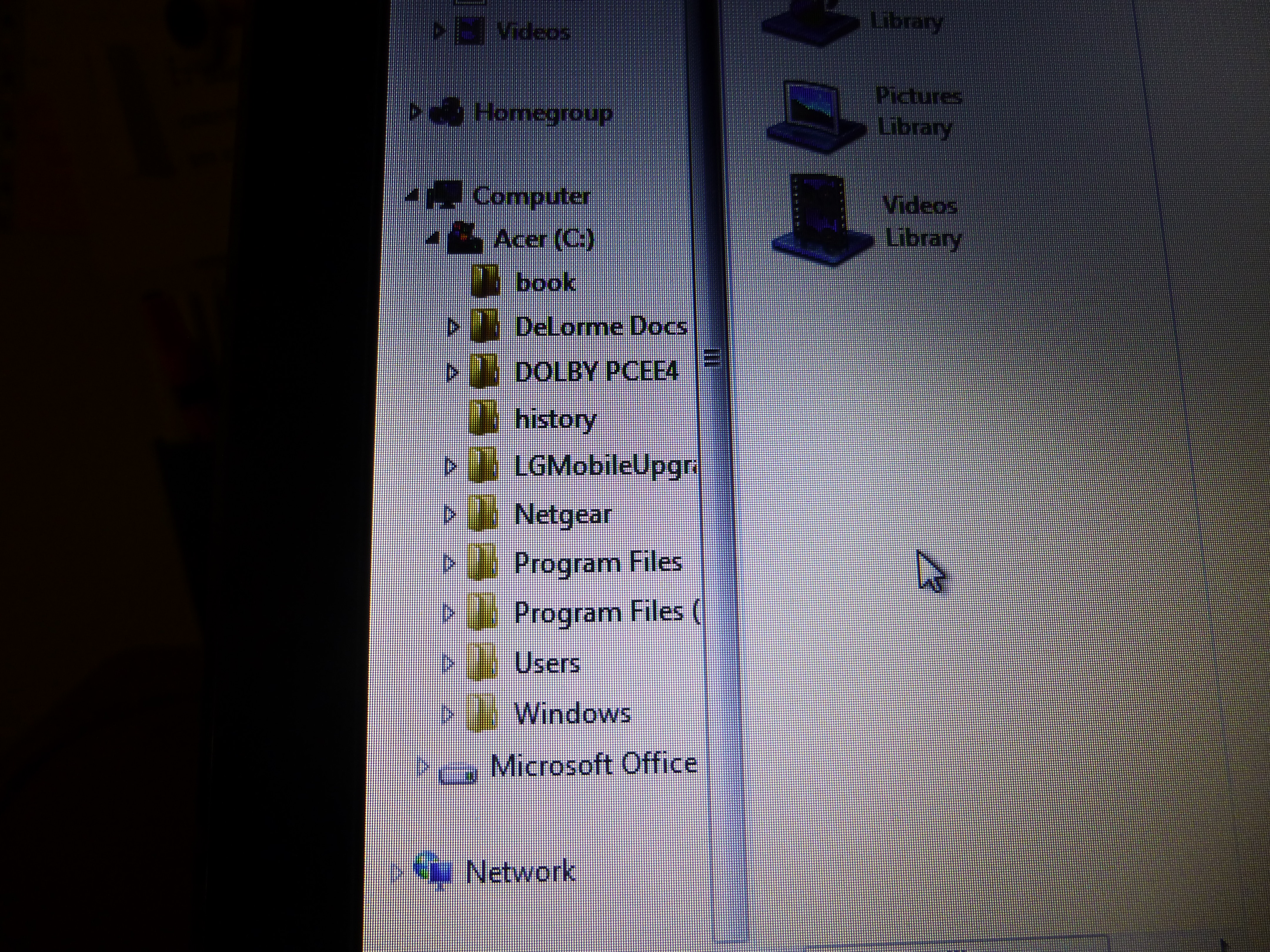
Computer main folders. Click on arrow next to "Users" folder to view sub folders.

Computer main folders. Click on arrow next to “Users” folder to view sub folders.

Also, for those of you who are brand new to backing up your computer, you only need to back up your data files, which should be under your computer name folder (whatever name you gave to your computer when you first got it and set it up.) In the picture below, the computer name folder’s title has been ‘blanked’ out. It is the folder immediately below the “Users” folder and includes sub folders from “Contacts” through “Tracing“. These folders will contain your documents, music, pictures, favorites, and video files, among others. It would be these folders that you would copy to your portable HDD for storage. I also include the “Public” folder below the “Tracing” folder as well for good measure. And, while this applies to Windows PC’s and laptops, this probably can apply to Apple/Macs to a degree as well. 

"Users" folder expanded to view computer's "Name" folder and it's sub folders.

“Users” folder expanded to view computer’s “Name” folder and it’s sub folders.

There’s no need to back up system or other files outside the “Users” file as any new computer you get will already have a more advanced version of these files anyway.

How often to back up your computer? It depends. If you make few changes over time, I would do it once a year at least. If you make lots of changes, then possibly weekly. It’s up to you. I usually do it every 6 months, but sometimes as soon as every 3 months if I’ve added lots of pictures or made a lot of changes in that time. If there’s a point of time in which updating would be a major chore, or a major loss if the data was to be lost, then back up sooner than that.

In any event, if you have a serious data loss you’ll be really glad that you backed up your data.

Happy computing!  And thanks for reading!

If you like what you’ve read here, please let others know of this post, site, and blog! 🙂


Unknown's avatar

Read Those Reviews and Watch Out For Them Too!

Oftentimes, if there’s something I want to buy, or a service or even a job I want to check out, but am not too sure of it, I like to read reviews on it, both from experts and customers or employees. It’s good to read reviews, especially for big-ticket items or companies you may want to do business with that you don’t know as well.

Reviews can help you decide if buying the product, doing business with that company, or working for that employer is still what you want to do and, if so, they alert you to the possible pitfalls as well as letting you know about benefits that you may not have considered or known about.

Reviews can be among the most important factors to consider for business decisions of almost every kind.

Now, I’m not saying you should look for reviews for everything you want to buy or every company you want to do business with, only for those you are less familiar with. However, know that the quality of models under the same brand can sometimes vary, so reviews can still be helpful, even though you may be familiar with the brand in general.

What are good sources of reviews? Online, good sources are Amazon, Ebay, Edmonds, MSN Autos, Cnet, Glassdoor, Consumer Reports, and many others, too, which can be found using Google.

Amazon and Ebay are good sources for almost any product. And there are ratings for sellers, too. I really like the reviews on Amazon, because you can see them according to the most helpful, as well as the most recent. And access is free. Same with MSN Autos.

MSN Autos and Edmonds are good for vehicle reviews by both experts and consumers. Glassdoor is good for reviews of companies that you may want to work for. Cnet is good for electronics, and Consumer Reports covers just about all products.

Some of these require a membership, which may include fees, for more detailed access to reviews, or more than just a free trial period.

Reading reviews, particularly from users, has helped me to make many good purchasing and business decisions.

However, there is one thing to watch out for. Even though sites containing reviews will try hard to filter out false positive reviews and false negative reviews, some reviews will be fake. And they’re not always easy to spot.

I once applied for a job doing reviews and was told to review a doctor’s office. So I asked about visiting the office and was told I didn’t have to visit, all I had to do was to write a glowing review as if I had been a patient there! I turned down the job flat! But I know that others with less scruples are out there, writing false reviews!

My guess is that the reviews you can put the most trust in are those that list both positive and negative points.

Of course, the reviews you can trust the most as being, … unbiased?, will be from face to face meetings with actual people who own the product or have conducted business with that company or person. Before I purchased my Subaru in 2005, I’d read lots of positive reviews, but the best reviews on how good a Subaru was, were from two people who’d driven them during an ice storm in my area.

I knew both of these people owned and drove Subaru cars all the time, so I knew their accounts were not faked in any way. And, no, neither worked for Subaru or had company stock, so no reason to give me a false account.

So, if you’re not sure of your pending purchase or business decision, don’t rush in! Look for reviews first, especially from those people you know or just happen to run into face to face. You’ll be glad you did.

Good Luck!

If you like what you’ve read here, please let others know of this post, site, and blog!

And thanks for reading! 🙂

Unknown's avatar

Skip Those Extended Warranties!

It’s the shopping season now, and many of you are buying items like electronics, things with lots of parts, and maybe even a car. And, quite possibly, you will be offered an extended warranty. Usually, this comes at extra cost, sometimes prohibitive extra cost. Should you go for it?

The only time you should automatically go for an extended warranty is if it is being offered for free! Otherwise, it depends on the price, and other factors.

If the item is really cheap and the warranty offered is more than 5% of the original price, skip the warranty. Period.

Items with lots of parts, or electronics? In my opinion, it depends on the price of the extended warranty, the store where you are buying the item, and whether or not there is a free basic warranty. Especially if the store is noted for not really backing the customer when a dispute arises. You could be throwing money away in such a case.

Where cars are concerned, absolutely skip any extended warranty offers! Many insiders in the industry who’ve turned consumer advocate say not to get one and that they are not worth the paper they’re written on!

And I concur. I purchased a used car some years back, and it has served me well. I’ve had new cars, too, and knew not to get any extended warranties, but, since this was a used car with no basic warranty, I decided to purchase an extended warranty, believing that it would act the same as a basic warranty from a dealer, at least to some extent after I paid a $100 deductible.

Well, lo and behold, I had a part that needed repair and the warranty people said it did qualify as warranty work. But, they said that the job should only take 2 hours while my mechanic, who I know is honest, said it was an 8 hour job, which it was.

So the warranty helped very little, and I would have to have a real “lemon” of a car, with everything that went wrong qualifying as warranty work, to have even the slightest chance of getting back the money, through savings, that I paid for the warranty! Luckily, I was not too far into my warranty period and managed to cancel the rest of the warranty and get my money back!

You see, extended warranties for cars are more like insurance. When you get a new car, as I did in the past, the car comes with a standard basic warranty. (Usually 3 years or 36,000 miles, though some are for longer periods and greater mileage.) With this basic warranty, anything that goes wrong that is covered by this warranty gets repaired, usually at no charge with no deductible. 

With an extended warranty, it’s like health insurance. They can deny that the work is covered by the warranty, or, if they approve, they’ll claim that the job can be completed in far less time than it actually can. And you have to pay a deductible, too!

Let’s say you bought an extended warranty for your car for $2,000. (Usually this is a low price. Some can run as much as $5,000!)

This means that for a job that costs $1,000, you first would have to pay, say, a $100 deductible. Then, your mechanic says the job will take about 8 hours to do, and the warranty people say it only takes two hours, and so should only cost about $250, based on the hourly rate. Subtract your $100 deductible, and the warranty ends up only paying $150! You still pay $850 out of your own pocket! And since you only got $150 back from the $2,000 you paid for the warranty, you’re still out $1,850 for the warranty as well!

You would have to have 14 $1,000 repair jobs to get back the money you paid for that extended warranty! And if your car needs that many $1,000 repair jobs, you’ve got a real lemon!

It’s far better to keep that $2,000 that you would have paid for that extended warranty, and use it to pay repair bills yourself instead.

Without that extended warranty, you would pay the full $1,000 for that repair, but you would still have $1,000 left over from that $2,000 that you didn’t use to buy that extended warranty!

So, even if you get a used car, skip the extended warranty! (Unless it’s free or less than 1% of the original price of the car!)

If a car sales rep pushes an extended warranty, ask him or her if they are trying to sell you an unreliable car, and see their reaction!

So watch out for those warranty offers!

If you like what you’ve read here, please let others know of this post, blog, and site!

And thanks for reading!  🙂

Unknown's avatar

In the Market for a Sports Car? Here’s some Things to Think About

If you’ve read my earlier post, Why I Prefer Small Cars“, you may have read that, when I was younger, I liked sports cars. They looked great, (And still do, in my opinion!), they were fast, and also powerful, and I assumed they really handled well.

As time went on, however, I saw that these cars were really impractical for me. And possibly others, too. Now, you may have heard stories about some guy, (Usually a middle-aged guy, but any guy, or girl, is prone to doing something like this!), who wins the lottery or receives a really big inheritance and rushes out to get his Ferrari, Maserati, or Lamborghini. What happens?

Well, first of all, he probably thinks he looks really great and impressive. But he soon has to confront some realities.

First, cost. Unless his windfall is really, really huge, he could be blowing it all, or close to it. Many exotic sports cars come with price tags of $250,000 and up. And even used models can set you back $80,000 or more, enough to buy 3 or 4 brand new 2014 Honda Civics or Toyota Corollas fully loaded.

And that’s just the beginning. There’s insurance, which is likely to be astronomical as well. I know its pure speculation, but I would guess that one’s yearly cost for insuring a Ferrari at the lowest level of coverage could be enough to insure 5 average mid-sized cars at full coverage for each!

Also, due to their powerful engines, they are not likely to do well in the gas mileage department.

Then, these cars require lots of maintenance. And, since mechanics who specialize in these cars are in a high-end niche, they will charge much more for their services. And these cars often have more things go wrong here and there, than most less expensive cars.

Then, there’s driving them. I’ve never driven one, but I understand that it’s very easy to ruin a clutch or other part of these vehicles if shifting and acceleration aren’t done right. And, if fueled by an ignorant need to show how fast one can go, control can be easily lost. Check out You Tube videos under “Jerks Driving Super Cars”, or anything similar.

And, their interiors are often cramped, and may be more spartan in terms of amenities than one would expect. You also ride very low, and if you’re big and tall, overweight, or arthritic, or just plain unable to bend easily, getting in and out of these cars can be a real pain. And for long trips, forget it! I saw a You Tube video once about the Lamborghini Countache, One of the top exotic cars of the 1970’s, and which may be the basis of the designs of many of today’s exotic sports cars. The guy who tested the car and told about his experience with it, did say that he could not drive it for more than one hour before he had to stop and get out, or he would be in pain. And these cars also have very limited storage capacity.

So, if you do have a great windfall, and really want that Ferrari, do your homework, and think about these things, before deciding if you really want an exotic car for your next ride.

Happy motoring!

If you like what you’ve read here, please let others know of this post, blog, and site.

And thanks for reading!  🙂