Unknown's avatar

So, I Did Have To Get A New Phone, And It’s Great!

Well, in my earlier post, “Smartphone Not Acting Right? Don’t Ditch It Yet!”, I explained how a problem with your phone doesn’t always mean it has to be ditched and replaced, and how it seemed that was the case with mine.

Well, it turns that my phone’s problem did persist even after a factory reset, so I ultimately needed a new phone. But, it isn’t all bad. The new phone I got? One of those new I-Phones or Samsung Galaxies for $500-$700 ? No!

I got a Motorola Moto-e 2nd generation 2015. And I’m really satisfied with it.

Photos of my Motorola Moto-e 2nd generation 2015 phone. 4/30/2016

Photos of my Motorola Moto-e 2nd generation 2015 phone. 4/30/2016

And I did well for the pricing, again, too! I paid $89 at the Verizon store instead of the $119-$149 shown on the web.

And I kept my current “Paygo” plan as well with no price increase ($45 monthly for unlimited talk, text, and now, 3GB of data!)

The phone itself? It is bigger than my LG Optimus Zone 2 was, and so I did need to get a new case for it, and also a new way of carrying it on me, and no local stores carried anything for this phone. One thing I’ve learned with both my smart phones is, stores mainly carry cases for the high-end level (Read: More Expensive) I-Phones and Samsung Galaxy phones as well as a few other high end phones of a few other brands. Your best bet for a phone case is to go online and get one from Amazon, Ebay, or any other online store, as they will have a much wider selection. There are also other good sources of accessories such as Mobile Mob. I found a case for my old phone on Amazon and Amazon is where I found my current case, which came with a clip on holder which works really well, so I don’t have to try to fit the phone in my pocket or try to find a camera or other type of carrying case or pouch that the phone will fit in.

Fortunately, this phone is still a good deal smaller than the large Samsung and I-Phones so is still easier for me to carry, and yet is large enough for me to see things on the screen more clearly than on my previous phone.

This phone also has the latest edition of Android, which is called “Lollipop”. It has 1 GB of RAM, twice what my old phone had, and 2,390 units of battery storage, about 40% more than my previous phone, so this phone has a much better standby battery life and loads pages and installs apps much faster than my old phone did.

It also comes with the full suite of Google apps, some of which I’m finding to be very useful.
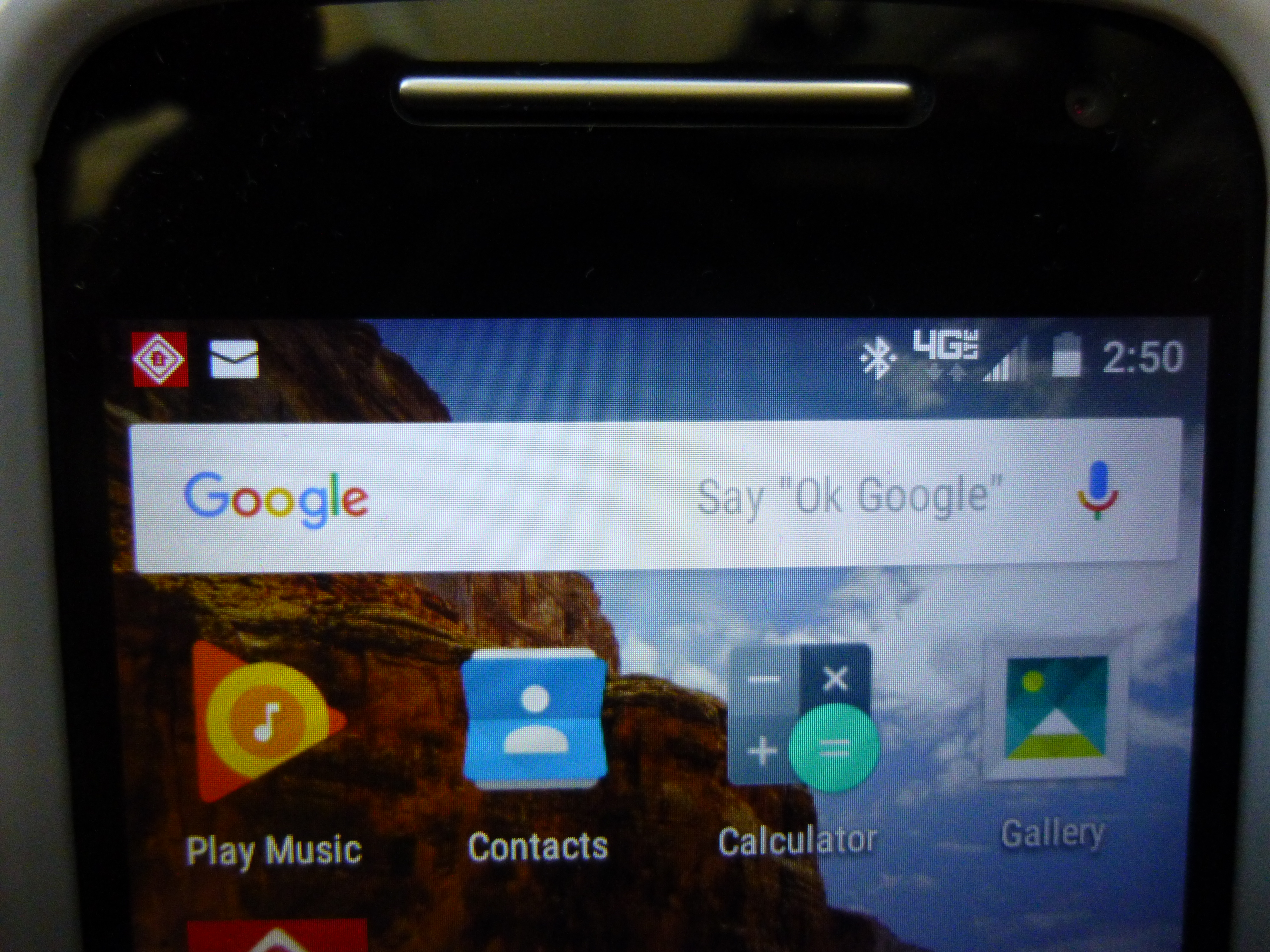
Google Search Bar with Voice Activation. Photos of my Motorola Moto-e 2nd generation 2015 phone. 4/30/2016

Google Search Bar with Voice Activation. Photos of my Motorola Moto-e 2nd generation 2015 phone. 4/30/2016

The Google Search bar pictured here, is voice activated and will do searches and also activate the Google Maps gps function just by voice alone. All I have to do to get it to listen is to say, “Ok Google”, just as it says. It will say that it is listening. Then, as an example, I can say, “Take me to 123 Somestreet”, and it will turn on the GPS feature and take me there, and it will recognize places that Garmin won’t. My old phone had this, too, but I hadn’t yet tried to use it.

Next, it also has a better camera and both front and back facing lenses so I can take selfies if I wish or make video calls.

So far, this phone has worked really well and I’m getting used to how it works, as it does do some things differently, and makes different sounds, than my previous phone, which was an LG.

But all in all, I am really enjoying this phone and still learning more about what it can do.

So, even if you do have to ditch your current cell phone, it can lead to a better phone and without a great cost besides!

Happy phoning!

If you like what you’ve read here, please let others know of this post, blog, and site.

And thanks for reading!  🙂

Unknown's avatar

More Than Meets The Eye

You walk into a McDonald’s, order a burger and fries and get it quickly, or you go into a hardware store, find the part you need, and buy it and leave. It all seems so simple, right?

Many people think the business has these items or services and rakes in the money and that it’s easy and simple. But, in reality, there’s a lot that goes on behind the scenes of just about any business you patronize, no matter how small.

I’ve certainly come to see this with my job at a radiator shop. It’s not just repairing and selling radiators. Parts have to be kept on hand, which means having them warehoused on site, stock has to be kept up, which means ordering new items from time to time. Add to this, moving items from stores that are overstocked to stores that need more of any item. In addition, there is a need for parts of radiators that need to be ordered and kept track of. Then, the shop also needs to have other services related to the repair of radiators and related items, so the shop does business with other service vendors as well.

Then, there are peripheral items which are just as important, such as items needed for the repair and upkeep of the tools and machines and vehicles that the shop uses. These can range from gloves and goggles for the welders, new blades for various saws and cutting equipment, lubricants and paints, and delivery of chemicals, fuels, and supplies needed daily. This also includes that item virtually all businesses use, paper.

Now, if you go to an eating place, you’ll likely see the cooking staff working, especially if it is a fast food place. But even here, you don’t see everything, especially the management of supplies and services provided by outside vendors, many of which are as important as the food they serve you.

When we are the customer, it’s easy to forget that all those other businesses and the clerks and employees you deal with, have as much complication as you do, and that there’s a lot more to a business than just the facade or sign.

So, next time you are feeling frustrated as a customer, even though the employee you’re dealing with is honestly trying to help you, the company honestly cannot make delivery any sooner, or the mechanic can’t see you today, try not to take it out on them. They’ll thank you for it. Happy shopping!

If you like what you’ve read here, please let others know of this post, blog, and site.

And thanks for reading!  🙂

Unknown's avatar

Smartphone Not Acting Right? Don’t Ditch It Yet!

Hi everyone! And a Happy Easter to all of you! If your smartphone starts acting up, all may not be lost, though it may take a factory reset to make things right.

A factory reset? So I’ll have to re-type all my contacts and download all my apps again? Time to get a new phone?

Well, not necessarily. It all depends, but one rule to always follow is:

If your phone is acting up and you can’t figure it out, go to your provider store and ask for help first! No need to pay for another phone if you don;t have to!

Of course, everyone’s case is unique, but, here’s what happened with my phone over the last week.

My battery started discharging faster than normal to the point where I had to charge it up each morning and night. Well, I hadn’t changed my usage patterns nor did I download any new apps or anything else that would have gobbled up extra battery power.

I then checked my settings, including the battery usage to see if anything stood out as suddenly developing an enlarged appetite for battery power, but nothing stood out as such.

By the way, it’s a very good idea to get familiar with the settings of your phone, and any other similar electrical device, like your computer or car. This can help you greatly when you need to find out what is causing a problem, and can help those who are helping you as well.

So, not being able to pinpoint the problem, I went to my provider store, in this case, Verizon Wireless, and they were very helpful. I told them what I’d checked and they did some checking of my phone and suggested that it might be the battery, so I went to the battery shop and got a new one, being sure to hang onto my receipt and not discarding the old battery.

I charged the phone with the new battery that night and the next morning, it had drained as much as my old battery was now doing, so I saw that it was not the old battery but the phone itself that had a problem.

But it was not yet time to ditch the phone. Verizon Wireless had one more thing to try, and that was a factory reset. This erases everything on the phone and resets it so it would be in the same condition as when it was first taken out of the box. Again, the staff was very helpful in showing me how to save my contacts, photos, and many of my apps using my Google account, and it worked. They also helped me through the reset, and setup afterwords, which only took a few minutes. My contacts came back as did most of my apps and photos. I’d made a list of my apps so that I knew which ones to re-install using the Google Play Store.

So, what was wrong? They weren’t sure but they did say that sometimes phones will do strange things after a software update and that the factory reset is a last resort fix.

Luckily, the factory reset is not as scary as it may seem at first. And all the help was free.

And best of all, in my case, it seems to have worked, I was able to return the new battery and get my money back, and my phone is working good as new again. And I’m glad because I really like my current phone!

So, do become more familiar with your phone, learn how to save your contacts, and don’t ditch your phone at the first sign of trouble!

Happy calling!

If you like what you’ve read here, please let others know of this post, blog, and site.

And thanks for reading!  🙂

Unknown's avatar

Yup, I Had to Let Them Go!

You may have noticed that my sticky post on this site regarding two new websites to visit, is no longer there.

Reason:

I’ve shut down both apartmentway.com and resumescheap.com. I had them up and running for two years, but, no matter what I did, they hardly had any traffic, they required more work than I was able to put in, and my renewal date and bill for hosting them was approaching, so, I’ve decided to cancel the hosting account and shut both sites down.

Apartmentway had only a few posts that have been more or less duplicated here on lifespaceblog.com.

Resumescheap got me absolutely zero business for my resume writing business.

Craigslist, my car door magnets, my business cards, word of mouth, referrals from satisfied clients, and yes, lifespaceblog (Which costs far less to maintain than the other two websites!), each, by themselves, got me more notice and business than resumescheap ever did.

And neither site produced any revenue from clicks on ads or other sources.

What does this mean for this site and my resume business?

Don’t worry, this site, lifespaceblog.com, is here to stay, and so is my resume writing business!

In fact, I’ve had more clients these past two months than I think I’ve had in any two month stretch so far, and, if you or anyone you know needs a resume or other simple writing task done, please send them my way! The sidebar and my services page will have information as to contacting me.

To those of you who have checked out those two other sites, thanks for visiting them and checking them out, and I hope you will still come and visit here at lifespaceblog.

If you like what you’ve read here, please let others know of this post, site, and blog.

And thanks for reading!  🙂

Unknown's avatar

About That WiFi…

For a long time, I was confused about how WiFi worked and also afraid to use it because of security issues brought up by articles on the internet. I’d heard all these stories about how WiFi exposes your computer to others and so on.

Well, I had the unit that powers my internet router go out on me about two weeks ago and had to have a technician come over to fix it. So, I decided that would be the time to ask about WiFi. And I’m glad I did.

So, What is the truth? Well, my main concern was security. And I found out that, if you are using a router provided by an internet provider such as Verizon, Frontier, or AT&T, you are safe using the WiFi connection to that router and don’t need any extra security in addition to your anti-virus program or software. (You do have some kind of anti-virus program or software on your computer, right? I hope so.)

Your provider provides the password or key. (You do need to check as each provider may be different as to where or how the info is provided.)

Since this is encrypted and the router and provider have their own protection, you are safe using your router’s WiFi network.

With WiFi, if you have a laptop, you can ditch the Ethernet or CAT 5E cable, plug in your battery, and access the internet from anywhere in your home, including using Skype or any other communication. I did this last week using Skype and it’s great!

Of course, your battery has to have enough of a charge, but, you can still plug in anywhere instead of only at your computer desk.

Even if you are using a desktop PC (If it does have wifi, most desktop pc’s don’t.), this can eliminate one cable. Also, more and more printers are being made WiFi capable, so this has the possibility of eliminating another cable. And, if you have more than one computer, they may be able to connect using the router’s WiFi network. Your mobile phone may be able to as well if it, too, has WiFi capability.

Now, there are security concerns, of course. If you turn on WiFi on your computer, you will notice that several networks show up as “available” One of these will be your router, if it is WiFi capable. The others are neighboring networks, usually from nearby homes, apartments, and possibly businesses, too.

Can they access your network? No, because they don’t have the codes. And you probably cannot access their networks, either for the same reason. And besides, you wouldn’t want to access networks you don’t know.

So, if you do connect to your router, you are the only one. And no one else can connect to your router’s network unless you give them the codes.

What about these places with free WiFi, like cafe’s and hotels? Here is where you have to be careful, as this network, even if secured against “outside” access, is still shared by those customers who are given the code by the management or employees. So, if you connect with the network at the coffee place, you are sharing that network with strangers you don’t know and your files and info are more vulnerable to being hacked. For this, you may need additional protection on your computer.

One solution? You can purchase your own “hot spot”, usually a small portable router that many internet providers sell, along with the service, which allows you to access WiFi from just about anywhere. It, too, is secure and again, only you would have the code for accessing the network.

Another couple of things to know about WiFi, is that, if you are downloading new software, especially if it is large, it will download faster using an Ethernet cable than it will using WiFi, so it’s best not to discard your Ethernet cable completely just yet.

For phones with data plans, using WiFi when it’s available means that your phone is not using up its allotted Data, since it is being provided by the network and not the phone’s own data plan. It’s like getting extra data for your phone for free. But you do have to be in range of the router or hot spot your phone is connected to.

One great thing I’ve found is that you only have to put in the codes for the network once on your machine. Then, when you use WiFi, your machine will automatically connect to the network and you have access to the internet!

So, how to activate WiFi on your computer? Fortunately, most WiFi capable computers already have their WiFi activated, which does not mean they’re connected to a network, only that the capability is turned on.”

If it’s not turned on, or has been turned off or deactivated, you need to turn it on. If you have a Windows 10 computer, just click on the Start button, then select settings, then Internet and go from there. Or you can simply click on the internet icon on the right hand area of the task bar and this will bring up your Internet/WiFi controls on the right hand side of your screen. (At least on an HP Computer. Some computers may be different.) If you unplug your Ethernet cable, the internet icon will change to a WiFi icon and you may see the message, “Networks are available”. Clicking on the icon will bring up the available networks.

To connect to your router’s network, and it will be there if your router has WiFi, just click on it. You’ll be presented with fields for your password or key. Enter that, and you’re set.

On a Windows 7 computer:

  1. Click the Start Button, then select “Control Panel”, then “Network and Sharing Center”.

  2. On the left hand column, select “Change Adapter Settings”.

  3. Click on “Wireless Network Connection”.

This “turns on” your WiFi. A small icon will appear on your task bar on the right side. Clicking on this will bring up the available networks. As above, just click on your router’s network and enter the password or key, and you’re set!

Hope this clears up things for those of you who are wondering about WiFi.

Happy Computing!

If you like what you’ve read here, please let others know of this post, blog, and site.

And thanks for reading!  🙂

Unknown's avatar

Leapin’ Lizards, It’s Leap Day!

So, its February 29th, that special day that comes every 4 years. A year with a February 29th is, as we all know, a “leap” year.

So, where did this come from? Well, there is a lot of history behind it, but, basically, in earlier times, they found that calendars, growing and planting seasons, and so on, were getting further and further off until it was realized that our planet’s year is not exactly 365 days. It really is closer to 365 ¼ days.

So, to insure that Christmas doesn’t eventually drift into what would now be July, an extra day was added to February every 4 years to catch up, or “leap” back to the correct time. Hence, the leap year, and leap day, February 29th.

Now, to be sure, the Earth doesn’t complete an orbit exactly in 365 ¼ days, and, the planet’s orbital speed and daily rotation changes imperceptibly over time, so, every so often the correct time is adjusted by a few seconds here and there. This so our days and years continue to match the seasons and our calendars.

So, Happy Leap Day, everyone!

If you like what you’ve read here, please let others know of this post, blog, and site.

And thanks for reading!  🙂

Unknown's avatar

Windows 10 and Missing MS Office? Try Libre Office!

If you have a Windows 10 computer or have upgraded to Windows 10, you may notice that MS Office, which contains such programs as MS Word and Excel, among others, as well as MS Word Starter, isn’t quite as accessible as it was on earlier versions of Windows. Oh, it may be there, but now you may have to pay for a subscription to use it on Windows 10.

Is there a way around this?

Yes, there is! Libre Office is the answer!

It has just about everything Windows Office has, and is entirely free to download. In fact, I’ve not only downloaded it onto my current Windows 10 computer, but also on my spare computer which is running Windows 7 and already has Windows MS Word Starter and Excel Starter on it (The free versions, of course!).

So how good is Libre Office? Well, it does save things in its own format. Word documents are saved as .odt documents by default, but, you can save them as .docx documents (for word docs), or as other types of documents and, there’s a special “Export to pdf” button, as well, which saves a separate copy as a pdf file, which is accessible for adobe readers. Also, it will open your word documents as well.

Then, when you open Libre Office, it will display your most recent documents that you worked on.

In addition, Libre Office also has Excel type spreadsheets, drawing capability, and a presentation program.

And, while donations are accepted, (I did donate $5), the program is entirely free to download and you aren’t required to donate anything!

So, where to get Libre Office? You can visit www.libreoffice.org and download it from there.

It’s really a great program and I still haven’t explored it completely, but I think it’s well worth downloading. As a matter of fact, this post, as well as my last two or three, were all written using Libre Office!

Happy computing!

If you like what you’ve read here, please let others know of this post, blog, and site.

And thanks for reading!  🙂

Unknown's avatar

Window Deflectors are more than Cool for your Car

About a year and a half ago, I had window deflectors installed on my car. Here’s what the one on my driver’s side looks like.

Close up of window deflector. 5/26/2014

Driver’s side window deflector. 


Some people think the window deflectors make the car look cool. Others may disagree. I think they do add to my car’s looks to an extent, but they do add a lot more functionality than one might think at first.

First of all, the deflector’s main function is to prevent people in the car from being buffeted by air when the window is lowered. Yet, if more air is wanted, the opposite window can be opened which will draw in more air regardless, so the deflectors don’t block air completely. But, the deflectors do more than that.

When it is raining, especially if it is also not too cold, the car can get stuffy, and, if you don’t want to use the defroster, you can now open the window just enough for some air to come in but yet still “under” the overhanging deflector, so no rain comes in. And I can attest to the fact that this really works!. The deflectors really do their main job.

But here’s what they also can do:

  1. They can allow you to leave the windows open just slightly on a hot summer day and no one will see that they are not fully closed. This allows you to keep your car somewhat cooler without drawing unwanted attention.

  2. They can act as a sunscreen while still allowing you to see, when facing in a certain way when the sun is lower. Of course, this is dependent on your direction of travel and time of day, but it has helped me at times, providing some measure of glare prevention.

Now, if your car is one of those where the doors don’t have window frames, I believe you can still have deflectors installed. Check with an auto detailer or an auto parts dealer to make sure.

Price? Probably between $50 and $100 including installation, more or less.

So, window deflectors for your car are more than just show.

Happy motoring!

If you like what you’ve read here, please let others know of this post, blog, and site.

And thanks for reading!  🙂

Unknown's avatar

You’ve Won The Lottery! Lump Sum or Annual Payments?

Recently, a record Powerball jackpot of 1.6 billion dollars was won by 3 winners. That’s about $530 million dollars apiece. Wow! Unfortunately, I only won a measly $7, but at least that’s $7 to the good and more than probably most people won.

From what I’ve read, most people who win big jackpot opt to take the lump sum. Some do it because they want it all right now. Others because they want control over all the money and fear that if they pass on, nothing goes to their heirs. I don’t know if it’s true for all lottery type games and gambling overall, but I do know that in many cases, the rule is that annual payments stop upon the death of the winner, even if all the winnings haven’t been paid out.

And, if the winner is already quite elderly, this fear is even more legitimate.

However, unless I was very old and the annual payments wouldn’t be very much, I would

opt for taking annual payments! And, if you were one of the three winners, having won $530 million dollars from that huge jackpot, you should opt for the annual payments, too, and here’s why.

  1. You don’t get all of the money when you take a lump sum! Each winner of the Powerball jackpot will get their 530 million only if they take annual payments. If you take a lump sum, it will get it cut to around 300 million, and that’s before taxes are taken out. After taxes, you may be left with $150 to $200 million by some estimates.

  2. If you blow it all right away as many big winners have done, that’s it! No more money coming! Sure, the $180 million you’d be left with in the previous example is still a huge amount of money and you’d have it now. And, if you kept your head, you can certainly have the fact of never having to work again and yet having a very good lifestyle that you are in nearly complete control of, be your life. But there are lots of pitfalls, like friends and relatives and others coming out of the woodwork, many who may try to sue you for the money and really tangle up things for a long time, and making you hire attorneys and financial experts, all of which will cost you money, and, if you haven’t managed the money well, you could still wind up even more broke than you were before you won. With annual payments, you’ll have more money coming in the next year for 30 years. And you’ll likely get a much bigger percentage of your 530 million.

  3. You may not be able to have future payments go to your heirs, but those payments you do receive will still let you leave a great deal of money to them!

    Thirty years of annual payments from that 530 million that you won would come to $17.6 million per year. But of course there’s taxes. Let’s say, worse case scenario, you have 60 percent taken out for taxes. That would take it down to approximately $7 million yearly that you would receive every year for 30 years! Worried you may pass on after the first year’s payment? You’d still get to leave $7 million to your heirs. How many people do you know that can even leave that much or are in line to inherit that much money? I don’t know any.

  4. You have more money coming! The positive side as mentioned at the end of number 2 above, you have more money coming! You know all those problems that cropped up before when you first won? Like those friends and relatives you didn’t know you had suing you, and those nasty taxes? And your overindulgence, like that $350,000 Ferrari you bought? Well, next year, you’ll get more money, and the year after that, for 30 years! You’ll get smarter, learn how to pay your taxes and manage your money, you won’t be out buying a new Ferrari, and you’ll probably outdistance those nuisance lawsuits brought about by all those new-found friends and relatives from the woodwork.

So, if you do win big, think about taking annual payments instead. And first thing, see your tax people and get a trusted financial advisor first thing! You’ll be glad you did.

Happy playing and good luck!

If you like what you’ve read here, please let others know of this post, blog, and site.

And thanks for reading!  🙂

Unknown's avatar

Get Them Presence For Christmas!

So, what to get friends and family for Christmas? Video games? New computers, tablets, or smart phones? Subscriptions? Gift cards? Money?

Gift cards and money are good because they give the recipient more freedom to choose what they ultimately get.

But the best gift is probably your presence!

So, that get together you’ve been invited to? Go! If you haven’t heard from someone? Contact them! If those loved ones want you to come visit? Make that visit! If they want to visit you? Tell them to come and welcome them with open arms! No time? Make time!

Yes, there often isn’t time, but isn’t that always the case? Keep making that excuse, and you’ll find one day that there is no time! And you never know how long you’ll have any particular person you love in your life, even the younger ones.

In another of my posts, “Don’t Let Time pass You By!”, which I posted on May 15th, 2015, I mention how a travel writer wrote about not visiting a favorite uncle. That uncle died and the writer regretted not making the time to visit. It’s a good post to read if you think you haven’t the time.

As for money? Yes, it may be tight. And if you live far from those you love, it can make visiting more difficult. But please, do set money aside if at all possible and look for the cheapest way there! It will be money well spent!

So, you think no problem, except, you have no presents to give? That’s ok! Give them your presence! It may be the best present your loved ones would want!

Merry Christmas, Happy Hanukkah, and a Happy New Year to all!

If you like what you’ve read here, please let others know of this post, blog, and site!

And thanks for reading!  🙂