Unknown's avatar

Back Up Your Computers!

With this being January, it’s new year’s resolution time. People make all kinds of resolutions, most commonly to lose weight, get fit, make more money, spend less, or spend more time with the family. And all of these are good. But one that I suspect many leave out is, to back up your computers. Now, many businesses, especially the larger ones, do this all the time, but how often do you back up your home computer?

Why is this important? If your computer should have a catastrophic failure, and many do unexpectedly after a time, you could lose your data, which can include your pictures, scans, documents, favorite or bookmarked sites, music, and written or artistic documents, and anything else that you have saved on your computer.

Don’t think it can’t happen because your computer is working fine? My first computer worked fine for 7 years, then developed a wiring problem that experienced techs told me was “fatal“. So, I bought a new computer and it worked fine. For a year. Then it suddenly died and was proven to be unfix-able. So now I have my current computer.

Luckily for me, I’d worked for a company that made a point of backing up its computers and I was assigned this task, so I was in the habit of backing up my own computers from the get go. So when my own computers failed, I didn’t lose any of my data. 

How to do this, and what do you need?

You will need a portable hard  drive (HDD) or a flash drive (Often called a thumb drive) if the amount of data you have is small (128 gigabytes  is the largest I’ve heard of currently, but they are being made with higher capacities as time goes on.)

You can also use CD-R or DVD-R’s but this is much less convenient, especially with higher capacity computers.

You can also back your data up to the “cloud“, that is, online. There are services that allow you to do this. The advantages are that you can access your data from any computer anywhere in the world, so if you lose your laptop in Bangkok, you can still access your data. Also, you don’t have the worry that something like a fire will wipe out your data because both your computer and portable HDD were burned up.

However, there are disadvantages here, too. Currently, you may have to pay a fee for the service or downloading of the necessary software. And, as we all know, the internet isn’t always secure. So a breach on the part of the backup service can render your data being accessible to anyone who may want to look. And, if your service provider is doing maintenance or is otherwise shut down for some reason, you won’t be able to access your data. You can grab your portable HDD or flash drive out of your desk drawer right now and have use of the data whether you have internet service up and running or not.

16 gb flash drive.

16 gb flash drive.

Flash drives do have the advantage of having no moving parts and being solid state, and their construction is much less delicate. Add to that their small size and this makes them very easy to carry and store. But, they have limited storage capacity compared to a portable HDD.

Portable HDD drives are probably best now, as they have shrunk greatly in size and grown greatly in storage capacity and ease of use.

The first HDD I had only had a capacity of 80 gb, half of my first computer’s capacity. Also, in addition to having to be plugged into my computer, it also had to be plugged into a wall socket. And it was somewhat large, about the size of a small to mid-sized phone book or hard cover/text-book, such as the cookbook in the picture below.
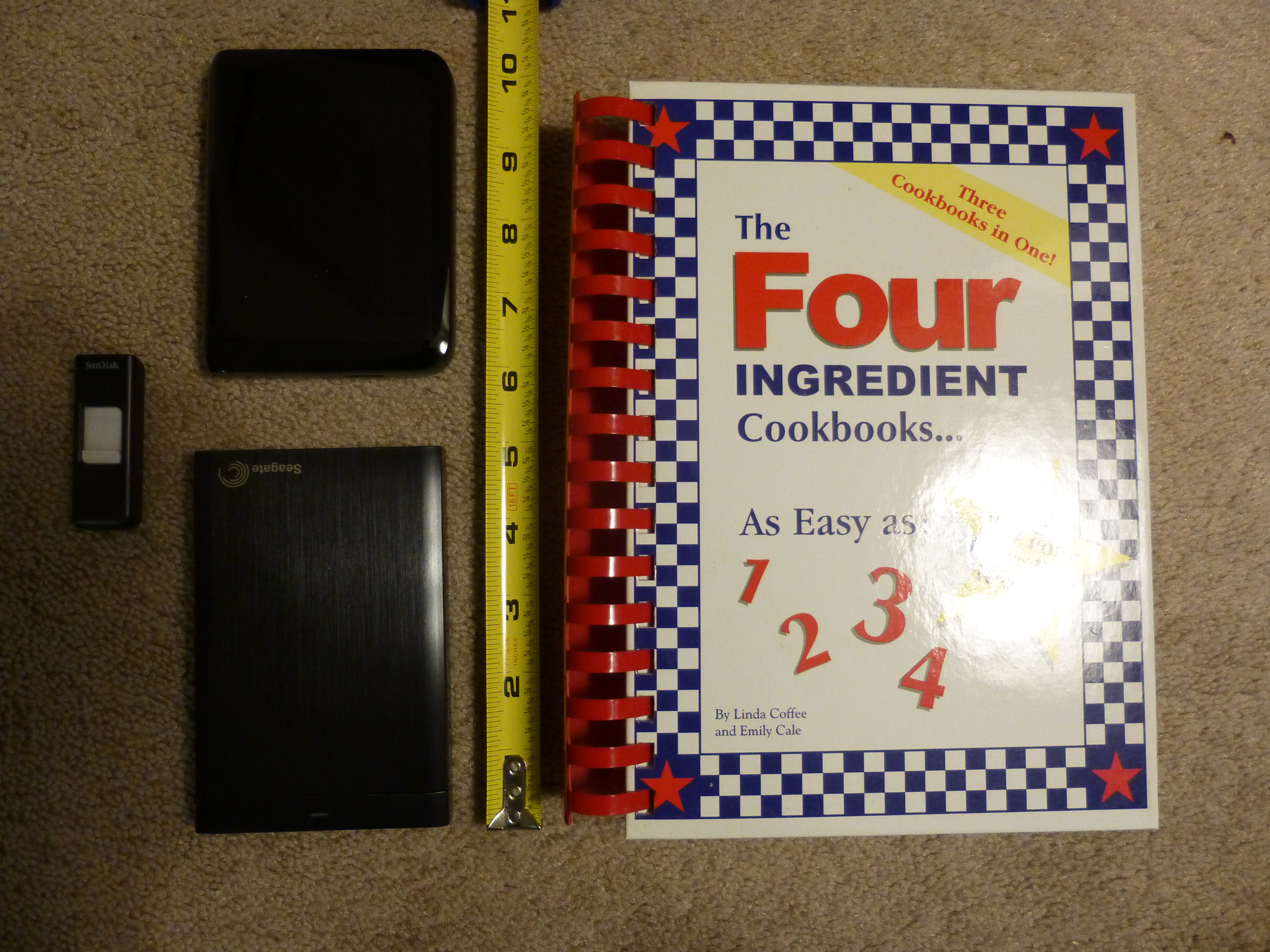
16gb Flash Drive at far left, 750 gb Portable HDD upper left, 1 tb HDD lower left, and cook book which was the size of the 80 gb capacity HDD I once had.

16gb Flash Drive at far left, 750 gb Portable HDD upper left, 1 tb HDD lower left, and cook book which was the size of the 80 gb capacity HDD I once had.

Now, there are small portable HDD drives that are about the size of a man’s wallet and some are almost as thin as a smart phone. Some I’ve seen can hold up to 4 terabytes (tb) of data. That’s 4,000 gigabytes (gb), more than the capacity of most computers being sold today, in 2015!
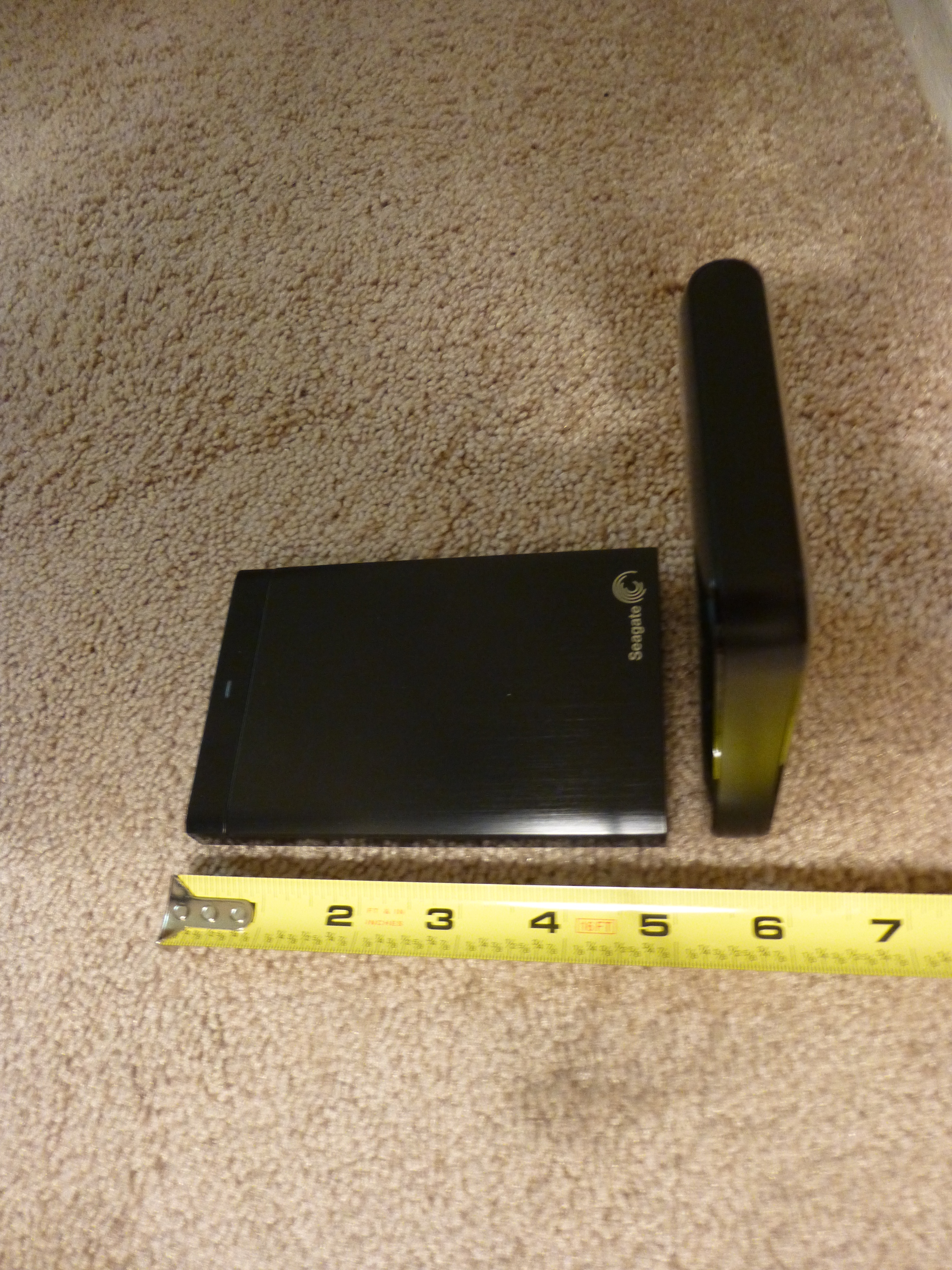
1 tb HDD lying flat on left and 750 gb HDD on it's end at right.

1 tb HDD lying flat on left and 750 gb HDD on it’s end at right.

And they can often be had for well under $200, many 1 tb and under portables are less than $100 with enough capacity to satisfy most users’ needs.

They usually come with their own USB cable and all you do is plug them in. No need for a second plug-in to  a wall socket, either.

Now, many portable HDD’s will have their own backup software, which can often perform continuous backup so long as they are plugged into your computer. This can be very convenient as you won’t have to do periodic backups.

However, if you are like me, you may want to go into folders from time to time, whether to make changes, such as renaming folders or clicking and dragging one sub folder to another parent folder, or to retrieve a picture or document to attach to an e-mail, using the portable HDD software may not be for you.

I tried using the portable HDD software with my first computer, to save time. However, when my first computer went out and I attempted to transfer my data to my new computer, I found that the portable HDD software had created different folders with different names. or actually number and letter designations, and had completely rearranged the stored data, so I had pictures and documents on the same folder, and other things which were originally together, now separated! So, while transferring my data to my new computer was easy, I had to reorganize all my data once it was on the new computer!

So, before using the portable HDD’s backup software, be sure you read all the instructions first, and test it first by viewing the contents and folders on the portable HDD after a backup.

If you are into manual organization of your data files and folders, then you may just want to back up your computer by simply clicking and dragging your user files and folders to the portable HDD once you have it connected to your computer. I do my backups this way and find it convenient, as well as knowing that, if my computer dies, I know exactly what to look for when I transfer my data from my portable HDD to my new computer.
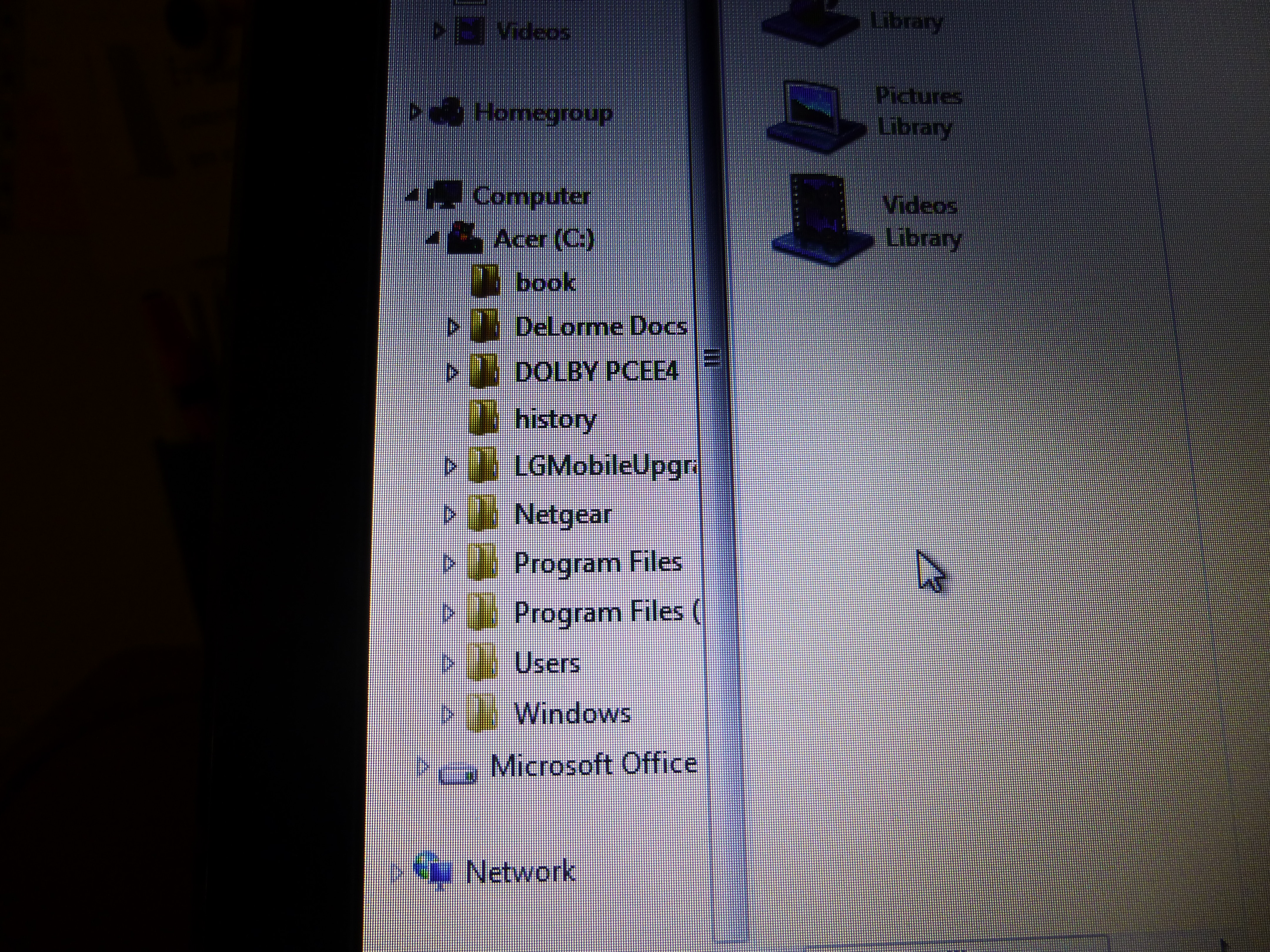
Computer main folders. Click on arrow next to "Users" folder to view sub folders.

Computer main folders. Click on arrow next to “Users” folder to view sub folders.

Also, for those of you who are brand new to backing up your computer, you only need to back up your data files, which should be under your computer name folder (whatever name you gave to your computer when you first got it and set it up.) In the picture below, the computer name folder’s title has been ‘blanked’ out. It is the folder immediately below the “Users” folder and includes sub folders from “Contacts” through “Tracing“. These folders will contain your documents, music, pictures, favorites, and video files, among others. It would be these folders that you would copy to your portable HDD for storage. I also include the “Public” folder below the “Tracing” folder as well for good measure. And, while this applies to Windows PC’s and laptops, this probably can apply to Apple/Macs to a degree as well. 

"Users" folder expanded to view computer's "Name" folder and it's sub folders.

“Users” folder expanded to view computer’s “Name” folder and it’s sub folders.

There’s no need to back up system or other files outside the “Users” file as any new computer you get will already have a more advanced version of these files anyway.

How often to back up your computer? It depends. If you make few changes over time, I would do it once a year at least. If you make lots of changes, then possibly weekly. It’s up to you. I usually do it every 6 months, but sometimes as soon as every 3 months if I’ve added lots of pictures or made a lot of changes in that time. If there’s a point of time in which updating would be a major chore, or a major loss if the data was to be lost, then back up sooner than that.

In any event, if you have a serious data loss you’ll be really glad that you backed up your data.

Happy computing!  And thanks for reading!

If you like what you’ve read here, please let others know of this post, site, and blog! 🙂


Unknown's avatar

How to Stay Safe with Craigslist Transactions

You may have read my earlier posts regarding Craigslist and how to buy and sell using Craigslist. But what happens after you find that item, buyer, or job offer? How do you know if it’s safe to meet or do business here?

Well, Craigslist is a lot like working with the classified ads in a newspaper, except that you can tell how old a Craigslist ad is. Other than this, Craigslist is a pretty much a free for all marketplace. They don’t act as a middleman, like Ebay or Amazon, where buyers and sellers are regulated to an extent and can be penalized for bad behavior, and where there’s a secure system for payment and shipping. And there are lots of scammers and other nefarious types using Craigslist, sometimes to commit horrible crimes.

But you can stay safe with Craigslist if you use it right and know what to look for.

When selling or buying a physical item, and you either want to see the item or you have an item that someone wants to see, there obviously has to be a meeting. And you can’t blame someone for wanting to see your item, as they are following the rule you probably follow yourself that says, “Don’t buy something sight unseen from someone you don’t know”. So, what to do?

My advice is to not meet at your place, or theirs. Not yours, because they can see what you have and case out your place for future burglary or worse.

Not theirs, because they can rob you or worse, and you be on “their territory”, so to speak, and won’t know what to expect. The only exception to this is, if they are having a garage sale. And then, drive by first to see if they really are having a garage sale. See nothing there? Drive on.

Solution? Meet in a public place, where lots of people are. A fast food place, mall, or even a police station can be good. And take someone with you if possible. There’s safety in numbers. But if you can’t take someone with you, always meet in a crowded public place.

Now, before you meet, be sure to get the person’s name and description, and also learn to pick up what ever else they say that can help. One guy I sold something to suggested meeting at a fast food place where he worked. I came early and asked one of the employees there about him, mentioning his name, and the employee knew him and verified that he worked there, so this made it much safer.

If you or the person you want to deal with is selling items at a flea market, you can also have them meet you there, since there will naturally be people there, too.

What about large items that are hard to move, or even homes? If you are the buyer, and the item is being sold by the owner and not a dealer or agency, go early and check out the area. This may not always help, but sometimes it can. And definitely take someone with you, even if they are just an acquaintance. And let someone else know where you are going.

If you are the seller, make sure that someone is with you. Having a garage sale with neighbors, friend, and relatives helping out would be ideal.

In my opinion, if it’s your house that you’re selling and you’re selling it yourself, it would be wise to move everything out, including you and your family, out first. This way, anyone who comes to see your home, will think you no longer are actually living there and they’ll see no items to steal. However, having said this, I would still speak to a realtor first before selling the house myself. They may have better ideas regarding this.

What about posts in the jobs or gigs categories? Same applies. When inquiring or responding to ads in these categories, always ask for the business name if it is not in the ad. If they are vague or won’t tell you outright, move on. If it is a private party, as is often the case in the gigs category, be extra cautious, especially if it involves modeling, entertainment, or the arts. Many scammers will claim that they can get you in but instead will empty your wallet or worse. If someone appears legit, check them out further and anytime someone won’t give you information that they should give you, like their name, or details about what they require, again, move on!

Lastly, regarding any job or gig posts, don’t give out personal information until you can really confirm that you’re dealing with someone legitimate and that it is required! If you answer a gig where they just want you to dig a ditch for cash, they do not need your social security number, and if they demand it, leave!

If you are selling a service on the side, you will have customers and they will be paying you. To stay safe, if the service, or business that you do can be done online and delivered by using shipping or e-mail, try to keep from having to meet clients if possible. I do this with my resume business.

Clients call me or e-mail me and send me what they want on their resume. I put the resume together and send it to them as an e-mail attachment. They then send payment to my P.O. Box, or via PayPal, which is safer than having it sent to my home address. If the client does need to meet with me, I make sure that it is in a public place.

While none of what I said will absolutely guarantee your safety, they will lessen the odds significantly that something bad will happen to you during a Craigslist transaction. Craigslist can be a great site to use if you just use common sense and keep your eyes and ears open. Stay safe!

If you like what you’ve read here, please let others know of this post, blog, and site. And thanks for reading!  🙂

Unknown's avatar

Get Rid of that E-Mail Clutter, Too!

Awhile back, I published a post called “Don’t be a Hoarder! or Do You Really need All That Stuff?“, where I talked about getting rid of items that you no longer need. Well, many people, myself included, have the same problem with their e-mail in boxes and folders, holding many saved e-mails and folders that they no longer need.

Well, this isn’t as big a physical problem as the hoarding of physical items, as all of the e-mails are on the computer, which, thankfully, doesn’t get bigger and bigger with the more e-mails you save.

But, depending on how much unneeded e-mails you have, it could be infringing on the amount of storage space your e-mail account provides, and could also cause you to wade through many more e-mails to find the one you want than is necessary.

So, it’s a good idea to go through your e-mail every so often and delete those e-mails and folders you no longer need, as well as checking to see if you can better organize the ones you do decide to keep.

But, this may not be all. You may be getting e-mails from sources that you no longer want to be subscribed to. And some of these may be “3rd party” subscriptions, lists that you were automatically subscribed to when you subscribed to that one list you wanted to be on. It happens all the time. You may have signed up to receive e-mails from, say, a crafts website, and, as a result, the website automatically subscribes you to a crafts supply website, a particular craft store’s website, and maybe others as well. And you may decide you don’t want all those extra e-mails that just keep on coming.

So, you need to unsubscribe from those lists. Fortunately, most e-mails from a subscription list will have an “unsubscribe” link in their e-mails, usually at or near the bottom. Just click on the link and follow the instructions to unsubscribe, but beware, some sites will have additional ads or links along the way that may look like they are part of the unsubscribe process.

You’ll find that cleaning your e-mail of unwanted e-mails and folders will keep your e-mail account easier to manage and navigate.

Good Luck and happy computing!

If you like what you’ve read here, please let others know of this post, blog, and site!

And thanks for reading!  🙂


Unknown's avatar

Lose that Bath Mat!

For years, my folks and I used bath mats for the bath tub. At first, the mats would feel great and grip well, but always, the mats would become grimy and/or mildewed, and some would lose a little bit of their grip as well.

No matter how diligently my folks or I cleaned the mat, the result was always the same. Some mats did last longer than others, but in the end, they always had to be replaced.

A number of years ago, when I visited my folks, they’d gotten rid of the mat in favor of a pair of “shower” shoes. These were some plastic slip on type of sandals or flip-flops. And they worked well. Their grip on the tub’s floor was excellent! Well, I still liked my mats so I continued with them for a while, but finally, with the last one, which just wouldn’t get truly clean, I’d had it and bought myself a similar pair of shower shoes. And they’re great!

They cost less than just about any mat, about $6 at Wal-Mart. They are easy to clean. I wash them as I take my shower and wash my feet, so they always are clean when I’m done, and this just takes about a minute, if that!

Then, they are easy to store and dry quickly. And they grip the tub’s bottom better than any mat I’ve ever tried, so I feel even safer using them.

Finally, the tub doesn’t pick up the griminess of the mat!

So, instead of a bath mat, try using shower shoes! Lose that mat and you may just be amazed!

If you like what you’ve read here, send your friends and family here to this post, blog, and site!

And thanks for reading!  🙂


Unknown's avatar

Vibram is the Way to Walk!

For the last 8 years, I’ve been distributing fliers door to door, which involves a lot of walking. 

Well, of course this means needing, and going through, pairs of comfortable shoes, like running shoes or deck shoes. So, I found this one brand of shoe that was very comfortable and fit just right.

However, the shoes would wear out quickly, especially in the heel section, so after 1 1/2 to 2 months, I would feel as if I were leaning back when I wore the shoes. And at 3 months, the soles were too worn and I had to get another pair at $110 – $120 a pop!

This could add up to $450 a year! Well, I decided to look for a different shoe and noticed one made by Merrell. The word “Vibram” was printed on the side of the sole’s heel. I asked a rep at the store what vibram was and he told me. It indicates that the sole is made of vibram, which is similar to what car tires are made from, and wears very well.

The shoe was also slightly less expensive, at around $90, so I decided to give it a try. And am I glad I did. The Merrell shoe fit as well as my previous brand and the sole had better grip on slippery surfaces than my previous shoes did.

But the best part? The shoes lasted over a year doing the same heavy walking that I’d done in my previous shoes! I’ve since bought other pairs, two that are waterproof and made for light rain to heavy rain and snow conditions, and a pair to wear when I’m not working. And all of these shoes have stood up really well, some for over two years now. And it’s saved me a good deal of money.

I do know other brands of shoes are also made with vibram soles and now, I don’t even consider shoes whose soles are not made of vibram.  And I recommend you do the same and save yourself a bundle.

If you like what you’ve read on this post, please let others know of this post, blog, and site.

Happy walking and thanks for reading! 🙂

Unknown's avatar

Get that True Cinnamon Flavor!

I really like Cinnamon flavored foods, particularly, breads, cakes, pancakes, and ice cream. And I like it “straight”, that is, with no other items added, such as nuts, apple pieces, raisins, peanuts, or peanut butter.

Unfortunately, foods with just cinnamon added are quite rare, and, when I do find them, the amount of cinnamon is often very small, so you don’t get much of a cinnamon taste.

Luckily, cinnamon is sold separately, so, if you do it yourself, you can have those foods with cinnamon and only cinnamon! Pancakes is one example. My mom made cinnamon pancakes for me a few times when I was younger and they were great. Just by adding cinnamon to the batter. Now, if you’re like me, I don’t always want the hassle of making the batter itself. But there is a solution. You can find batter in a plastic container, usually where the pancake mixes are kept in the store. You just add water and shake and your batter is ready. Just add the cinnamon and you’re all set. I tried this recently and the pancakes came out great!

This can also be done when baking a cake. Just add the cinnamon to the cake mix before baking. For bread, cookies, and, if you know how to make ice cream, this can be done. And since you are the one adding the cinnamon, you get to decide how much to add and can avoid adding too little. And you don’t have to add the apple, raisins, or other things that stores and bakeries insist on adding that we cinnamon purists just cannot stand!

If you’re not into doing it yourself, you may want to give it a try. Lots of people you know may be able to give you hints about cooking that will help, and there’s always the internet and the library.

So now, you can get that true cinnamon flavor! Yea!

If you like what you’ve read here, please let others know of this post, blog, and site.

Thanks for reading! 🙂

Unknown's avatar

Go Ahead and Experiment! You may Like Those New Foods!

Lately, I’ve been experimenting with different foods. You may have read about my earlier post about eggs with bacon bits and pimentos. Well, I’ve also tried some things with pasta recently.

Here’s what I’ve tried:

Spaghetti and chili. Combine spaghetti with Hormel chili without beans. It was different, certainly not as Italian tasting, but good nevertheless, especially when shredded mozzarella cheese is put on top. It does taste good, but I’ve only tried it once, and more can be added, such as spices or garlic salt.

Spaghetti and lentils. I used a packet of Tasty-Bite brand lentils in a tomato like sauce and poured this over spaghetti. It also was different, giving an Indian taste to the spaghetti. Again, I’ve only tried this once and more can be added.

Lastly so far, I’ve made capellini, a very thin spaghetti, with Trader Joe’s brand roasted garlic blend sauce. It does taste very garlicky, and the capellini tends to bunch together a lot more than thicker angel hair, spaghettini, or spaghetti. But it does taste good, especially the leftovers.

I do plan more culinary experiments, so stay tuned!

Bon Appetit, and thanks for reading!

If you like this post or blog, please let others know of this site. Also, please check out my services page! 🙂

Unknown's avatar

Don’t Wait til Spring! Plant that New Tree Now!

You’ve just bought a new sapling at the nursery and can’t wait til Spring to plant it in your yard, right? Well, Spring may not be the best time to plant that new tree. At the time of this writing, it is Winter. And that can be the best time to plant a new sapling into the ground.

I once was employed distributing fliers for a landscaping company. In hearing discussions at the office, I found that some people had new plants and trees placed in the ground during the winter. Curious, I asked about this, thinking winter was the worst time to put a new tree into the ground, due to the cold and elements.

The answer was that most trees go dormant in the winter months, especially if they are deciduous trees, the ones that lose their leaves in the fall and grow them back in the spring, such as Maple, Elm, and Aspen trees.

When a sapling is planted into the ground, there is actually a sort of “Shock” as the tree must “get used to” the new soil of the yard. This would go for shrubs, too, or any plant that is “transplanted” to a new location. The tree’s dormancy in winter lessens this shock greatly and helps insure that the tree will take to its new location. Not only that, but the lessening of the shock will also keep the tree’s natural defenses against insect pests from being overtaxed and weakened.

So that’s why, unless the ground is truly covered with ice, it’s often better to plant a new sapling or shrub in the winter months.

If you liked what you’ve read here, please let others know of this post and blog! Also, check out this site’s other pages!

Thanks for reading!  🙂

Unknown's avatar

An Egg Recipe for You

I’m sure this is not a new idea, as it was originally introduced to me by my grandmother. When I was a kid, she would make scrambled eggs with pieces of salami thrown in. The pieces were embedded in the eggs and boy, did it taste great!

More recently, my mother made a similar dish for me at times, using bacon bits and pimentos, and it was equally good!

So, I decided to try making it myself, so I can have it whenever I wish. First time I tried, it didn’t go all that well, but not a disaster. I bought some pre sliced salami, which was sliced too thin. Then, I threw in the salami after the eggs were already mostly scrambled, and so the salami wasn’t embedded in the eggs.

Well, after contacting my mother, I followed her advice. I bought the bacon bits she used, made by Hormel. These bacon bits are not the small crunchy ones you throw on salads, though I suppose you can throw these on salads, too.

These are softer and definitely tastier, in different size chunks.

First, I threw these and some pimentos into a skillet first, with the heat on medium. Then, I cracked two eggs into a bowl and beat them first. If you’re concerned about cholesterol, throw out one of the egg yolks before beating them. 

Then, once the eggs were beaten, which didn’t take more than a minute, I poured them into the skillet, over the bacon bits and pimentos, and moved them around with a spatula, mixing the eggs with the bacon bits and pimentos. The eggs cooked in minutes.

I turned off the heat and put the eggs on a plate ready to eat. And boy, were they good! Just like my mother and grandmother made!

And best of all, there can be many variants to this recipe! One can throw in seasonings, different meats or veggies like chives or scallions, or sauces, too!

If you liked what you read here, please let others know about this post and blog.

And thanks for reading!  🙂

Unknown's avatar

Don’t Look at the Big Picture! or How to Get that Big Cleaning Job Done

We’ve all been there. You see that big pile of paper that keeps growing next to your computer, or all that dust accumulating on the furniture, or the floors looking ever more dingy in your home, or some other big household job that just seems to be getting ever bigger and more nagging!

You take it all in and just thinking about doing that big household job makes you too tired to do it!

Well, there is a better way and it’s more likely to get that job done. The first thing to do is to stop looking at the big picture!

Actually, this is most of the plan. Once, on a trip to the Grand Canyon, I was listening to a ranger speak at Phantom ranch, about hiking back up to the rim. Phantom Ranch lies at the bottom of the canyon and visitors there must hike down to it. Of course, this means they must hike up back to the rim in order to leave. This is a 9-mile hike with a 4,000 foot elevation gain.

The ranger told us that the best way to approach the hike back up was not to look at the full height of the rim, but instead look at the layers of colored rock individually.

Once you pass one layer in elevation, look only at the next layer. And this was excellent advice! Topping a layer was a far easier goal to achieve at a time than thinking about the entire rim’s height. Before I knew it, I was topping that last layer of rock and found myself at the top of the rim! Sure, I still hiked the same distance, but psychologically, it was a lot easier to do it piecemeal in my mind, and this made the hike easier to do!

Household chores that are big can be tackled the same way! That big pile of papers to go through? Just do a little at a time. If the papers are in a big mess, straighten them out and put them into several neat stacks on day one. Day two, go through a stack. If you’re busy with other things as well, take a few minutes between other tasks and go through 10-15 papers. Before you know it, that pile will look significantly smaller, then it will be gone!

Dusting? Just dust one or two pieces of furniture a day, instead of tackling all of the furniture that day. Two pieces of furniture would be a snap.  And the floors? Just do one room a day!

Yes, you’ll be doing that same big job, but in pieces. And thinking of just one “piece” of these jobs makes them look much smaller and easier to do. And you won’t be so tired just thinking about them!

If you like this plan, or anything else on this site, please let others know!

Thanks for reading and good luck cleaning!  🙂